32
Pellerin Milnor Corporation
3.1.1.9 To Modify a Step
BNCLJO06.T10 0000194237 E.2 B.3 E.3 1/2/20 1:22 PM Released
Change the step decisions for a step in a wash formula, such as the step type, the step time (dura-
tion), etc.
1. Use
and on the Steps in a Wash Formula display if necessary to scroll between
pages and show the step you want.
2. Touch the button that displays the step name (Sn).
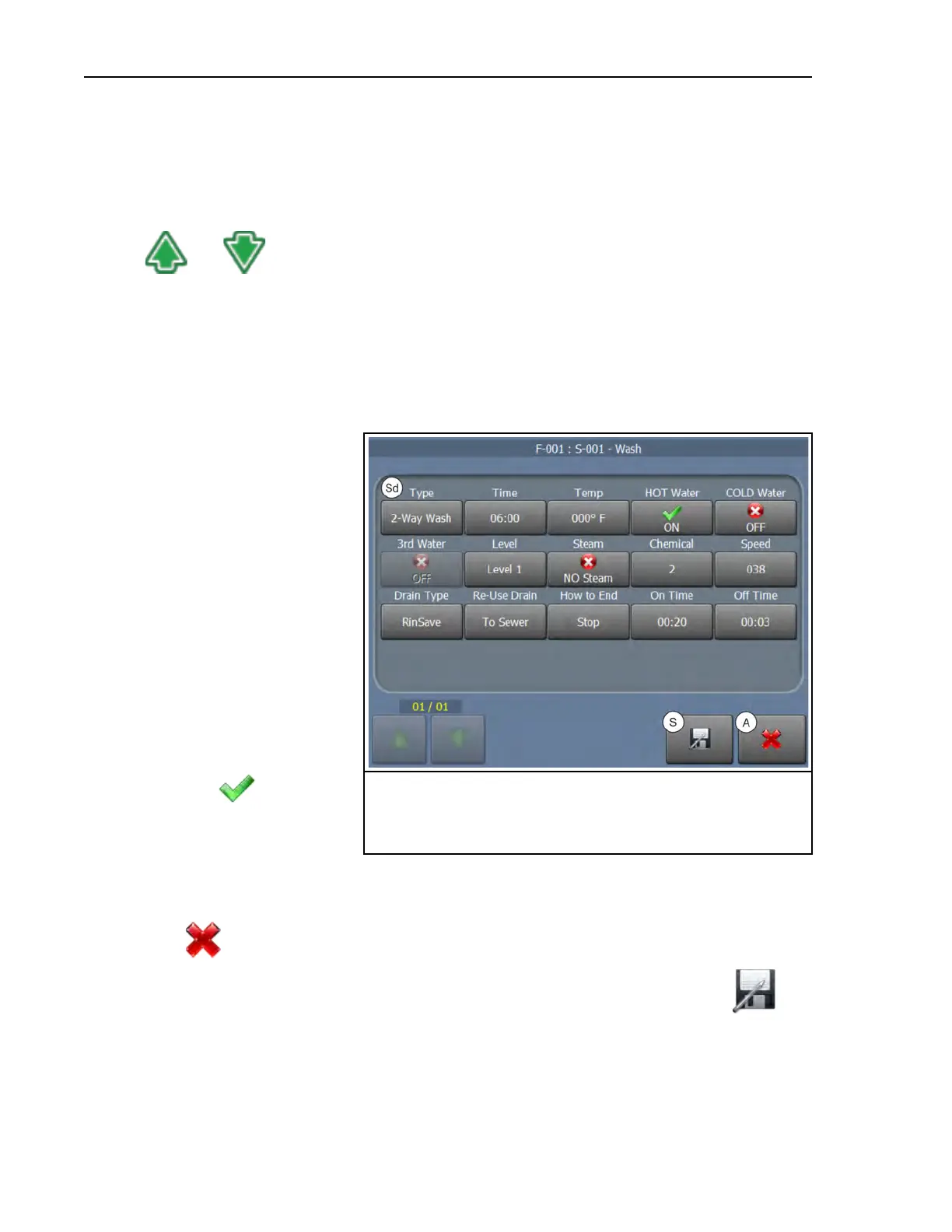
3. Touch the button that displays the step type (St) next to the step name (Sn). The controller
will display the decisions, as shown in Figure 13, page 32. See the next section for a descrip-
tion of all the step decisions.
Figure 13. The Step Decisions Display
Legend
A. Abandon changes
S. Save changes
Sd. The step decisions
4. Touch the step decision you
want to change. One of two
types of windows (not shown)
appears.
• A selection list appears.
Touch the value you want
to use.
• A window with a text box
and a keypad appears.
a. Touch the value in the
text box. Use the back-
space button to delete
the current value.
b. Touch the desired
numbers or letters to
enter the new value.
c. Touch
to save the
new value.
5. Save or abandon your changes:
• To abandon the most recent changes and return to the Steps in a Wash Formula display,
touch
.
• To save the changes and return to the Steps in a Wash Formula display, touch
.
Formula Maintenance












 To Next Page