Pellerin Milnor Corporation 7
The MilTouch™ controller contains several displays organized into a hierarchy. Top-most is the
Home display (Figure 1: The Home Display, page 8 ). Each display contains buttons that access
lower-level displays.
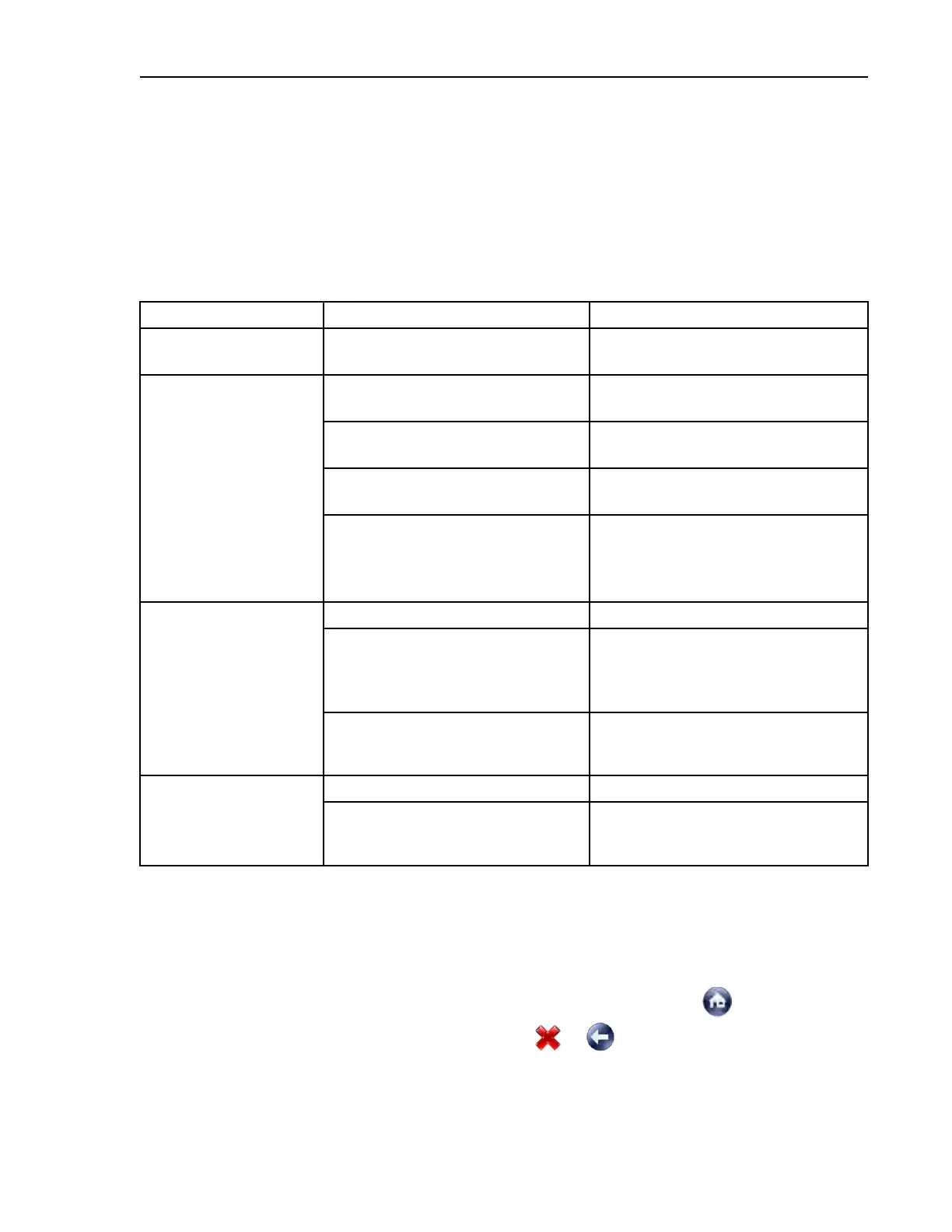
The chapters in this manual are organized, not by display, but by types of specialist activity. Ex-
amples are given in the following table. For a hierarchal tour of the displays, see Section 1.1.4 :
The MilTouch-EX™ WTB Display Hierarchy , page 9.
Table 1. Examples of Specialist Activity
Specialist Type of Activity Section & Page
Factory tester
Initial configuration Section 2.1 : Machine Configura-
tion, page 12
Chemical supplier Create and modify wash formulas. Section 3.1 : Formula Creation and
Modification, page 27
Test a wash formula. Section 4.6 : Formula Intervention,
page 62
Transfer formulas to/from the
machine.
Section 5.2 : Data Transfer with the
MilTouch™ Controller, page 96
Closely monitor machine
operation.
Section 1.1.3 : When a Formula is
in Progress (The Run Display),
page 9, Section 4.7 : Troubleshoot-
ing Inputs and Outputs, page 66
Laundry management View logs of machine operation. Section 4.2 : Data Logs, page 42
Change settings to accommodate
regional preferences such as tem-
perature units in Fahrenheit or
Celsius.
Section 2.1 : Machine Configura-
tion, page 12
Set lockout passwords to prevent
personnel from accessing certain
functions.
Section 2.2.1 : Enable and Define
Lockout Passwords, page 23
Service technician Troubleshoot error conditions. Section 4.3 : Errors, page 49
Change settings to accommodate
newly added hardware such as a
reuse water valve.
Section 2.1 : Machine Configura-
tion, page 12
1.1.1 When the Machine is Idle (The Home Display)
BNCLKO02.C01 0000250457 E.2 B.4 B.10 11/10/20 9:14 AM Released
The display pictured in the following figure, subsequently referred to as the Home display, is the
top-most display in the hierarchy of MilTouch™ displays and is used to access all the other dis-
plays. It appears when no other display has been accessed, when you touch
from another dis-
play, or when you back up to the Home display with
or .
The Home display cannot be accessed while the machine is in automatic mode. If you are in auto-
matic mode, to access the Home display:
Preface












 To Next Page