Pellerin Milnor Corporation 57
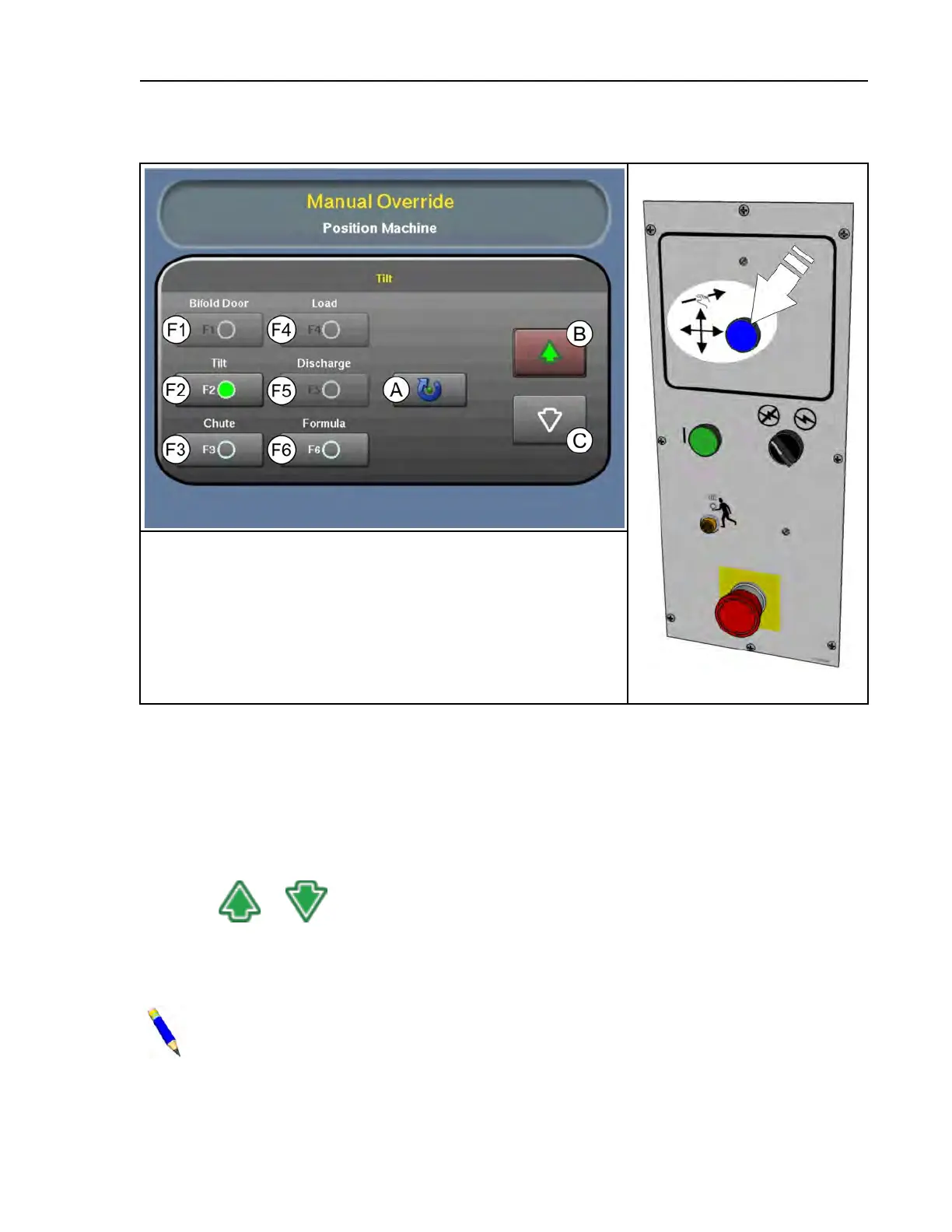
Figure 26. Manual Override Display
Hydraulic Pump Enabled
button
Legend
F1–6. . Manual functions. See descriptions in Section 4.4.1 , page 57 (tilt
function selected)
A...Switch to automatic operation
B...Up direction button (selected), used with F1–6 and the Hydraulic
Pump Enabled button on the control panel to perform manual
functions.
C...Down direction button, used with F1–6 and the Hydraulic Pump En-
abled button to perform manual functions.
4.4.1 Manual Functions
BNCLDO01.R02 0000242817 E.2 B.3 B.6 9/17/20 11:24 AM Released
To use a function:
1. Touch a function button (F1–6) to select it. The light on the button illuminates to indicate it is
actuated, as illustrated by F2 in the previous figure. The Hydraulic Pump Enabled button on
the controller, when held, will operate the selected function.
2. Touch
or , depending on the action you want to perform. The button illuminates
to indicate it is actuated. The actions vary by function.
3. Press or hold the Hydraulic Pump Enabled button, as indicated for each function. The se-
lected function occurs (Ex. The bifold door opens).
NOTE: The MilTouch™ controller prevents the activation of a manual control when its
activation would be inappropriate.
Troubleshooting












 To Next Page