Pellerin Milnor Corporation 55
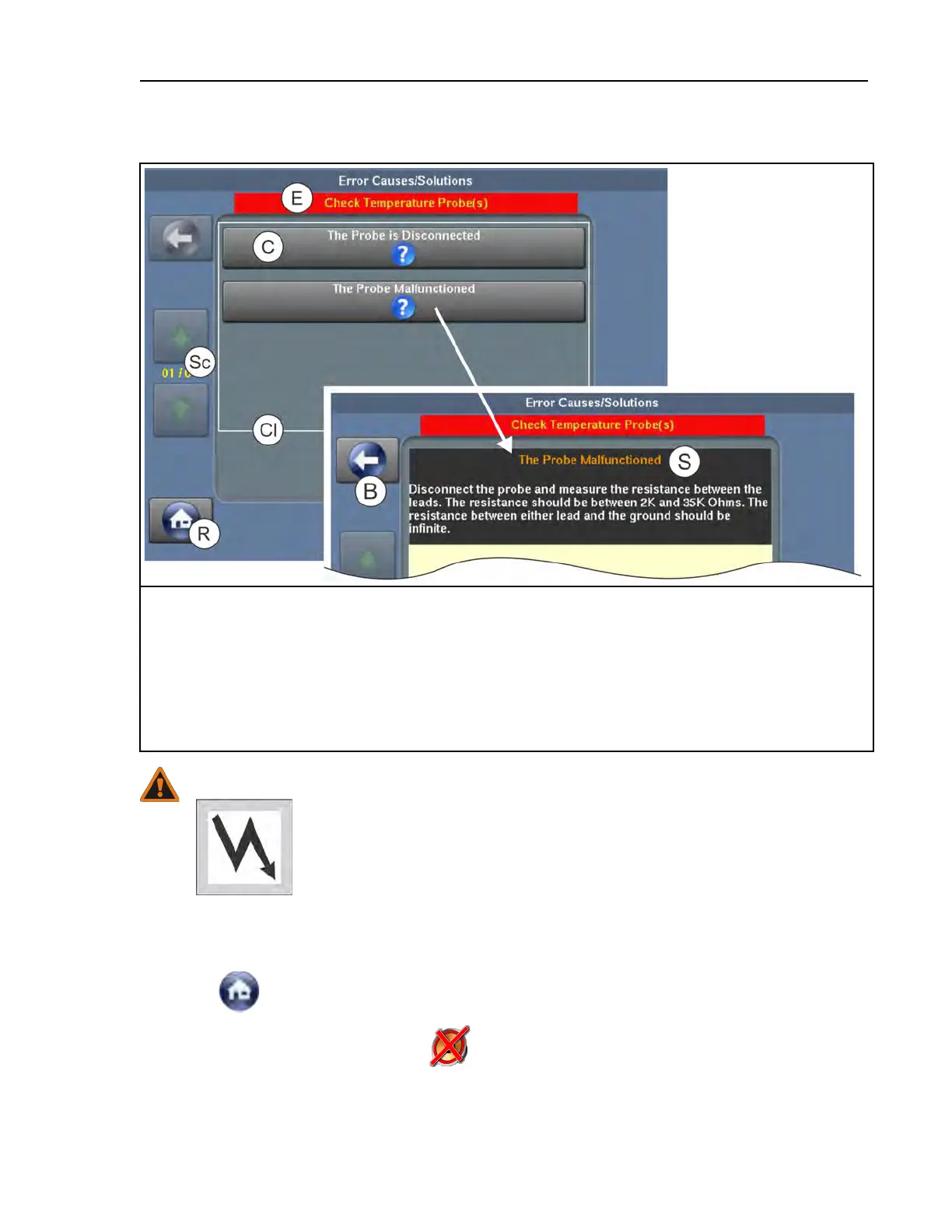
Figure 25. Error Causes/Solutions Display
Legend
B...Return to the list of possible error causes
Cl. . . A list of possible error causes
C...Touch to view the solution for this cause
E...The error description
R...Return to the Run display
S...A possible solution to the error
Sc. . . Scroll pages if there is more than one page.
WARNING: High voltage and/or moving parts — are present inside the machine
when troubleshooting.
� Qualified technicians only
� Use care to avoid contact with live or moving parts
� Keep bystanders away.
If your machine encountered an error while it was running a formula:
1. Follow the instructions on the Error Causes/Solutions display for how to correct the error.
2. Touch
to return to the Run display.
3. In the error code dialog box, touch
to silence the operator signal, close the error code di-
alog box, and resume the wash formula at the current step. Some error code dialog boxes
close automatically when you resolve the error.
Troubleshooting



 To Next Page