C
B
D
A
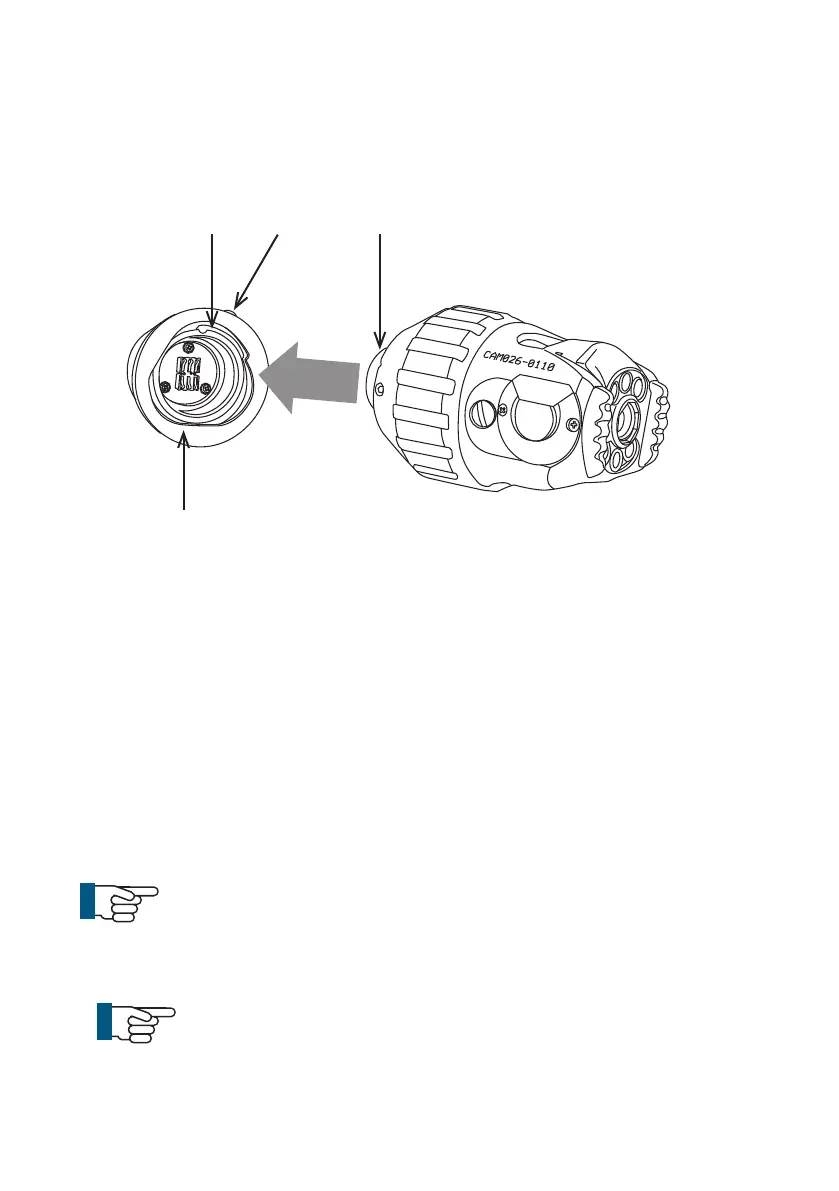
Connection of Camera to Floatation Raft
Connect the camera to the oatation raft as illustrated:
1 Ensure the connections are free of debris, dirt and moisture.
2 Ensure the locking ring (A) is rotated fully clockwise, as viewed in the
diagram.
3 Notice the orientation of the camera (B). Orientation pin locates here
(C). Fit the camera.
4 Turn the locking ring (A) anti-clockwise, as viewed in the diagram, to
lock the camera onto the raft.
5 Turn the grub screw (D) to lock the retaining ring in position using a
3mm Allen Key.
6 Removal is the opposite of tting.
NOTE!
Always t the protective caps when the raft or camera are
not in use to protect from ingress of dirt and moisture.
NOTE!
Grub screw has a mushroom head and cannot be fully re
moved. DO NOT OVERTIGHTEN!
144
Version LMinicam Proteus



 To Next Page