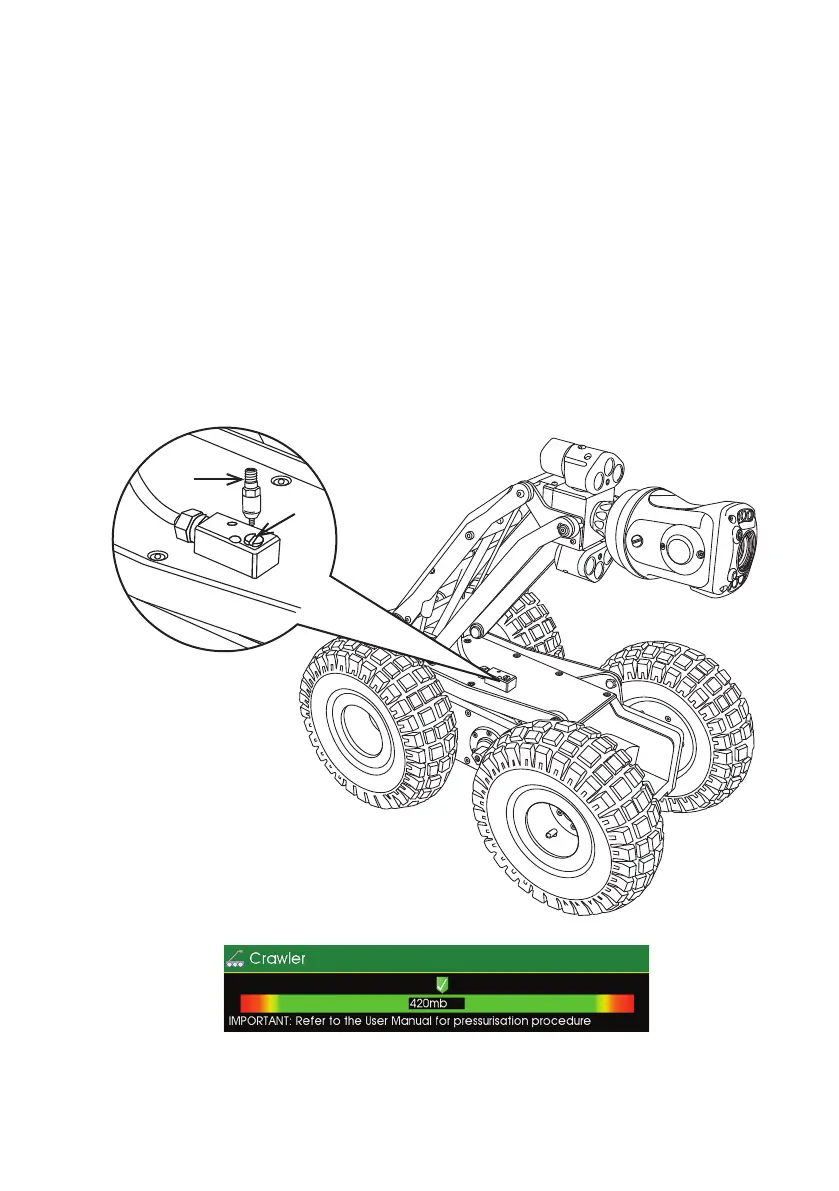
Instructions for Pressurising the CRP300 Crawler
1 Connect the PROTEUS
™
inspection system and apply power.
2
Unscrew the pressure valve protection cap (B) and screw on the pres
sure valve connection adaptor (A).
3 Set the pressure regulator for the CO
2
or Nitrogen to 10 PSI.
4 Ensure the crawler pressure is within the acceptable range by checking
the pressure gauge on the control unit. An example is shown below.
Refer to the CCU section of this manual on specic instructions on how
to access the
pressure gauges.
5 Remove the pressure valve connection adaptor
(A)
.
6 Ret the pressure valve protection cap
(B)
.
Image shows an example of the control unit crawler pressure
gauge:
B
A
37
Version L Minicam Proteus



 To Next Page