319
Kaleido-X
User’s Manual
As with destinations, the sources of the logical level must be associated with sources on
the physical router.
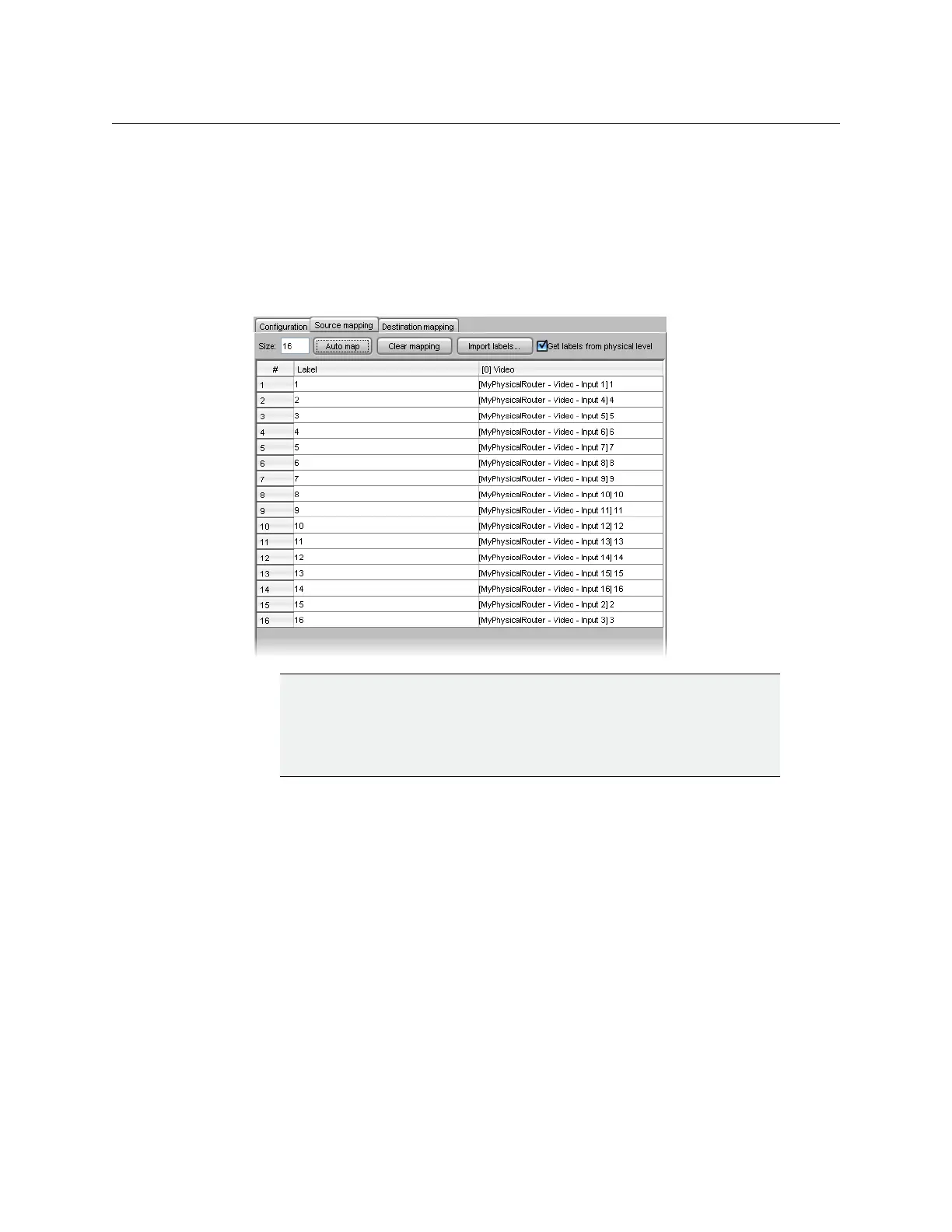
11 Click the Source mapping tab. The table works in the same way as for destinations,
except that the number of rows is determined by the number of sources specified
when the logical level was created.
Auto mapping example: Specify Input 4 in Row 2, then click Auto map. The auto
mapper starts by putting Input 1 in Row 1, detects the entry in Row 2, so picks up the
sequence by putting Input 5 in Row 3, Input 6 in Row 4, etc.
At this point, you have completed the source and destination mapping for a logical
level (e.g. “[0]
Video”). Additional levels can be created. For example, it is often
necessary to switch the audio at the same time as the video. If you have a video router
and an audio router, and you select Video 2 on the former, you probably want the
associated audio to switch as well. To accomplish this, define a new logical level for the
audio.
12 Create a new logical level (e.g. “[1] Audio”), and associate it with a physical router Audio
level.
IMPORTANT
You can have the same physical sources and destinations mapped to
multiple logical routers. The software does not prevent this. In the case of
destinations, care must be taken to avoid conflicts when using auto
mapping.



 To Next Page