EXPLORER BALANCES EN-9
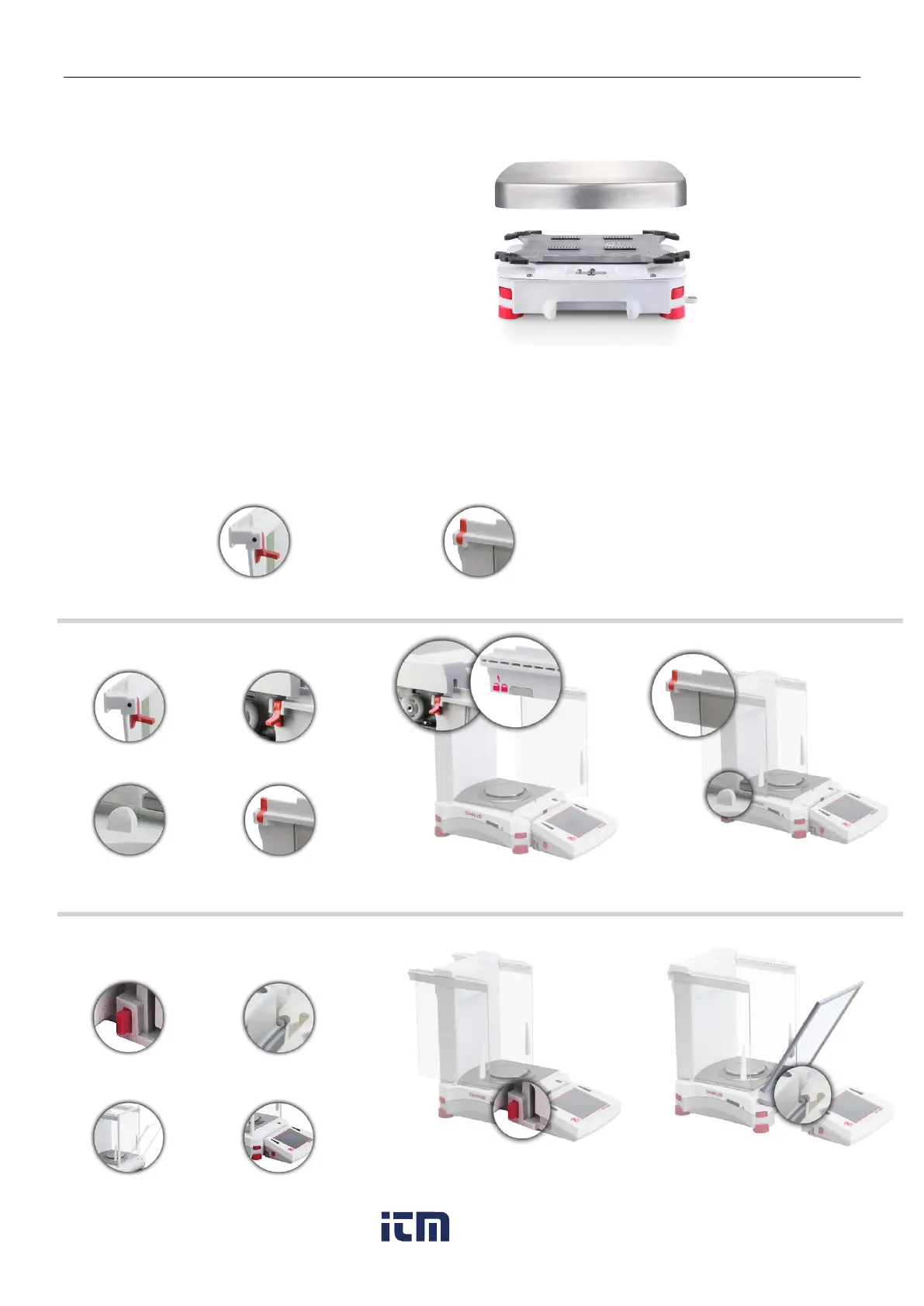
2.2.5 Installing the Weighing Pan on Models EX12001, EX24001 and EX35001
1. Position the Platform on the
base.
Notes: 1 Includes Automatic draftshield door Model
2 Includes ExCal Model
2.2.6 Installing the Draft Shield Glass and Doors on Draft Shield Models
1. Carefully remove each of the four glass Draft Shield sections from the packaging.
NOTE: Before installing side doors, be sure to set the lock tabs in the proper position, as shown here.
2. Follow the steps below to install side, front and top doors of the Draft Shield.
Position glass door to slide. Open lock tab (top); insert in top groove and slide inside bottom groove. Close lock tab.
Press button to separate Terminal from Base. Seat panel’s hooked ends in base. Swing panel to vertical position.
w ww . . co m
information@itm.com1.800.561.8187













 To Next Page