EXPLORER BALANCES EN-43
4.4.4 Check Weighing – Nominal/Weight Tolerance Mode
With this feature you can establish a Target or Nominal weight
value and pre-set tolerance in weight.
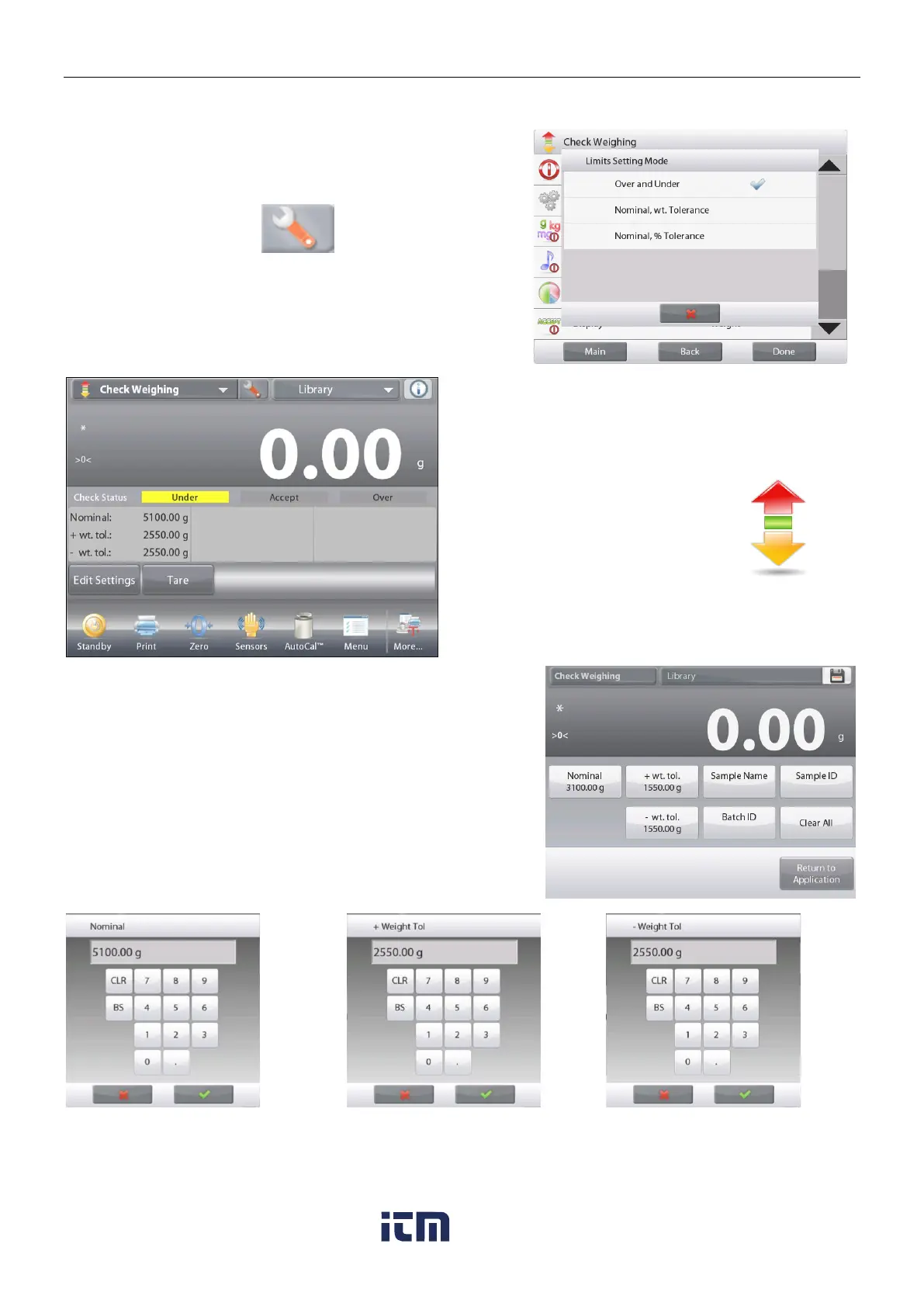
To enable this feature, enter the Setup menu.
Change the mode to Nominal/wt. Tolerance.
The Check Weighing options screen returns.
Press Done to begin Check Weighing.
CHECK WEIGHING – Nominal/Wt Tolerance home
screen
Main Display Line
Second Display Line (not shown)
Reference Fields
Application Buttons
Functions Application Icon
To use this mode, touch Edit Settings to set the Nominal, and
Upper and Lower Tolerance values (in weight).
(See keyboards below.)
Press Return to Application when settings are complete.
Note: please refer to section 4.1.1 for details about setting
Sample Name, Sample ID, Batch ID and Clear All.
w ww . . co m
information@itm.com1.800.561.8187













 To Next Page