5.10.10 Print Layout
This sub-menu is used to define the format of the data output to a printer or computer.
Format
Set the printing format.
Multiple Lines = a multiple line printout is generated. A CRLF is added after each data
output.
Single Line = a single line printout is generated. A TAB delimiter is added between each
data output.
Feed
Set the paper feed.
1 Line = move the paper up one line after printing.
4 Lines = move the paper up four lines after printing.
Form = a form feed is appended to the output.
5.10.11 Data Transfer Function
Output weighing results directly to a PC application. Setup is easy and no
additional software is required.
Note: Data Transfer Function is not supported in Win7, Win8 and Win10.
OHAUS provides SPDC software for Win7, Win8 and Win10 users.
OFF = do not print.
ON = print the specified settings.
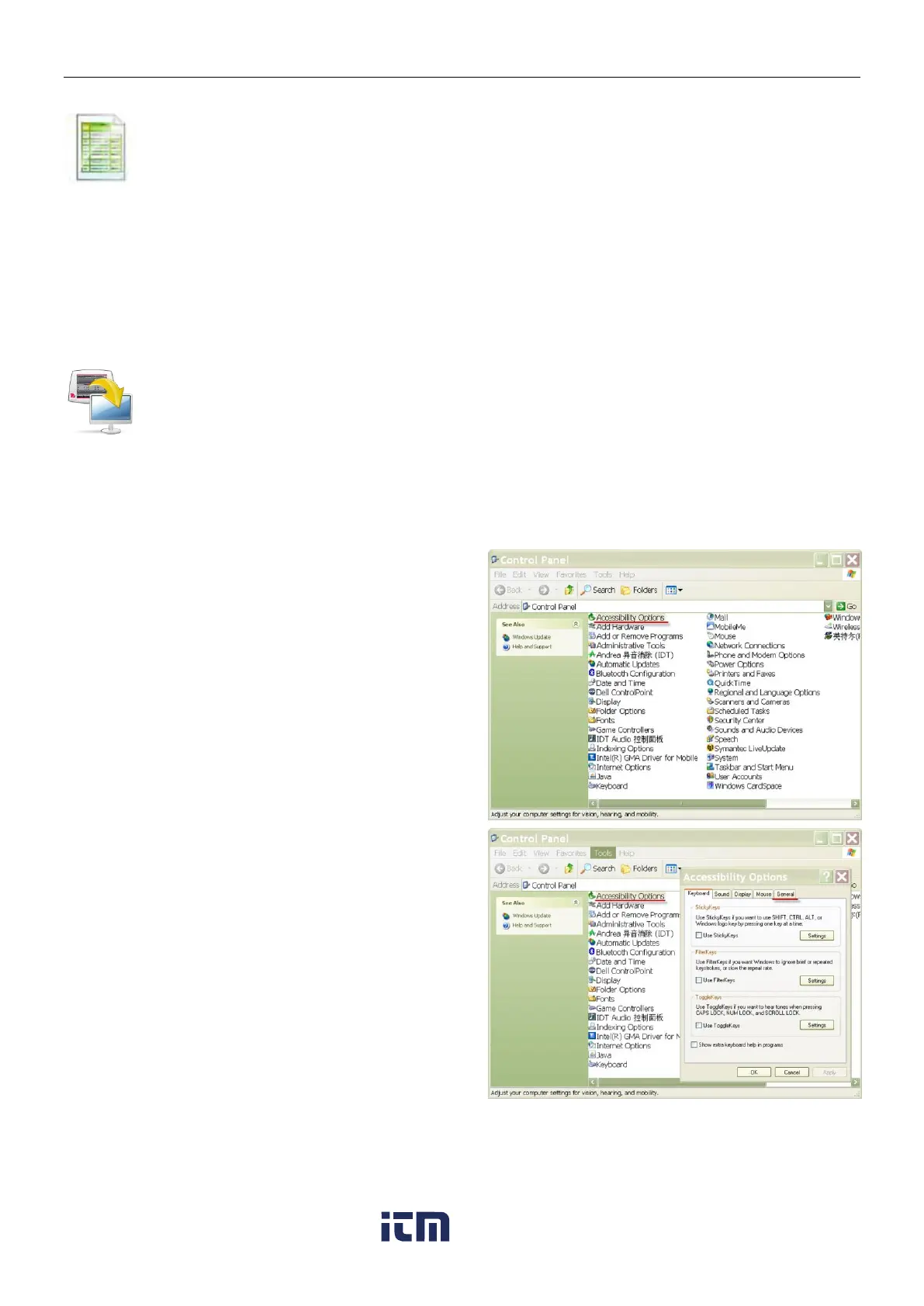
Click the Start Menu in Windows XP system
and click “Settings” –>open Control Panel.
Double click Accessibility Options in
Control Panel.
Select the General tab in
Accessibility Options.
w ww . . co m
information@itm.com1.800.561.8187













 To Next Page