EN-96 EXPLORER BALANCES
4.17 Library
When an item is processed on a regular basis, the item’s data may be stored in memory for future use. This
memory is referred to as the Balance’s Library.
The following data is stored for the Application used:
4.17.1 Creating a Library Record
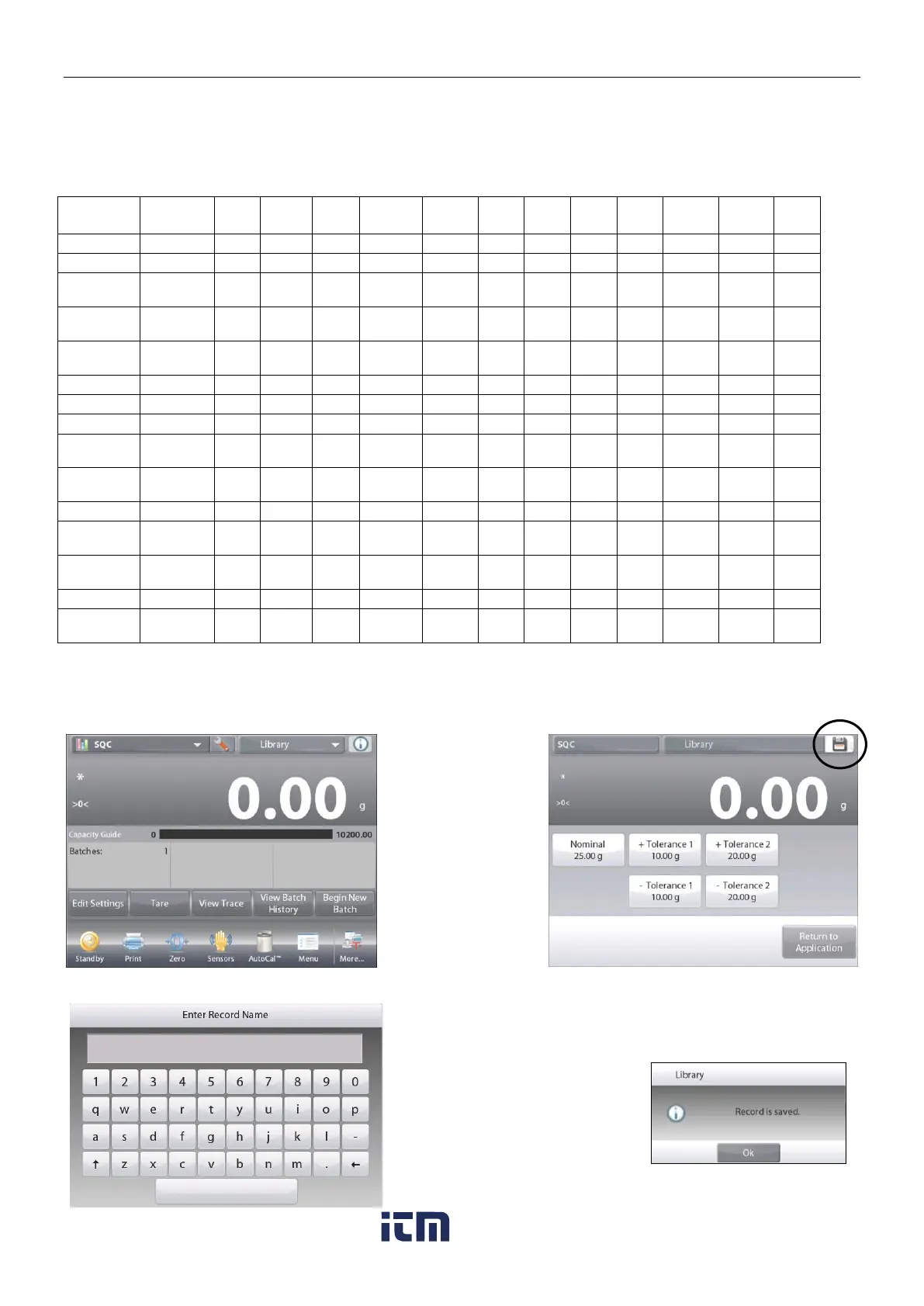
To create a Library record, the Settings screen is used. From the home screen, touch the Edit Settings button.
The Settings screen is now displayed.
Touch the
Edit
Settings
button.
The
Settings
screen appears.
Confirm the
application settings;
then touch Save
(the diskette,
top-right).
An alphanumeric
entry screen
appears, to enter
the Library Record
name.
Enter the Record name,
then press .
Note: Library Record names
can be 8 characters or less.
A
Record is saved
message
appears. Press
OK
, then…
Press
Return to Application
.
w ww . . co m
information@itm.com1.800.561.8187













 To Next Page