EN-94 EXPLORER BALANCES
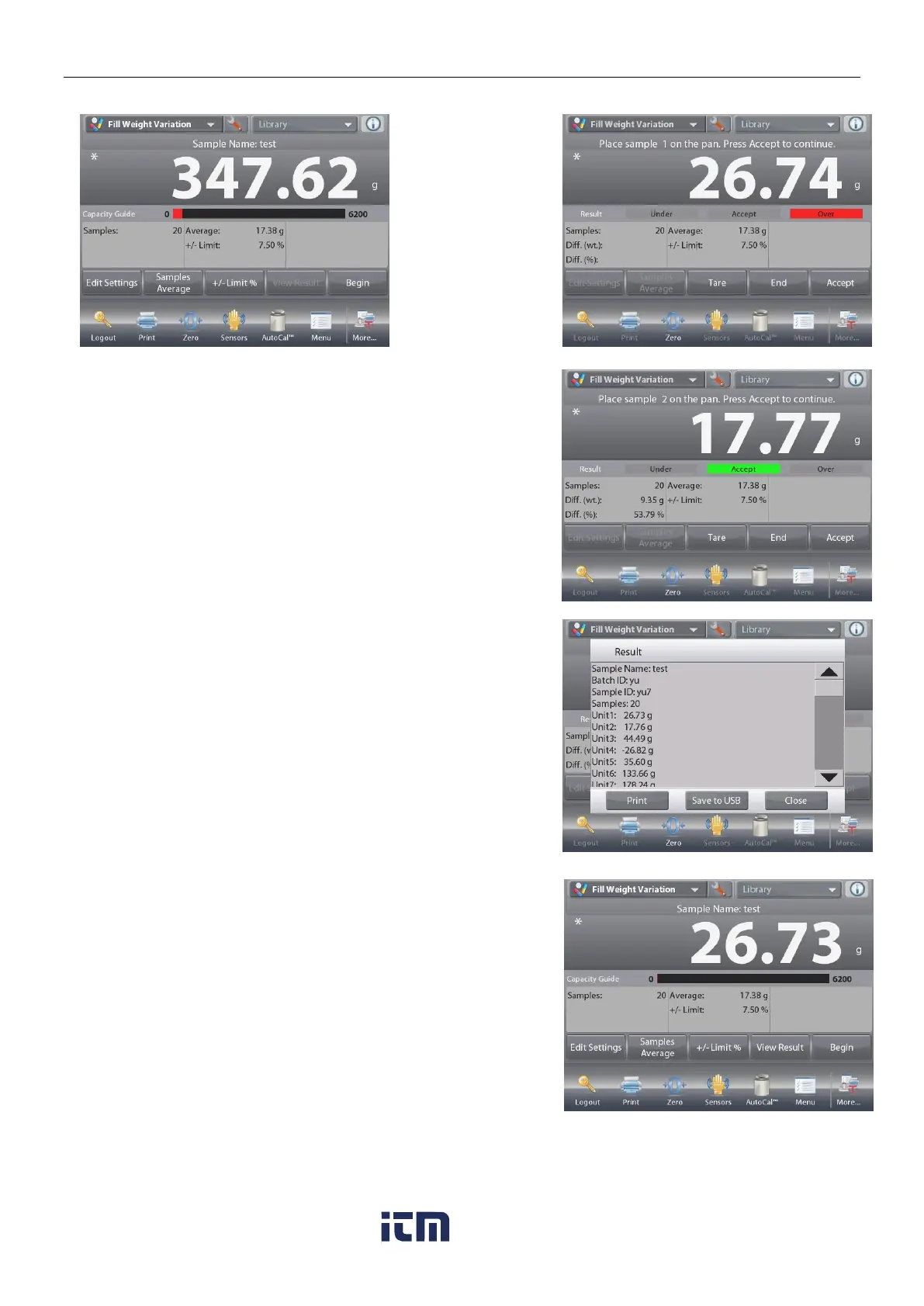
4.15.2 Begin the Fill Weight Variation Process
Touch
Begin.
Follow the screen
instructions to
place sample 1 on
the pan. Then
Press Accept.
After that follow the onscreen instruction to place sample 2
on the pan, and touch the Accept button to continue.
When a sample is placed, the screen will show if the result is
Under, Accept or Over the +/- Limit % value you set.
Continue to follow the screen instructions to weigh samples
and touch the Accept button to store each sample’s weight.
The maximum sample number is 99.
It can be changed from 1 to 99.
Once all the samples have been weighed, the
Results
screen appears automatically.
Setup the proper connectivity and press Print to send the
results to PC or printer.
See Communication Setup, Section 5.10 for details.
Insert a USB flash drive to the balance if you need to save
the result to it. Once the drive is inserted, you will see a
Save
to USB
button. Touch the button to save the result.
Touch
Close
to return to the current process.
To view the result again later, touch the View Result button.
w ww . . co m
information@itm.com1.800.561.8187













 To Next Page