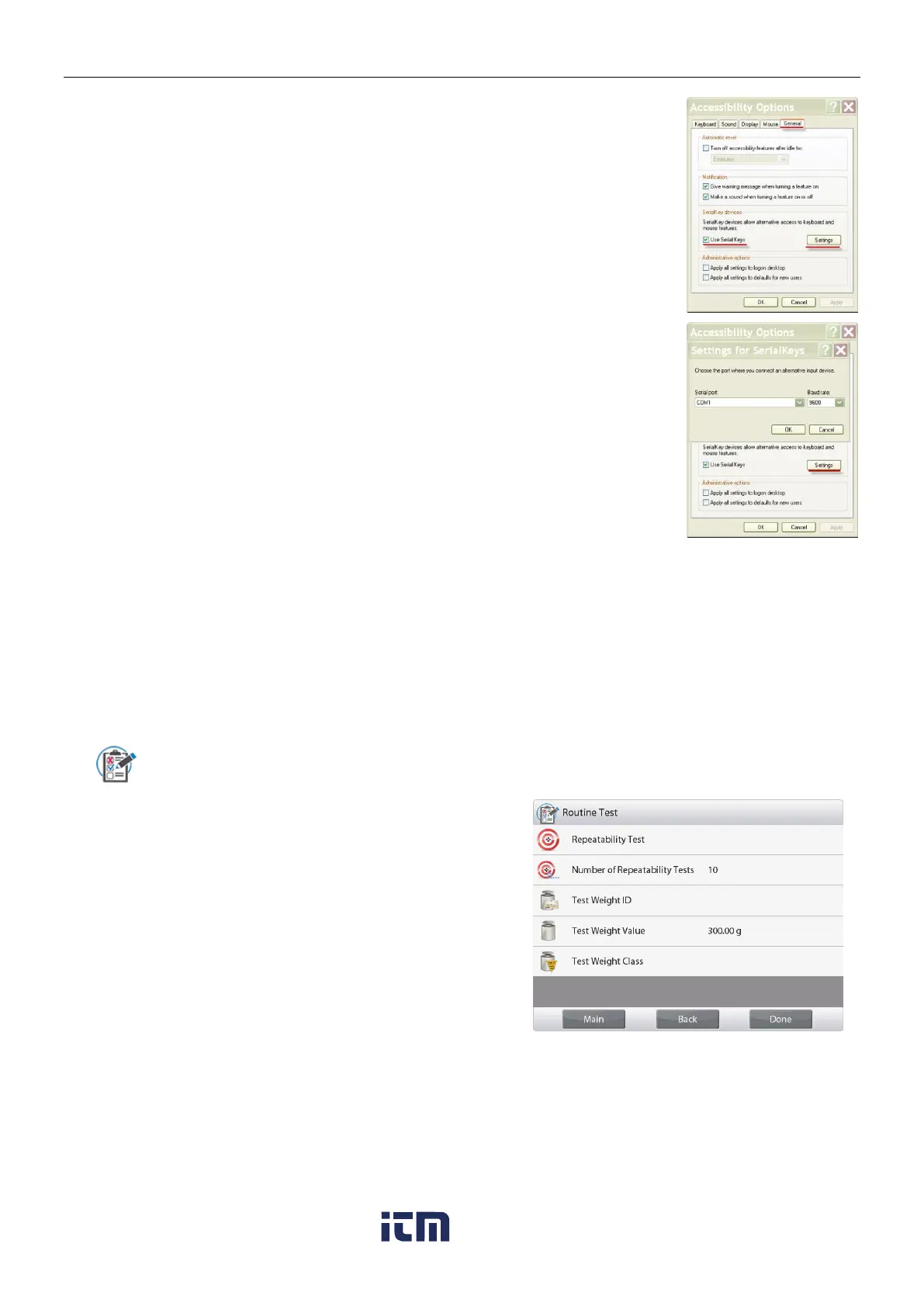
Check Use Serial Keys, and click the Settings button.
Select the Serial Port, and set the Baud rate to 9600.
After selecting, click OK to close setting for serial keys.
Close the Control Panel.
Run Excel to open one blank sheet. Focus the cursor on one item.
At this time, if scale sends data to the PC through the RS232 port, the data
will be put into the cell, and the cursor will automatically move to the next
vertical cell.
Note: If the weighing value is a negative number, set the target cell in
TEXT format. Otherwise, Excel will not distinguish it as a negative number.
5.11 Library
When an item is processed on a regular basis, the item’s data may be stored in memory for future use. This
memory is referred to as the Balance’s Library.
Delete All Record: Select to delete all library records.
5.12 Diagnostics
Use this menu to enable the Diagnostics (troubleshooting) functions, and to enter the Service menu;
5.12.1 Routine Test
To set settings for daily repeatability test and perform it.
You can set Number of Repeatability
Tests, Test Weight ID, Test Weight
Value and Test Weight Class in this
menu.
To perform repeatability test, press
Repeatability Test and then follow
the onscreen instruction.
w ww . . co m
information@itm.com1.800.561.8187













 To Next Page