EXPLORER BALANCES EN-47
4.5 Dynamic/Animal Weighing
Use this application to weigh an unstable load, such as a moving animal. Three different start/reset modes can be
selected: Manual (start and stop via key press), Semi-Automatic (auto-start with manual reset), and Automatic
(start and stop automatically).
Dynamic Weighing – Manual (default)
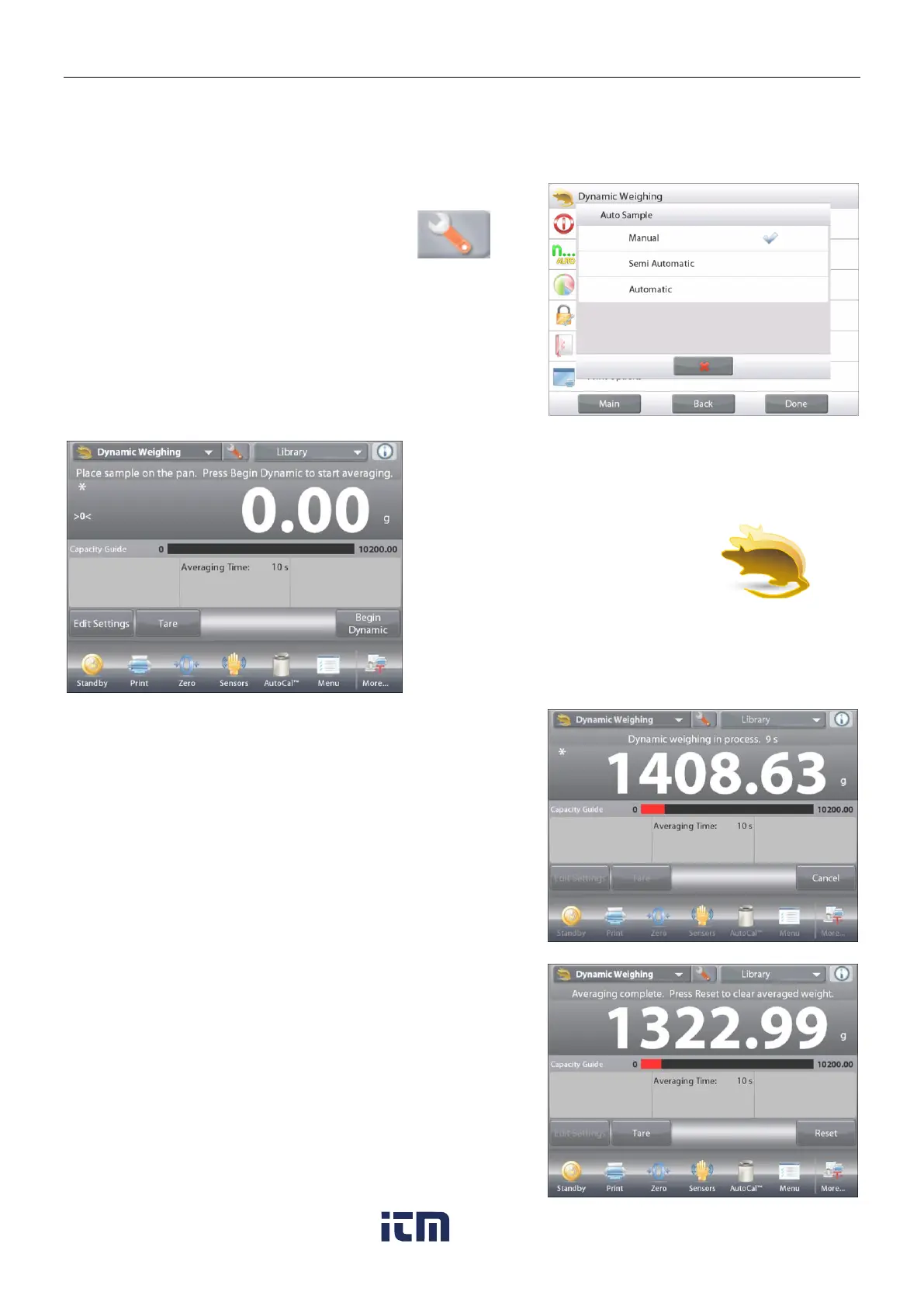
To set the mode, touch the Setup wrench:
When you make a selection, the Setup options
screen re-appears.
Press Done.
On the Dynamic Weighing home screen, the
default (or last) Averaging Time is displayed.
Follow the screen instructions.
The DYNAMIC WEIGHING Home screen
Main Display Line
Second Display Line
Reference Fields
Application Buttons
Functions Application Icon
Place objects on the pan.
Press the Begin Dynamic button.
The balance begins a countdown (averaging process).
During the countdown, the information line displays the time
remaining.
If necessary, press Cancel to quit and return to the Home screen.
When the countdown ends, the result is displayed and held.
Press Reset to clear the held weight and return to the Initial
screen.
Note:
Clear the pan before beginning a new Dynamic Weighing
cycle.
w ww . . co m
information@itm.com1.800.561.8187













 To Next Page