EN-40 EXPLORER BALANCES
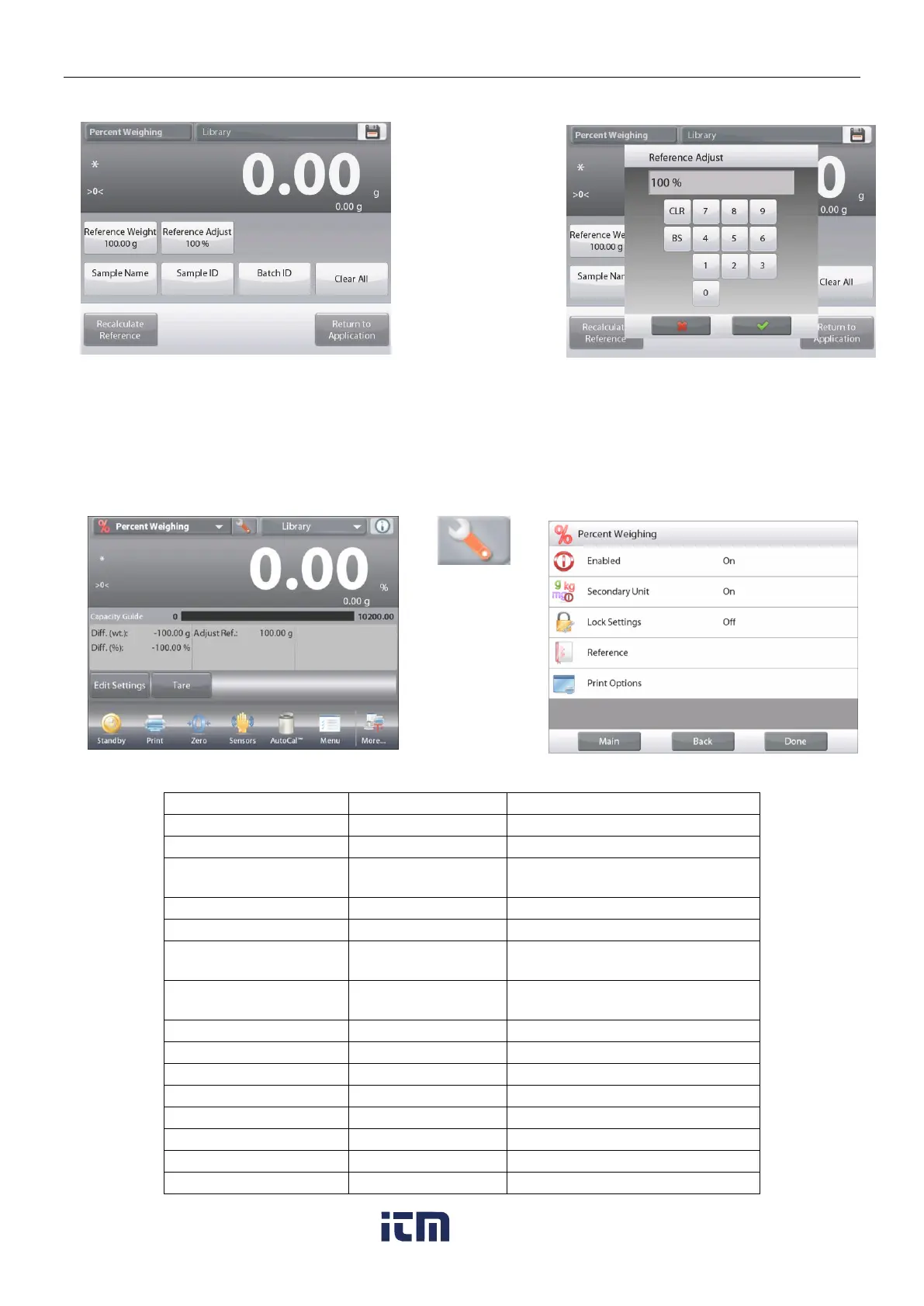
The Edit Settings screen shows current Reference Adjust value. To change it, touch Reference Adjust button.
A numeric input
window appears.
Key in the desired
Reference Weight
Adjustment,
then press .
The display returns to the previous screen with the new value highlighted momentarily.
To return to the Percent weighing home screen, touch
Return to Application
.
4.3.2 Application Setup
The Application can be customized for various user preferences. Press Setup (wrench) from the home screen.
The
Setup
Menu
appears.
Select the item
to view or
change.
To return to the
Application
home screen,
press
Done
.
Percent Weighing Application Setups (defaults in Bold)
To show the Second Display line
Press to lock the current setting(s)
so they cannot be changed.
The Reference is displayed
Displays the Difference to the
reference weight.
Displays the Difference to the
reference weight as percentage.
Gross weight is displayed
w ww . . co m
information@itm.com1.800.561.8187













 To Next Page