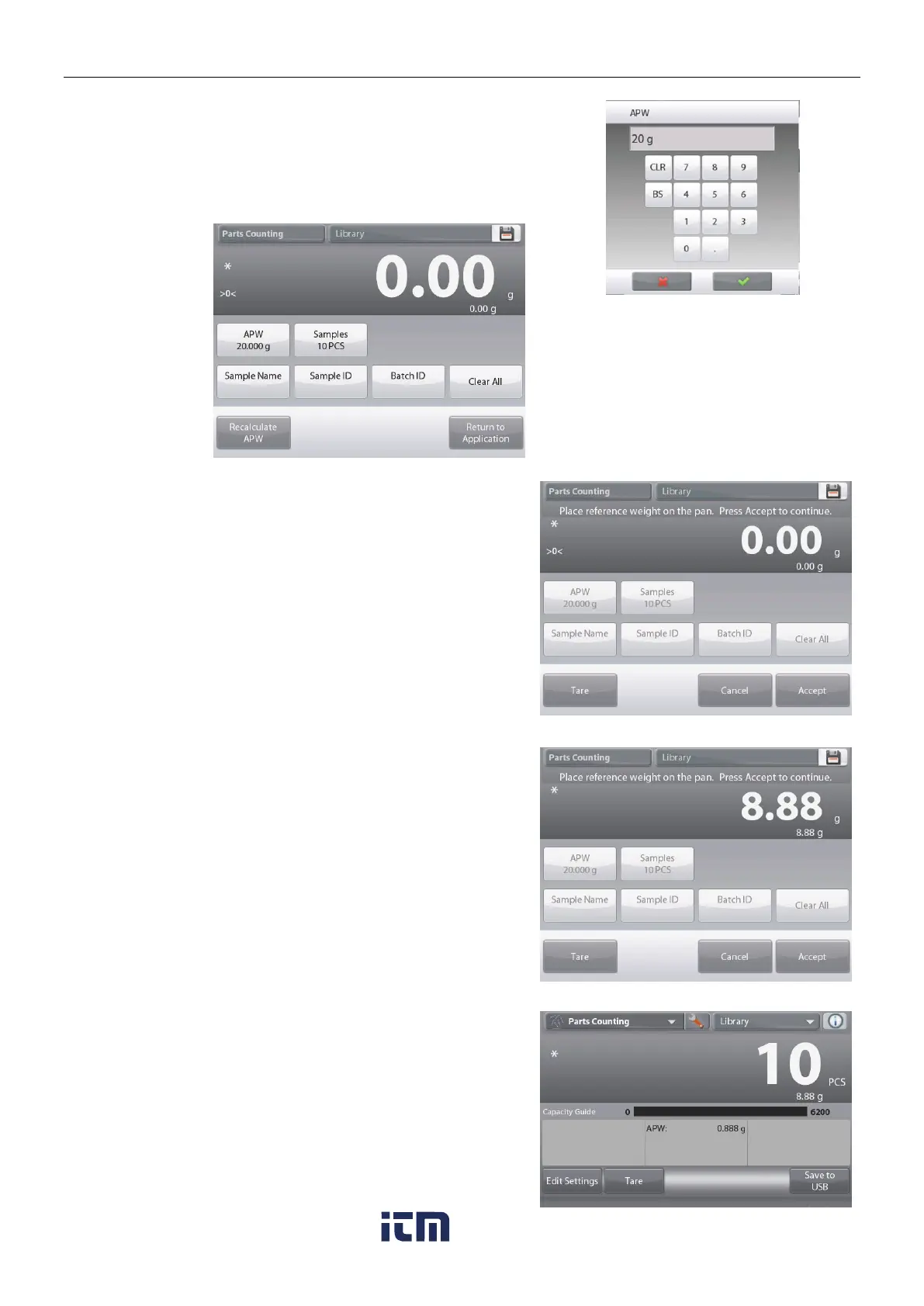
Set a known Average Piece Weight (APW)
To adjust the APW value directly, touch the
APW
button.
A numeric input window appears.
Key in the desired APW Weight, then press .
The display returns to the previous screen with the
new APW value highlighted.
To return to the Counting home screen,
touch Return to Application.
Set a new Average Piece Weight (APW) – Derived
To establish a new APW, touch the Recalculate APW button.
The APW Screen is displayed.
Note: The sample size that is displayed will be used.
To use a different sample size, change that first. (See below.)
Follow the screen instructions to establish a new APW.
Actions available: Tare, Cancel, or Accept
Press
Accept
to capture the value and return to the Settings
screen.
The Settings screen returns with the new APW value
highlighted.
To return to the Counting home screen,
touch
Return to Application.
The home screen shows 10 pieces at the new APW
w ww . . co m
information@itm.com1.800.561.8187













 To Next Page