Chapter 7
7-41
Configurator Settings
Note The differences from the Monitor Device Window are as follows:
• The Update Button is not included in the Maintenance Information Window. (To update the er-
ror log, Click the Update Button on the General Tab Page.)
7-2-13 Last Maintenance Date
■ Function
• The date on which maintenance was last performed can be written to the Unit.
• The timing for future maintenance can be determined more easily.
■ Setting Methods
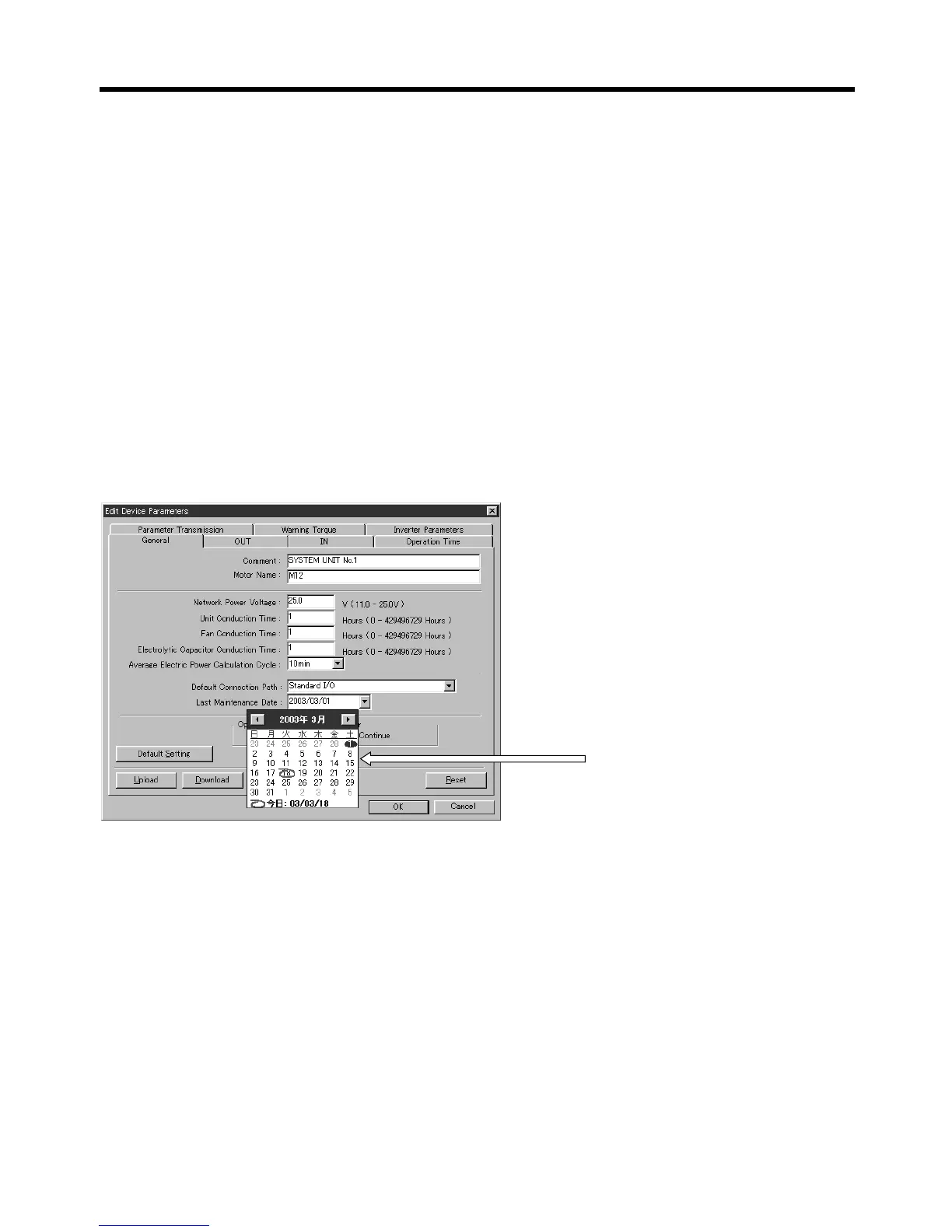
1.Click the General Tab in the Edit Device Parameters Window.
2.Select the desired date from the pull-down menu for the Last Maintenance Date field.
■ Checking Methods
● Using the Monitor Device Window or Maintenance Information Window
Click the General Tab in the Monitor Device Window (or Maintenance Information Window). The set
date will be displayed in the Last Maintenance Date field.
To enter today’s date, click Today at
the bottom of the calendar.
Click the date on the calendar to
input the date.
General Tab Page in the Edit
Device Parameters Window



 To Next Page