All-New Event Presentation Switching Solutions
User Manual
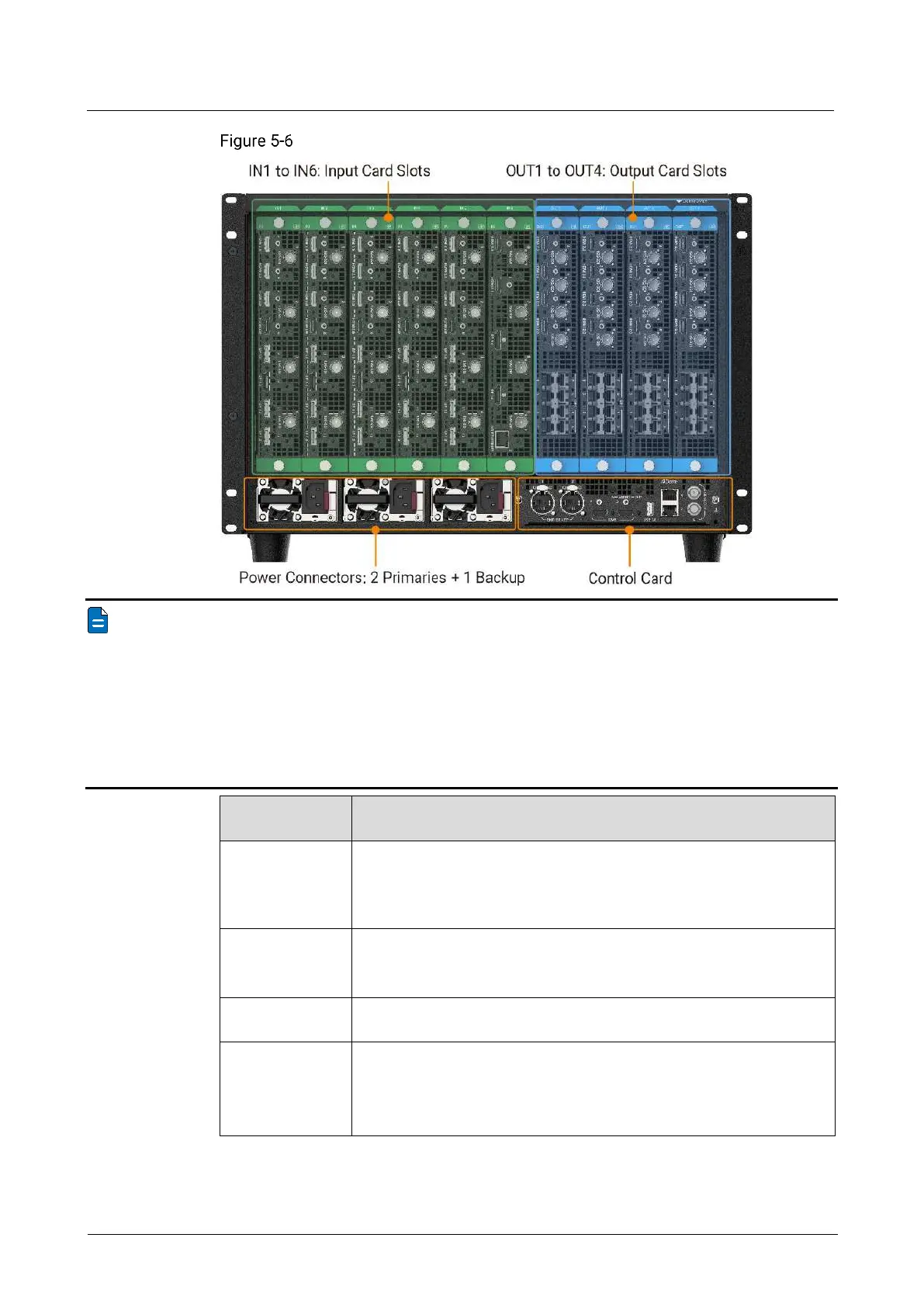
Q8 rear panel
Note
The picture above is the rear panel of the device when it is fully loaded. Users can
configure input and output cards as needed.
The input and output cards do not support hot-swapping, and the input and output
cards must be installed in ascending order of the card slot numbers.
The input and output cards can be replaced. Refer to the table below for input and
output card selection.
Configurable Input and Output Cards
Up to 6 input cards can be installed, which can be selected from the
following.
Q_4x HDMI2.0+4x DP1.2+4x 12G-SDI Input Card
Up to 4 output cards can be installed.
Q_4x HDMI 2.0+4x 12G-SDI Optical Output Card
Support 2 primary and 1 backup power supplies. Before powering on
the device, connect at least two power supplies.
Power specifications: 100-240V~, 50/60Hz, 10A-5A



 To Next Page