Reference Manual
00809-0100-4026, Rev FA
July 2009
7-11
Rosemount 5400 Series
The View/Record Mode
Tab
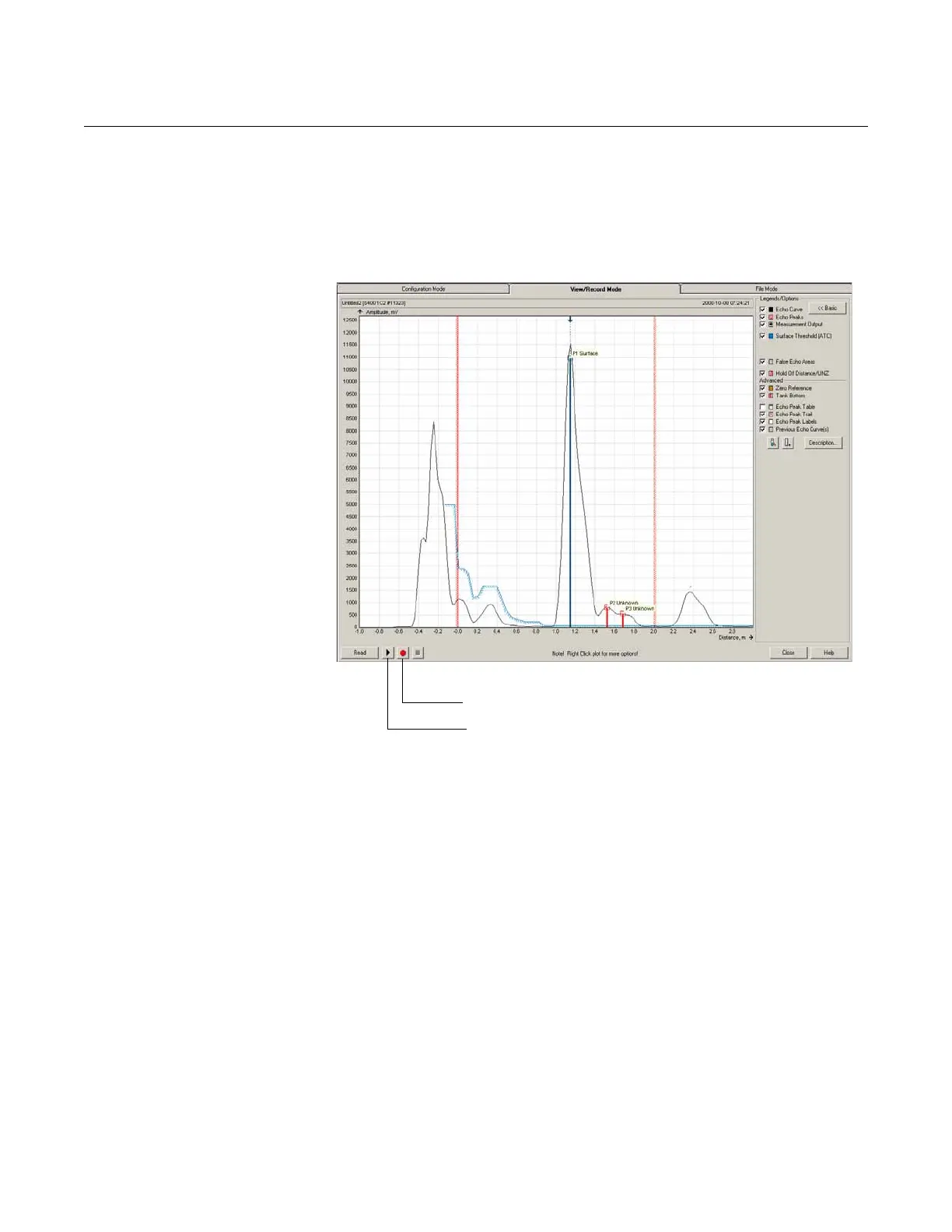
The View/Record Mode tab presents a plot of the current tank conditions
where each radar echo is displayed as a peak in the signal plot.
When clicking the Echo Curve icon under Device Config/Tools, the Echo
Curve Analyzer window appears with the View/Record Mode tab selected:
Figure 7-9. A Echo Curve plot in
View/Record mode.
Advanced
The Advanced button opens a list below the Echo Curve plot with information
on all echoes in the tank such as signal amplitude and position in the tank.
Play
When the Play button is clicked, the tank is continuously updated without
being stored.
Record Tank Spectra
This function records tank spectra over time. This can be a useful function if,
for example, studying the tank signal when filling or emptying the tank is
desired.
File Mode Tab The File Mode tab will open files with saved snapshots/movies to be
presented in the spectrum plot. A movie file can be played to view the
amplitude plot at the desired update rate.
Record tank spectra
Play (continuously updates the spectrum)















 To Next Page