Software v3.0.11065
© Satmap Systems Ltd 2017
24
(MAIN MENU → WiFi Networks
The Wi-Fi connectivity on the Active 20 serves 2
purposes :
a. Download Software Updates,
b. Sync your routes and activies with Xpedition
Online Route Planner (this feature coming soon).
ConnecttoWi-Fi
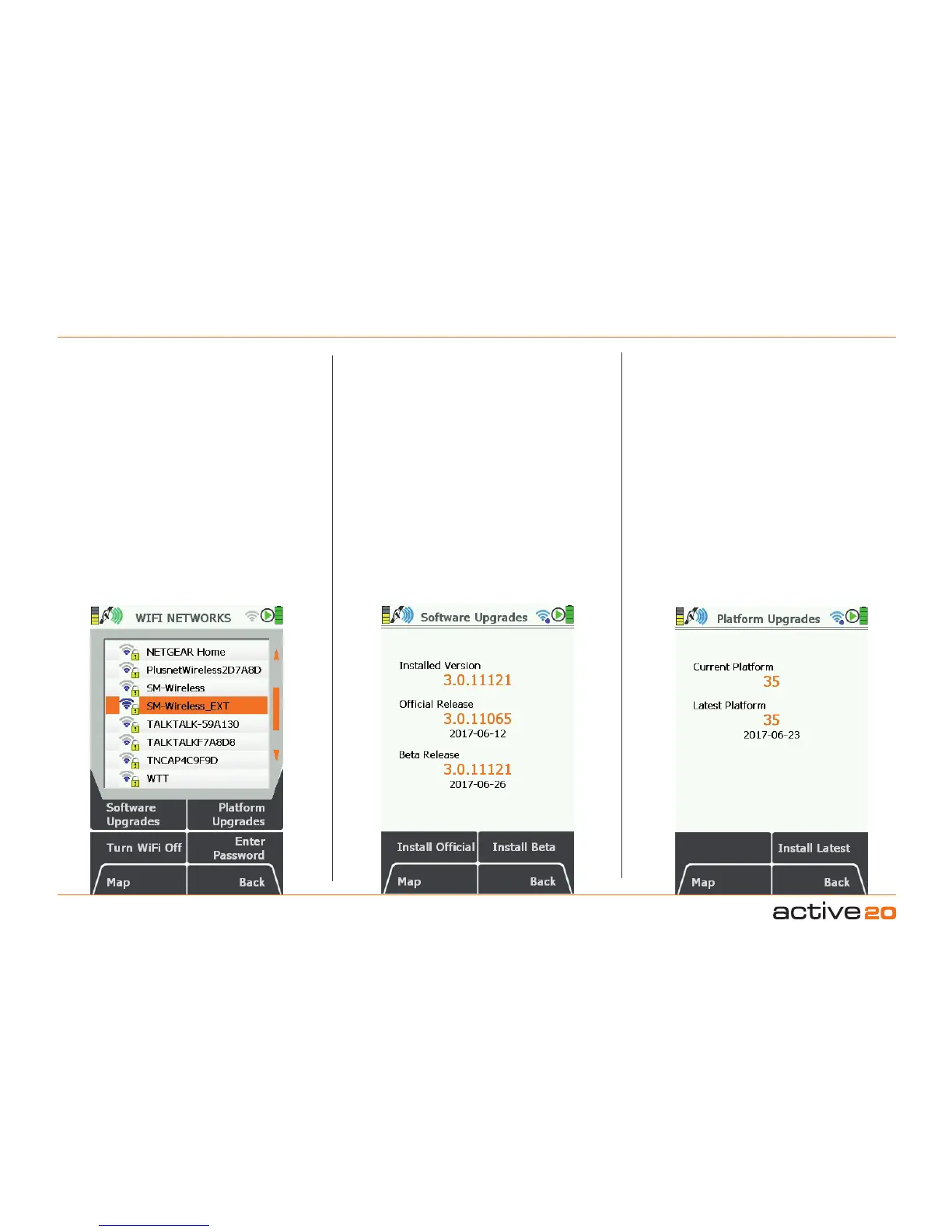
Navigate to the WI-FI NETWORKS screen using
the Primary Screen page forward button. Select
your local network using either the touch screen
or rocker pad, then press EnterPassword and fill
in the details in the normal fashion. Pleasenote:
Actice 20 does not yet support Wi-Fi networks that
require additional browser information to join (e.g.
some hotels that require marketing information)
Software Upgrades; press this button to check
the status of the "application" software.
InstalledVersion:This is the version that is currently
running on your device. If it is a lower number than
the OfcialVersion you should upgrade by pressing
the InstallOfcial button.
OfcialRelease:This is the version that is currently
being shipped by the factory on new units, has been
the most fully tested and should be supported by a
Full User Guide.
Beta Release: This is the latest version from the
Satmap software development team, and will include
all the latest features and bug fixes. However, it
may not be as fully tested or stable as the Ofcial
Release.If the Beta Release is causing you issues -
you can "Roll-Back" to the Official Release.
PlatformUpgrades: From time to time a
Platform Upgrade may be released. This is a larger
and longer download than the Application software,
and handls more basic functions of the GPS unit
(power supplies, screen drivers and the such like).
Satmap recommend that you always upgrade to
the latest Platform, if a newer one is available.
This upgrade requires that you have an SD card
fitted with sufficient space available, however the
system will test for this and issue a warning if
required.
PleaseNote:During All software upgrades it is
essential to ensure that the power to the GPS
unit is not distrubed, otherwise the software may
be currupted and the unit could enter "Recovery
Mode" and / or require return to Satmap for
attention.
4.7 Screen7:Wi-FiNETWORKS



 To Next Page