Software v3.0.11065
© Satmap Systems Ltd 2017
84
13. LOIs(LinesofInterest)
13.1 LOIs(LinesofInterest)Overview
LOIs are LinesofInterest allowing you to plot a line
consisting of multiple waypoints joined together,
instead of a single POI (Point of Interest).
LOIs are drawn in a similar way to a route, but
cannot be followed or activated like a route, or have
comments for individual points. They are used to
represent boundaries or alternative routes. The
description screen shows the length of the line and
the line colour can be edited.
Note: Use SatSYNC to add graphics or more detailed
information to an LOI. (See the SatSYNC 1.5 User
Guide).
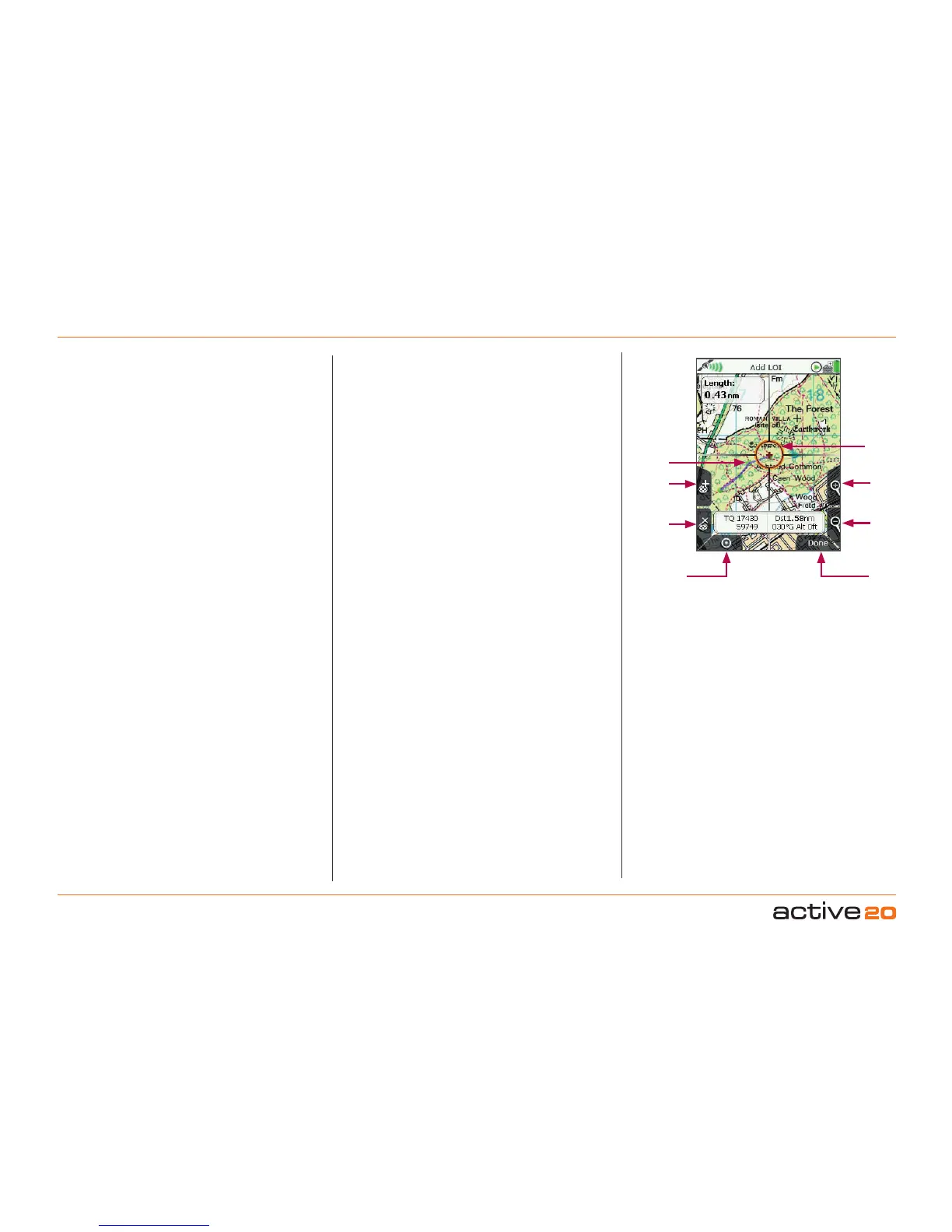
13.02AddLOIScreen
(GPS MAP → MAIN MENU → OOI Menu → Add LOI
by Map)
To create an LOI, select AddLOIbyMap from the
OOI Menu and press Select or centre press the
rocker pad. This will take you to the AddLOI screen
where you will be able to lay down points (green
dots) to form a 'line'.
The orange locator circle has a red cross in the
centre to indicate you are in edit mode and on
the AddLOI screen. You can plot points by either
pressing the top left '+' button or by centre pressing
the rocker pad. Use the lower left 'x' button to
remove points.
The line and its length are shown as you create the
LOI. The name of the LOI appears in the designated
area and you will be able to change the colour of
the LOI.
Buttons:
AddLOIpoint(+)
Lay down LOI points on the map
RemoveLOIpoint(x)
Remove LOI points from the map
GPSMap
Return to GPSMAP screen
Zoom
Zoom in/out
Done/(Back)
Go to keypad to name LOI and then to OOIFolders.
(Back cancels the operation and takes you back to
the OOIMenu).
13.03AddLOIinaSpecicFolder
(MAIN MENU → OOI Menu → OOI Folders → specic
folder → nal subfolder → Back → Add LOI by Map)
This will add the LOI to the last visited folder.
Note: Folders are created using SatSYNC and must
contain at least one OOI or route to be visible on the
unit. (See SatSYNC User Guide for more information).
LOI point
Remove
LOIpoint
GPSMap
Add
LOIpoint
Zoom
In
Locator
circle with
red cross to
indicate edit
mode
Zoom
Out
Done/
Back
Create Lines (of
Interest, LOI)



 To Next Page