Software v3.0.11065
© Satmap Systems Ltd 2017
31
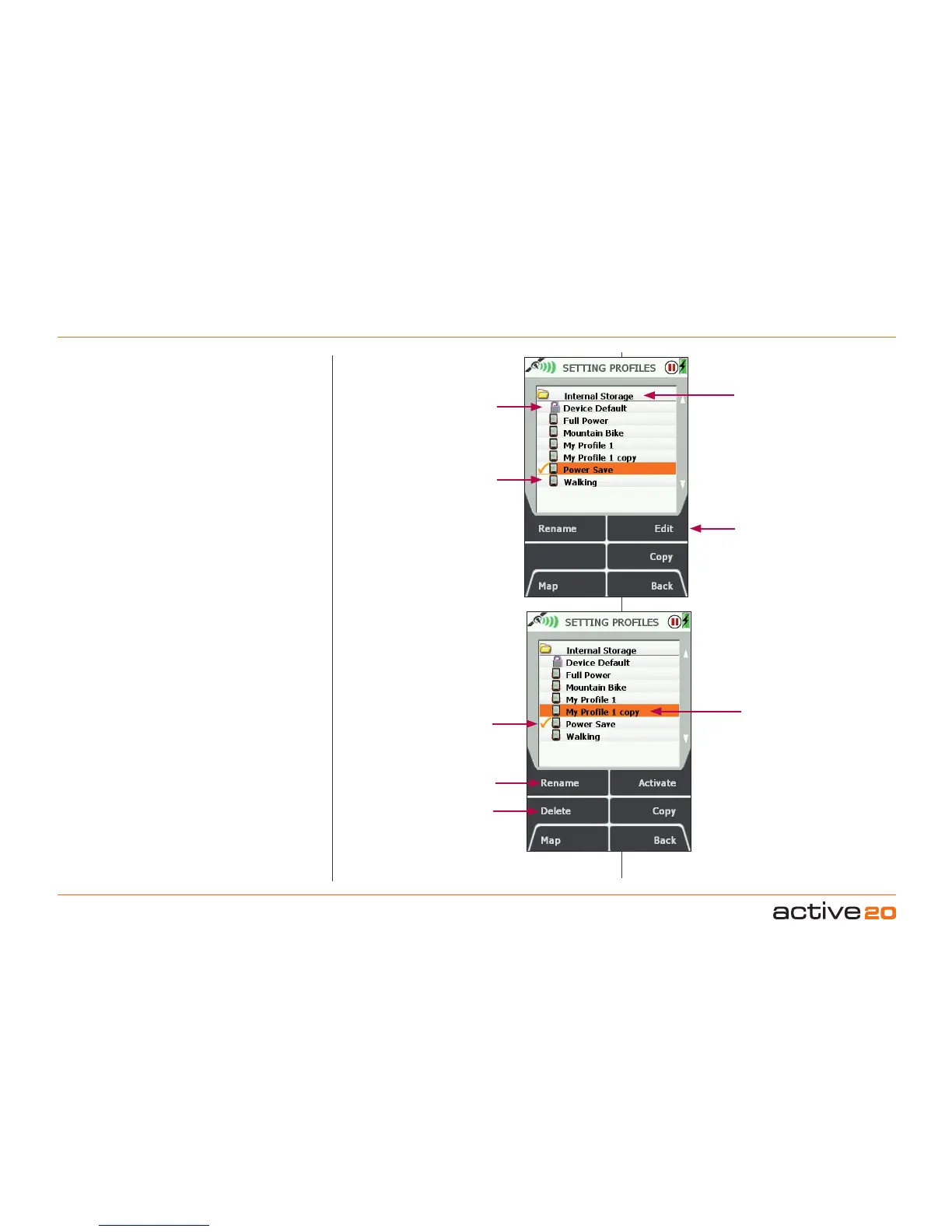
6.2 SettingProles
(MAIN MENU → Settings → Setting Proles)
User created Proles are an easy and flexible
way to save groups of settings. Extra Profles can
be created by using the Copy button, and they will
appear with the word "copy" after the original title.
Profiles can easily be renamed with the Rename
button.
Custom user Profiles have a variety of uses. For
Example: A "Night Time" profile could be set with a
very low backlight. A "Power Save" profile could be
set with very specific settings, e.g.
Nobacklightboost
Backlightoffafter30seconds
Backlightat50%
MapinNorthUp.
Please Note:
The current "Active" Prole cannot be
deleted. To do this, activate an alternate Prole, then
focus back on the original Prole and press
Delete.
Important: Any changes to Settings generally will be
reected in the Active Prole.
6. MAINMENU:SettingsMenu(...cont)
Profiles-2
Profiles-1
Profiles stored
only in Internal
Storage
Default Profile
cannot be deleted
User created
Custom Profiles
Active Profile
Copied Profile
Active Profile canot be
deleted
Only Active
Profile can be
Edited
Rename any Profile
except "Default"



 To Next Page