Software v3.0.11065
© Satmap Systems Ltd 2017
38
6. MAINMENU:SettingsMenu(...cont)
6.8 ElevationSettings
(MAIN MENU / Settings /Elevation)
Overview.
The Active 20 gives you 3
options for calculating elevation values.
All are useful, but they do have some
pros and cons.
Elevation from Maps.
Each map is
supplied with a "height data set" that
provides spot heights at regular horizontal
intervals (post spacing). Typically these
are between 50m-100m. This method
works well when the ground is less steep,
with fewer cliffs around.
Elevation from GPS.
This method uses
height data supplied by the GPS itself,
and works best when there is a good,
unobstructed view of a large portion of
the sky. The data can be quite variable in
forests and amongst tall buildings.
Elevation from Pressure.
The highly
accurate barometric altimeter can be
used to assist with elevation calculations,
and uses the principle that pressure
falls as elevation rises. It is especially
useful over short periods of time where
the weather is relatively stable, since
pressure also generally falls when bad
weather is approaching.
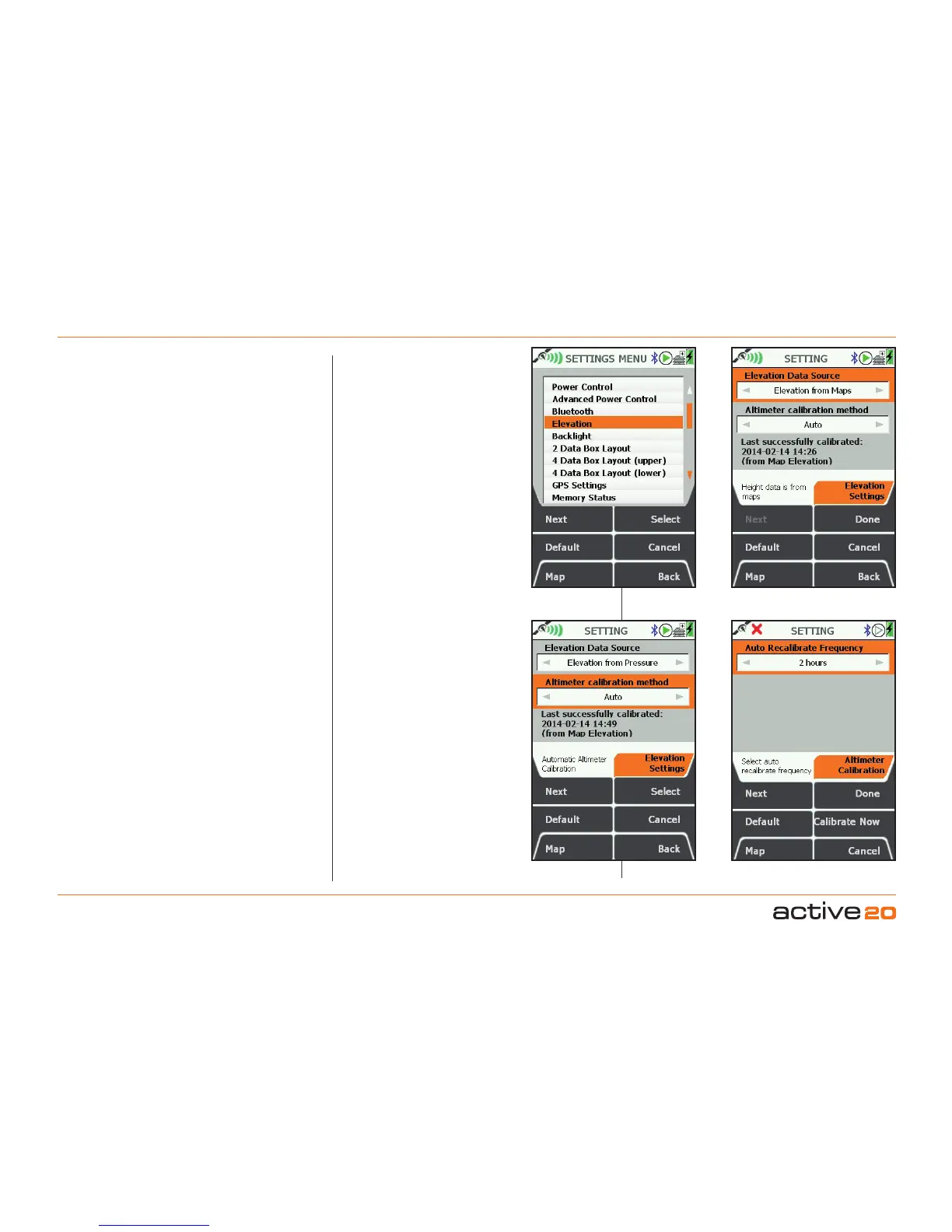
Setting"Elevation"source.
Data that is
stored for later upload has a single set
of elevation data. You can control this
by setting its source. Select Elevation
from the SETTINGS screen. The top box
indicates the Elevation data source and
can be changed by moving the rocker
pad left and right (when it is highlighted
by the orange background). A selection
can be made between "Elevation from
Maps, GPS or Pressure". The first
two settings require no further action -
just press Done, Back or Map to continue
with the GPS use.
Setting Elevation from Pressure.
To
work effectively, elevation from the
barometric altimeter needs to be
calibrated at intervals. This is because
changing weather would otherwise affect
the elevation reading.
Altimeter Calibration: Auto. On this
setting the Altimeter is recalibrated
against the Map elevation every 2 hours
(by default). This is a good setting for
normal use and requires no further user
input.
InfoBox:
"Last Successful Calibration."
If a
long time has elapsed since the last
calibration, the accuracy may have drifted
due to weather change: it would be wise
to recalibrate the device as described
below.
Auto Recalibrate Frequency. The left
/ right rocker pad function can be used
to toggle the recalibrate time interval
between 2 / 4 / 6 / 8 hours.
"CalibrateNow"
button will calibrate the
local pressure against your current Map
Elevation, and record the date and time
for future reference.
Manual Calibration.
Should you wish to
have more control over the recalibration
of the altimeter, select "Manual" using the
rocker pad, and then Select
.
Method 1: Map/GPS Elevation. This
will simply use the Map elevation for
calibration (or GPS height data for no
map data is available).
Select "Elevation" from SETTINGS
Select Elevation data source
Select Recalibration frequency
Auto calibration setting



 To Next Page