Software v3.0.11065
© Satmap Systems Ltd 2017
35
6. MAINMENU:SettingsMenu(...cont)
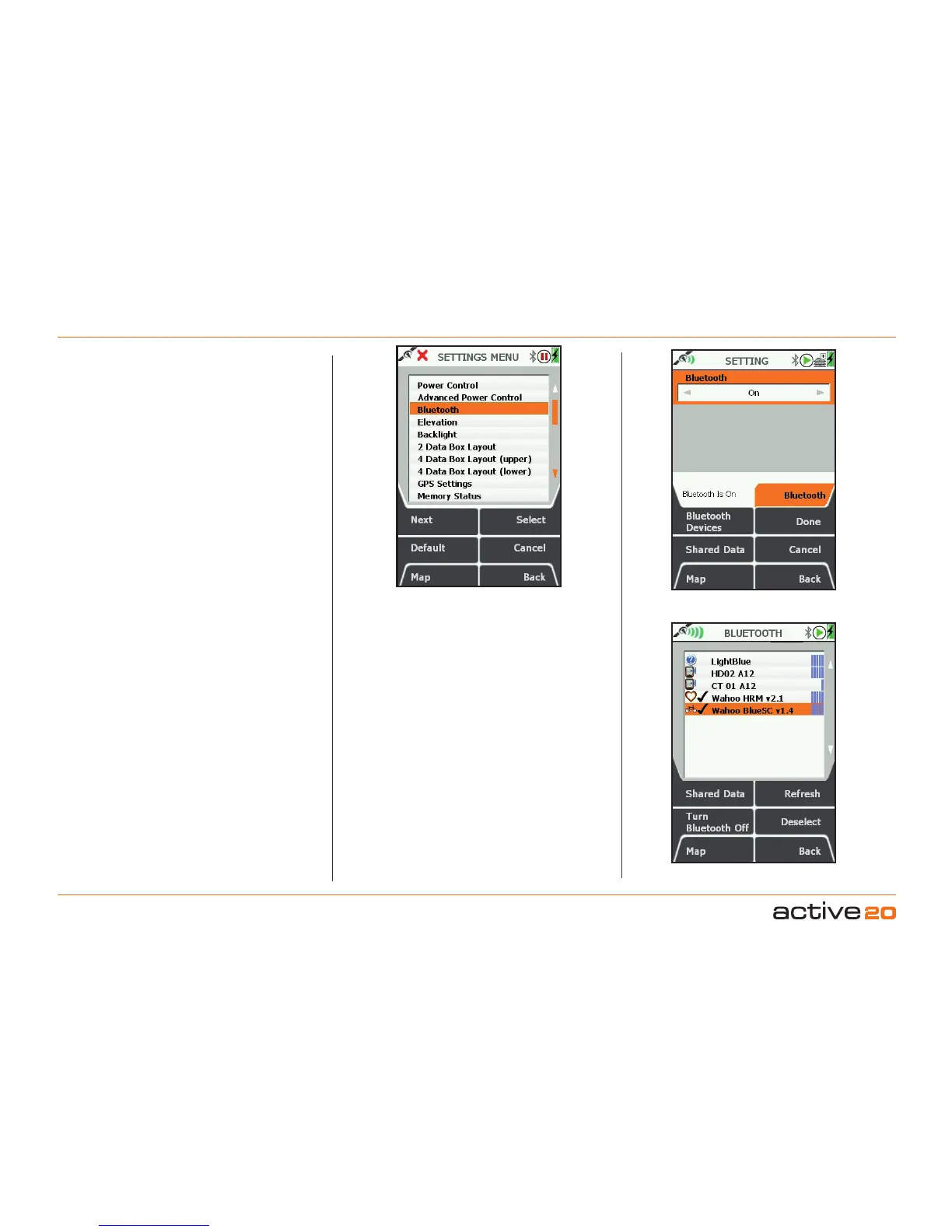
6.7 BluetoothSettings
(MAIN MENU → Settings → Bluetooth)
This Active 20 carries aBluetooth4.0 module (also
known as BluetoothSmart), which has two bands:
Classic(which handles route data transfer between
Active 20's) and Low Energy (LE, which handles
fitness sensor data, e.g. Heart Rate and Cadence
Monitors).
The SETTING/Bluetooth buttons have the following
functions:
Rocker pad Left / Right
will turn Bluetooth On &
Off. When turned On, the BT Icon on the status bar
should flash as the unit search for other devices.
Data transfer and fitness sensor data will not function
whilst Bluetooth is turned off.
BluetoothDeviceswill display all Bluetooth enable
devices that are nearby (Classic & Low Energy).
Done
returns you to the SETTINGS screen.
Shared Data
hops to the SHARED DATA screen
which allows you to see and fetch other Active 20
users' route data.
Cancel will cancel the operation and return you to
the SETTINGS menu.
Map
returns to the GPS MAP/PLANNING screens.
Back
will go back to the previous that you were on.
BLUETOOTH SCREEN
This screen allows you
to see local devices - and connect to Low Energy
sensors.
SharedData,as above, hops to the SHARED DATA
screen.
Refresh
,kicks off a Bluetooth refresh scan to look for
new devices nearby. In this version of the software,
previously identified Active 20's and LE devices will
be displayed. The blue bars on the right hand side of
the screen indicate signal strength. Typically 5 bars
indicate a range of 1m and 1 bar approx. 10m.
TurnBluetoothOff,does exactly that, and returns
to the main SETTINGS screen. At this point
any connected LE devices will disconnect, and
Bluetooth data sharing and data logging will cease.
Select/Deselect
, this controls the connections to
BT LE fitness sensors. This version of the software
allows Bluetooth Smart connection to two types of
fitness sensors: Heart Rate Monitors (HRM), and
bike Speed & Cadence sensors (Sp/Cad).
Sensors. Bluetooth Smart sensors are optional
extras for the Active 20 GPS units. They can be
purchased from the Satmap website, or from other
outlets.
Please Note;
Currently Satmap has partnered
with the "Wahoo" brand for these fitness sensors.
When selecting other brands, please ensure that
they support the Bluetooth 4.0 "Smart" and "Smart
Ready" profiles. The Active 20 doesnotsupport the
ANT+ profile.
SETTINGS Menu
SETTINGS / Bluetooth
BLUETOOTH screen



 To Next Page