140
13
FOR YOUR INFORMATION
This setting can only be made with TXB series balances (with the TW/TX series, the backlight is ON all
the time).
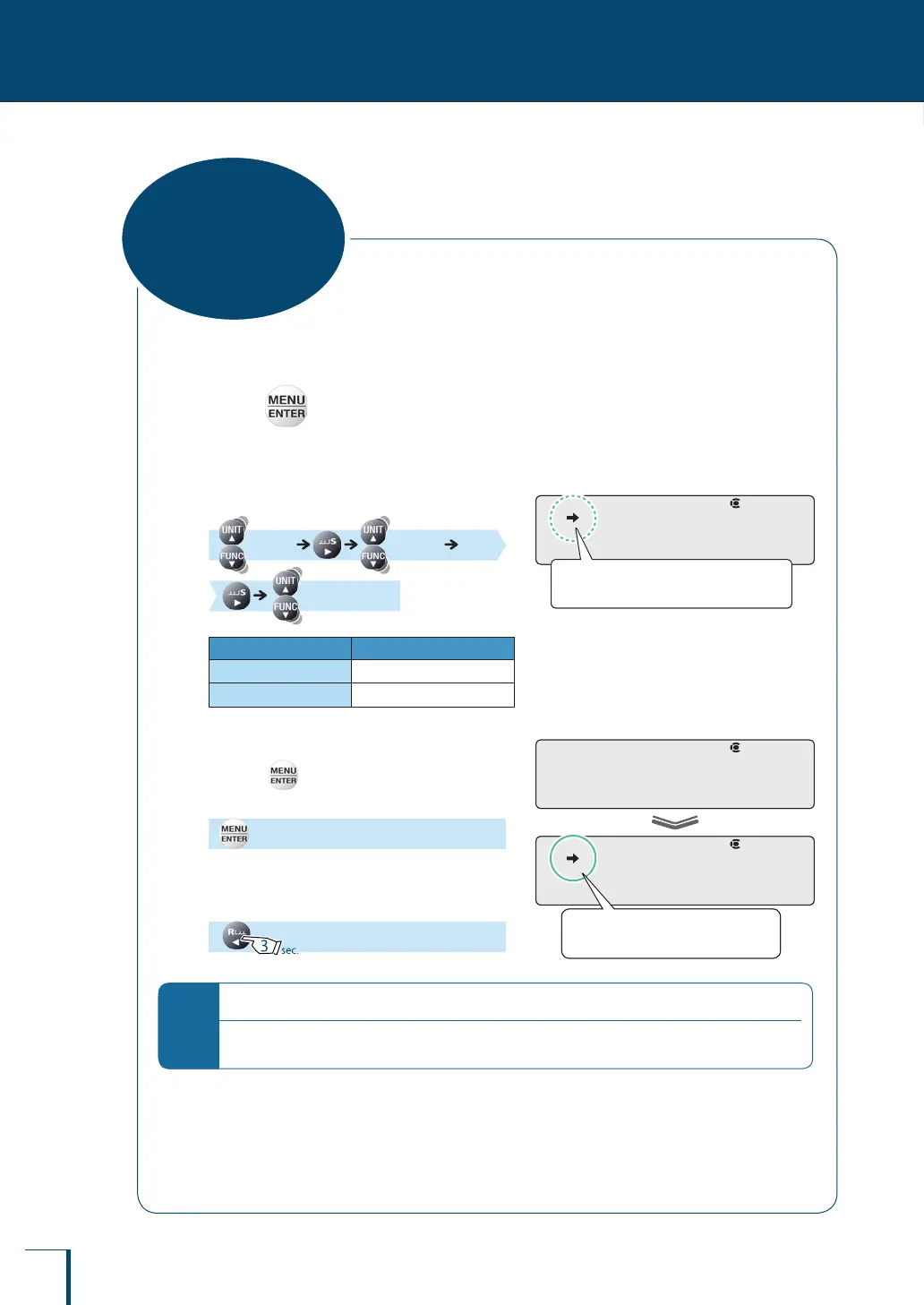
1
Press in the weighing mode.
This opens the main menu.
2
Select the backlight.
[TOOLS] [SYSTEM]
[BC.LIT]
Stability Mark Backlight
Lit
ON
Unlit
OFF
3
Change the setting.
Pressing alternately sets the ON and OFF
settings.
[SET]
4
Return to the weighing mode.
*
Backlight auto OFF
Even when the backlight setting is made ON (lit), the backlight automatically goes off if there is no key
operation or change in the loading status on the pan for 15 seconds.
! !B!C.L!I!T
Check the presence or absence of the
stability mark.
! !B!C.L!I!T
Check the presence or absence of the
stability mark.
! !S!E!T!
! !B!C.L!I!T
When ON is set the stability mark
is lit.
! !S!E!T!
! !B!C.L!I!T
When ON is set the stability mark
is lit.
Backlight
ON/OFF
(TXB Only)



 To Next Page