USING THE
BALANCE
USING MORE CONVENIENTLY MAINTENANCE
TROUBLESHOOTING
FOR YOUR
INFORMATION
BEFORE
WEIGHING
23
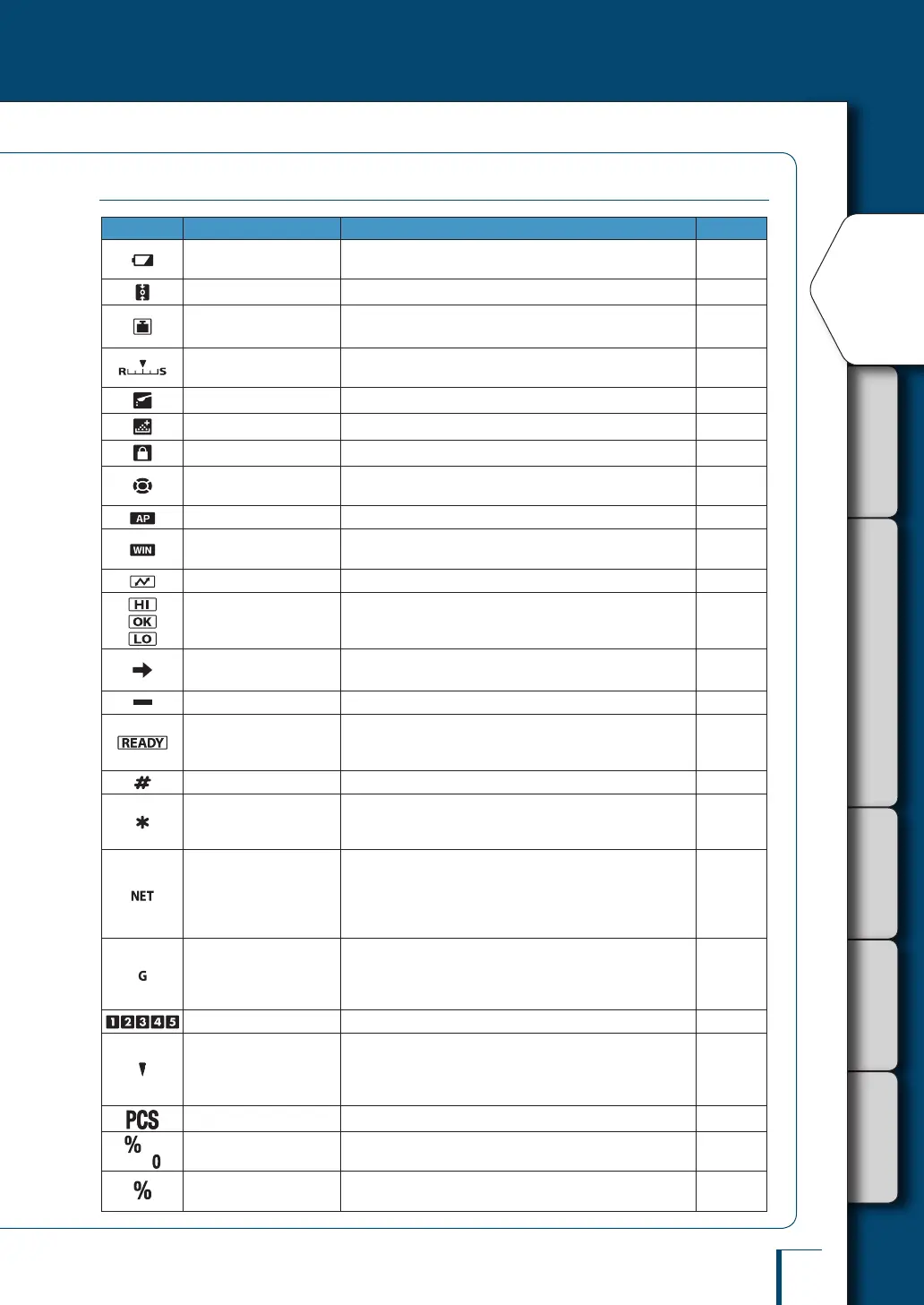
Display Panel
Display Name Description
See:
Battery symbol
Lights up when the power supply voltage is low, for example
when the battery voltage is low.
Page 33
Zero tracking symbol Lit when the zero tracking function is set ON. Page 71
Weight symbol This symbol is lit during calibration.
Page 57
Page 62
Easy setting indicator
Indicates what level the response and stability are currently
set to.
Page 78
Pouring symbol
Lit when the pouring mode is set.
Page 77
Formulation symbol Lit during mixing measurement (formulation) operations. Page 96
Menu lock symbol Lit while the menu is locked. Page 52
Menu operation key
symbol
During menu operation, indicates which of the menu operation
keys can be used.
Page 47
Auto print symbol Lit when the auto print function is set. Page 108
Win symbol
Lit when the WindowsDirect communication function has
been set.
Page 112
Communication symbol Indicates that data is being exchanged with an external device. -
Comparator symbol
When the comparator function (Checkweighing) has been set,
indicates the comparison judgment.
Page 102
Stability mark
Lit when the weight reading is stable. Lit when the option
currently set in menu setting is displayed.
Page 48
Page 79
Minus symbol Lit when the weight reading is negative. -
Ready symbol
Lit during the standby mode (TW/TX Series only). During
weighing, lit to indicate the ready to weigh status, for example
when using the formulation function.
Page 43
Page 96
Number symbol Lit when it is possible to enter numerical values. Page 49
Hold symbol
Lit when a value that is not the real-time weight reading (for
example the indication of the unit weight in piece counting) is
displayed.
Page 90
Page 95
Net weight symbol
Indicates that the weight reading displayed in mixing
measurement (formulation) is the net weight of the current
component with the weight of the container and prior
components. Also indicates that a measuring operation is in
progress.
Page 97
Gross weight symbol
Indicates that the weight reading displayed in mixing
measurement (formulation) is the total weight of all of the
components of the mixture with the weight of the container
subtracted.
Page 97
Item number indication Shows the item number in the piece counting mode. Page 90
Inverse triangle symbol
When this symbol is lit when changing the position of the
decimal point in the conversion factor with the of user-
specied units, numerical values can be entered without a
decimal point.
Page 50
Piece counting symbol Lit while the piece counting mode is in effect. Page 90
Specic percentage
weighing symbol
Lit when the specic percentage reference has been set for
percentage weighing.
Page 94
Percentage weighing
symbol
Lit during percentage weighing. Page 95



 To Next Page