62
Calibration Check
4
CALIBRATION
Calibration check using the external weight
1
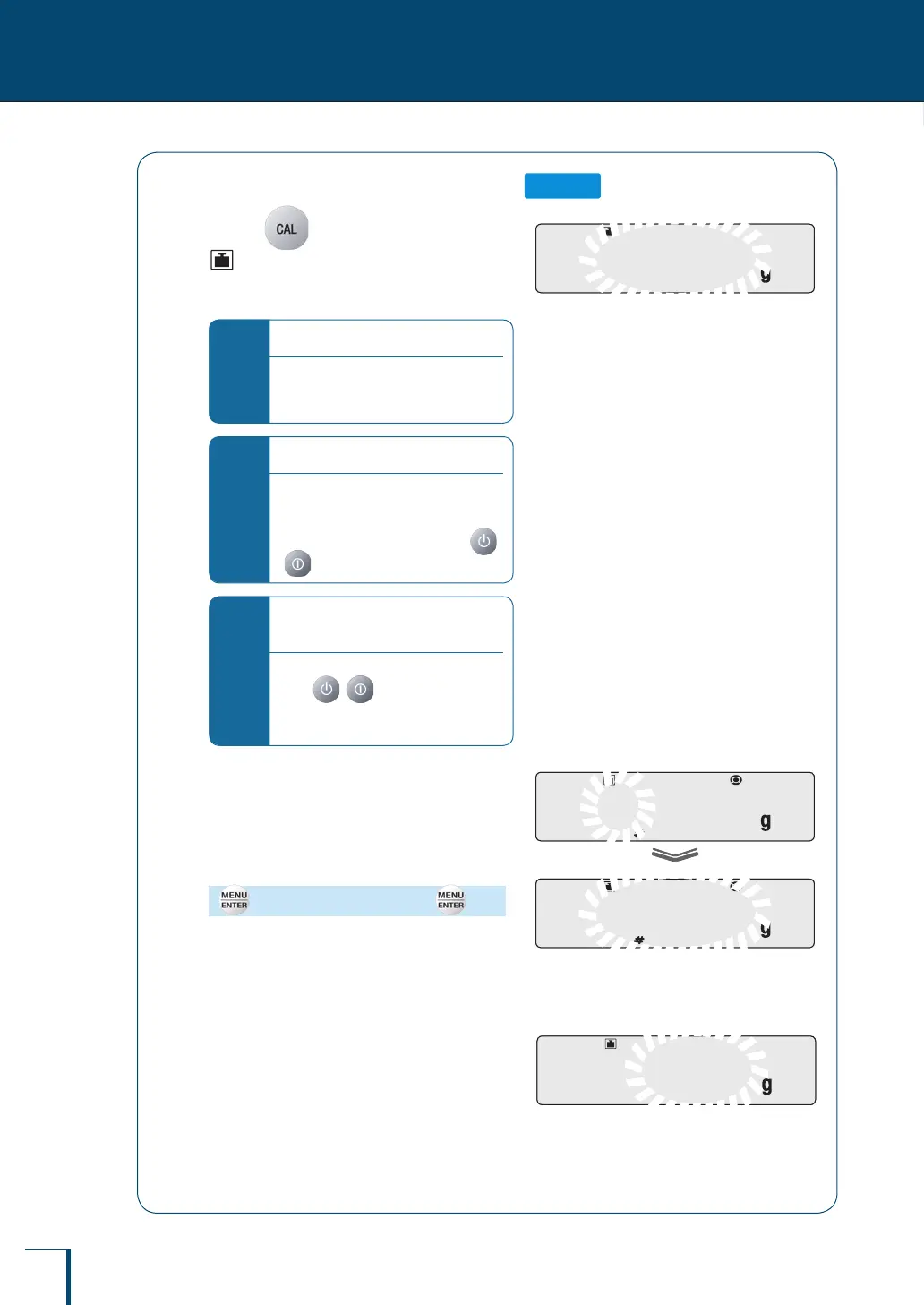
Press in the weighing mode.
(the weight symbol) will light up and the
value of the weight that should be placed on the
pan will ash.
*
If "WAIT" is displayed…
The calibration record is being output.
When output has nished, span
calibration will start automatically.
*
If "BUSY" is displayed…
There is something placed on the pan.
Take the item off the pan and follow the
procedure below.
To cancel calibration check, press
( with the TXB series).
*
If no operation is performed within
60 seconds…
"ERR C" (calibration error) is displayed.
Press ( with the TXB series)
and repeat the operation from the
beginning.
2
Enter the calibration weight value.
If necessary change the weight value displayed
to match the weight that will be used for
calibration. If there is no need to change it,
proceed to step
3
.
(Enter a weight value if necessary.)
^
"Entering Numerical Values", page 49
For details on the range of weight values that
can be used, see "Specications" (^ page
145).
3
Place the calibration weight on the
pan.
Wait until the ashing weight value display
changes to a ashing zero.
!3!0!0.0!0!0
/
/
/
/
/
/
/
/
/
/
/
/
/
/
/
/
/
/
/
/
/
/
/
/
/
/
/
/
/
/
/
!3!0!0.0!0!0
/
/
/
/
/
/
/
/
/
/
/
/
/
/
/
/
/
/
/
/
/
/
/
/
/
/
/
/
/
/
/
!3!0!0.0!0!0
!3!0!0.0!0!0
/
/
/
/
/
/
/
/
/
/
/
/
/
/
/
/
/
/
/
/
/
/
/
/
/
/
/
/
/
/
/
/
/
/
/
/
/
/
/
/
/
/
/
/
/
!3!0!0.0!0!0
!3!0!0.0!0!0
/
/
/
/
/
/
/
/
/
/
/
/
/
/
/
/
/
/
/
/
/
/
/
/
/
/
/
/
/
/
/
/
/
/
/
/
/
/
/
/
/
/
/
/
/
! ! !0.0!0!0
/
/
/
/
/
/
/
/
/
/
/
/
/
/
/
/
/
/
/
/
/
/
/
/
! ! !0.0!0!0
/
/
/
/
/
/
/
/
/
/
/
/
/
/
/
/
/
/
/
/
/
/
/
/



 To Next Page