BEFORE
WEIGHING
MAINTENANCE
TROUBLESHOOTING
FOR YOUR
INFORMATION
USING THE
BALANCE
USING MORE CONVENIENTLY
53
*
Releasing the menu lock
To release the menu lock, perform steps 1 through 3 again.
Outputting the Menu Setting Information
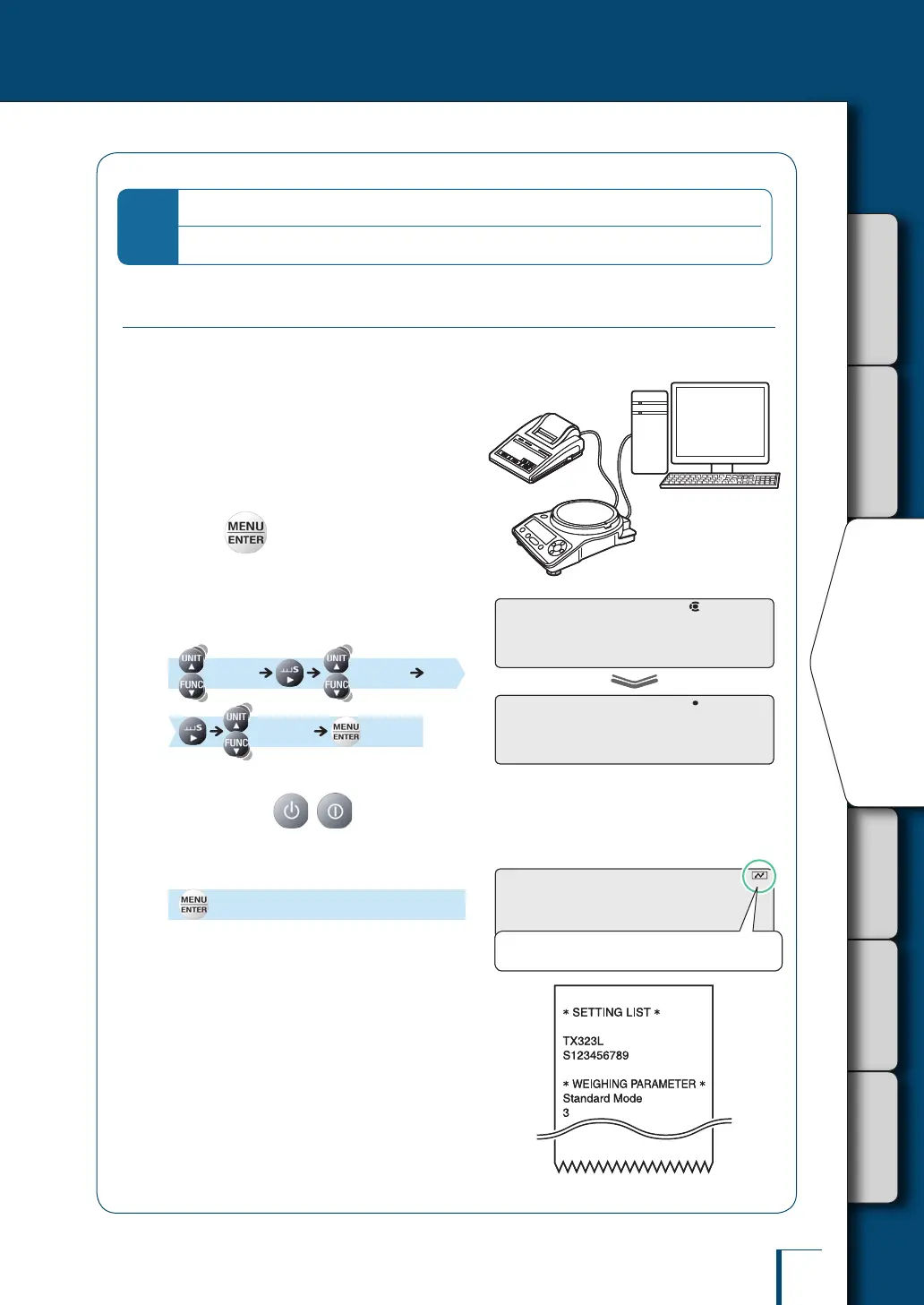
You can output the menu settings to make a record of the balance settings.
1
Connect the balance to a PC or
printer (option).
^
"10. CONNECTION AND
COMMUNICATION WITH
PERIPHERAL DEVICES", page 106
2
Press in the weighing mode.
This opens the main menu.
3
Select output of menu setting
information.
[TOOLS] [SYSTEM]
[COND.OUT] [OK?]
To output the settings, proceed to step 4.
To cancel, press ( with the TXB
series).
4
Conrm.
[WAIT]
On conrmation, the menu setting information
is output to the PC or printer.
On completion of output, the balance returns to
weighing mode.
C!O!N!D.O!U!T
! ! !O!K!?
C!O!N!D.O!U!T
! ! !O!K!?
! ! !W!A!I!T
During output the communication symbol is lit.
! ! !W!A!I!T
During output the communication symbol is lit.
SHIMADZU CORP.SHIMADZU CORP.



 To Next Page