BEFORE
WEIGHING
MAINTENANCE
TROUBLESHOOTING
FOR YOUR
INFORMATION
USING THE
BALANCE
USING MORE CONVENIENTLY
83
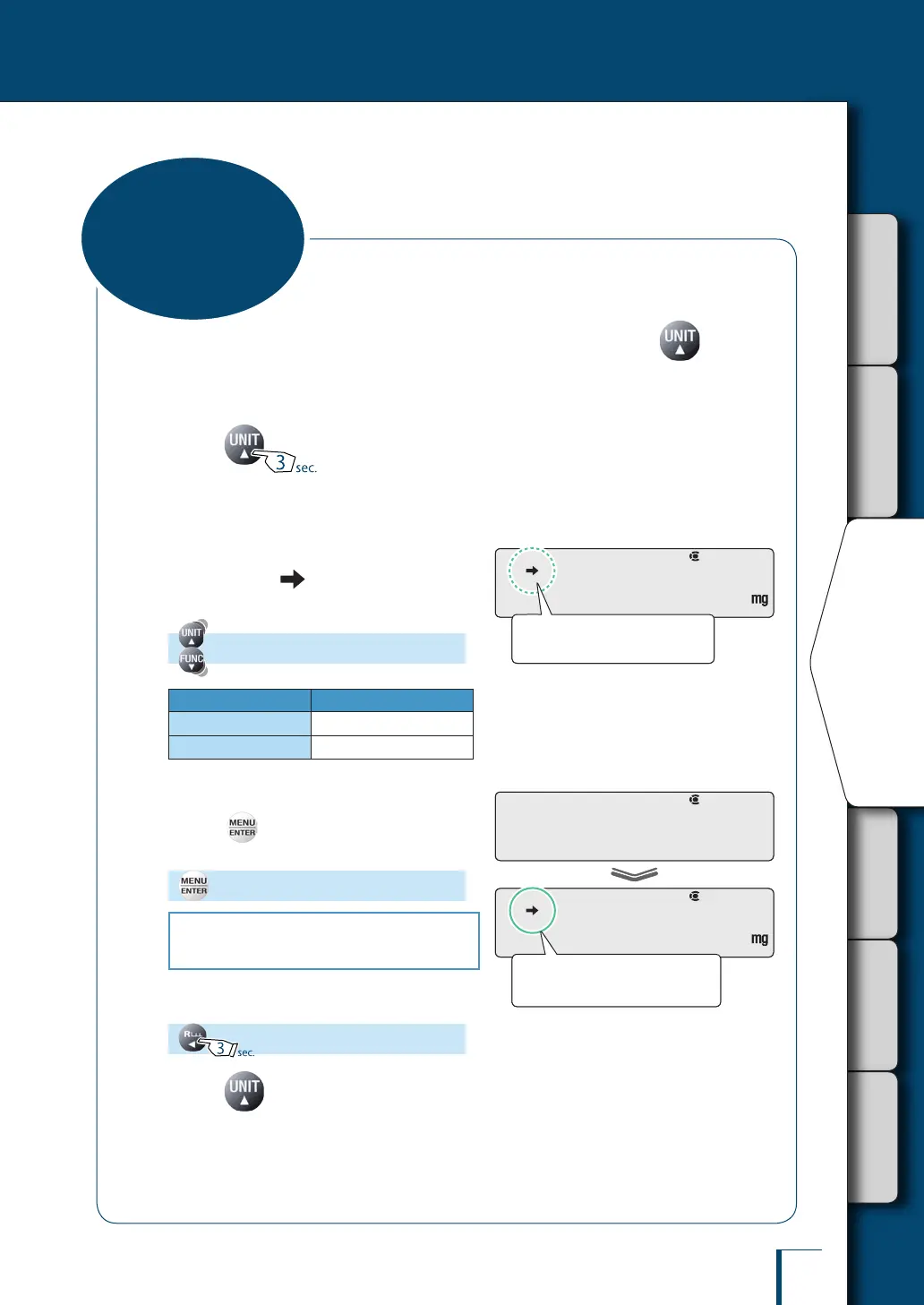
Select and set the units you require to display so that they can be called up by pressing during
weighing operation.
For details on user-specied units, see "Setting User-Specied Units" (^ page 84).
1
Press for about 3 seconds
in the weighing mode.
This opens the unit setting menu.
2
Select the units to be called up
and check if (the stability mark)
is displayed or not.
(Select the units.)
Stability Mark Registering Units
Lit
ON
Unlit
OFF
3
Change the setting for units.
Pressing alternately sets the ON and OFF
settings.
[SET]
To set or cancel other units, go to step 2.
To quit, go to step 4.
4
Return to the weighing mode.
5
Press to call up selected
units.
^
"Switching Units", page 41
!U!N!I!T!-
Check the presence or absence
of the stability mark.
!U!N!I!T!-
Check the presence or absence
of the stability mark.
! !S!E!T! !
!U!N!I!T!-
When ON is set the stability mark
is lit.
! !S!E!T! !
!U!N!I!T!-
When ON is set the stability mark
is lit.
Selecting Units to
Display



 To Next Page