Chapter 5 Maintaining the Workstation 5-3
5.2.2 Powering Off the System and Removing the Left
Side Access Panel
Before you remove, replace, or install any components, perform the following steps.
1. Power off the system and all of the peripherals connected to it.
2. Turn the power switch on the back of the chassis to the Off position ( 0 ).
Caution – Failure to properly turn off the system before you start installing
components can cause serious component damage.
3. To maintain system grounding, do not unplug the AC power cord from the back
of the system unless the specific procedure instructs you to unplug it.
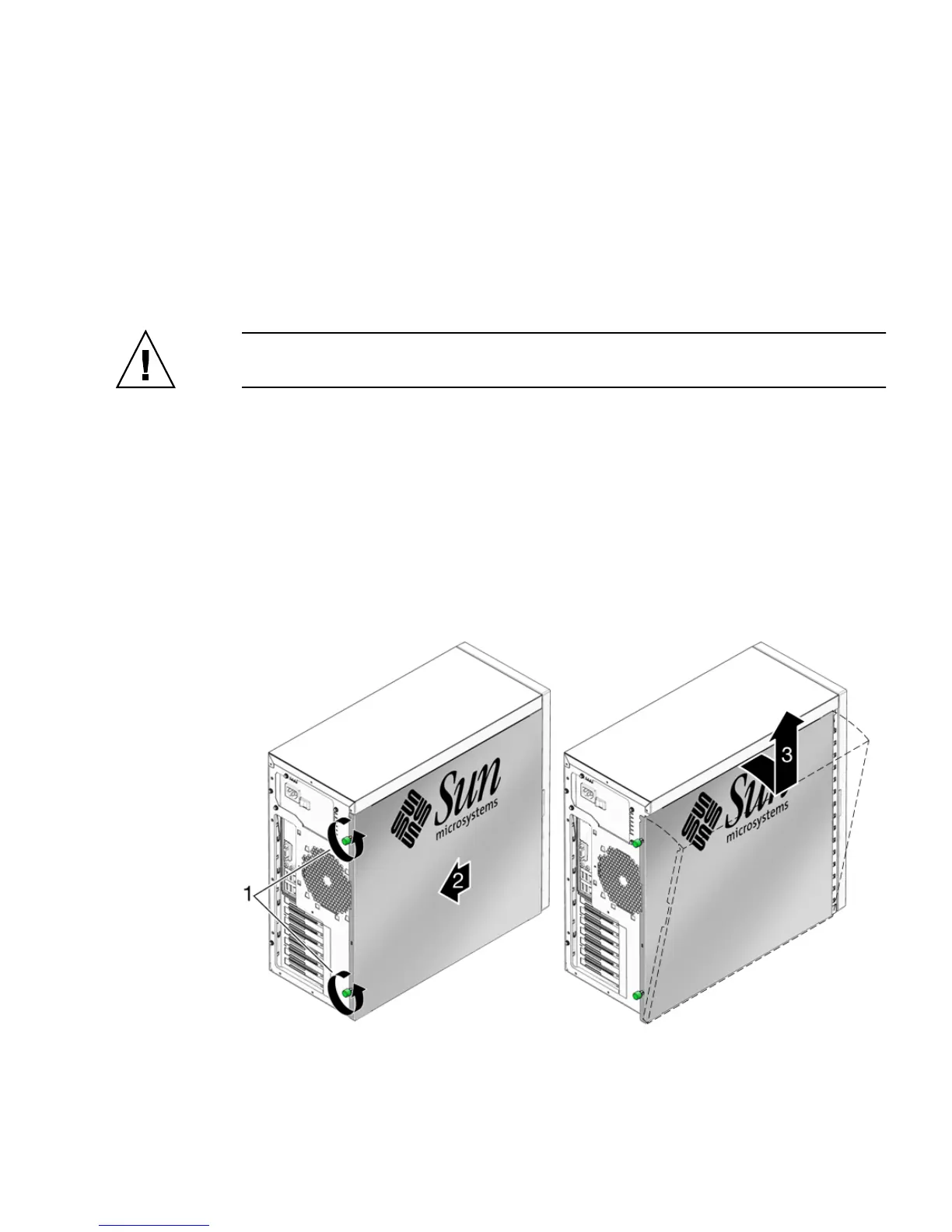
4. Loosen the two captive thumbscrews located on the rear edge of the left side
access panel (see
FIGURE 5-1).
5. Slide the access panel approximately 1.5 cm toward the back of the workstation.
6. Tilt the top edge of the panel out, then lift the panel upward.
7. Carefully set the panel aside.
FIGURE 5-1 Removing the Side Access Panel














 To Next Page