OPERATION & MAINTENANCE MANUAL SWE50E/SWE60E/SWE70E/SWE80E9/SWE100
3.8 Air condition instruction
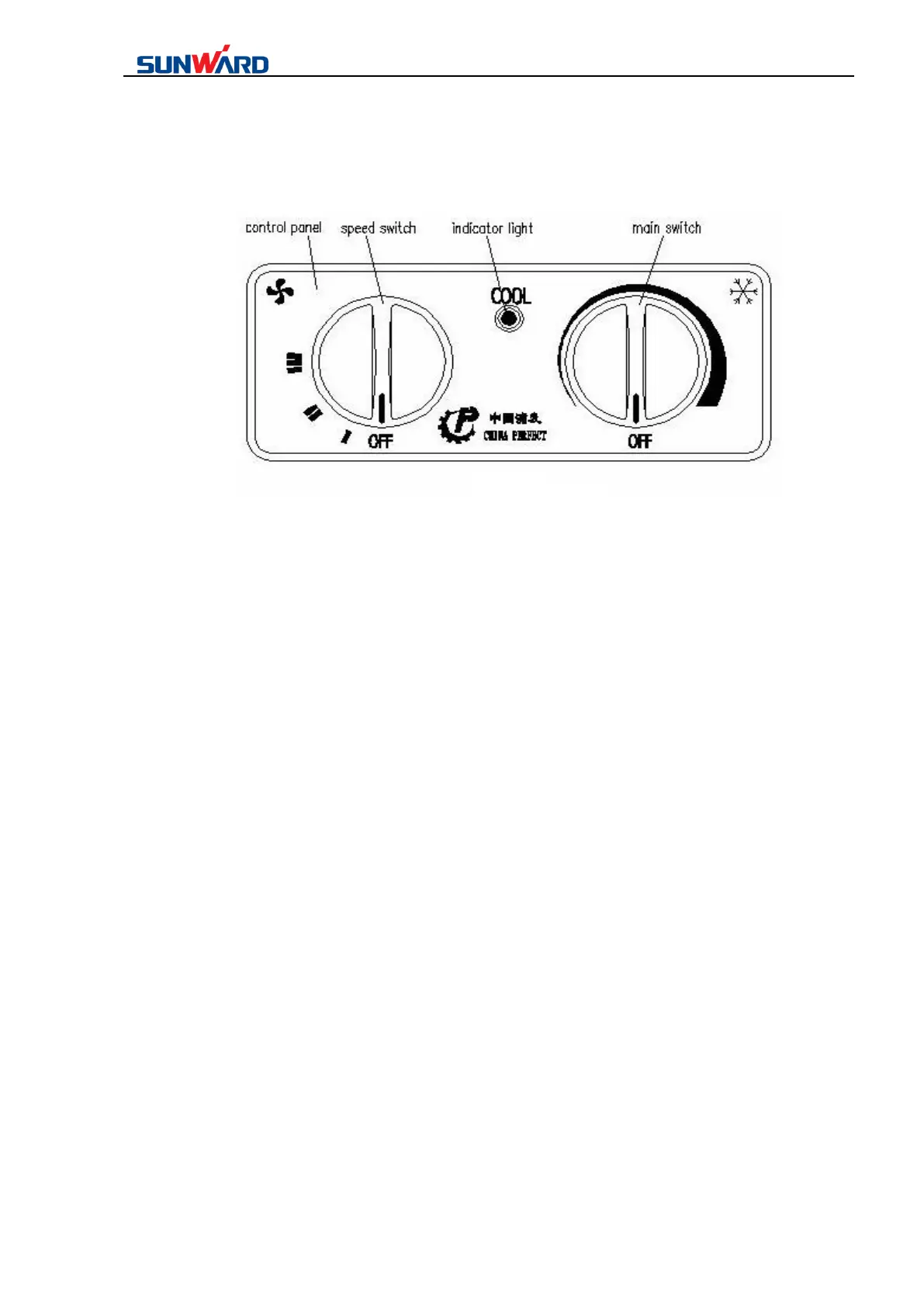
3.8.1 Basic form Figure 1
3.8.2 Basic operations
(a) Aeration operation
(1) As figure 1 shows, counter-clockwise turn the main switch to OFF.
(2) As figure 1 shows, clockwise turn the speed switch to I, II or III, you can make low,
moderate and high wind speed.
(3) As figure 3 and 4, turn the wind exit to a proper direction, you can choose proper wind
direction.
(4) As figure 1 shows, counter-clockwise turn the speed switch to OFF to shut down the whole
system.
(b) Refrigeration Operation
(1) Choose proper wind speed and direction according to the “aeration operation”.
(2) As figure 1 shows, clockwise turn the main switch to a proper position. (Clockwise turn
make lower temperature. Turning to the most right makes the lowest temperature. While it is
too cool, you can counter-clockwise turn the main switch. Furthermore, you can control the
coldness by the wind speed.)
(3) You can get a comfortable environment by controlling the wind speed, wind direction and
the coldness.



 To Next Page