RUN MED: Service & Maintenance Manual - rev. 1.0
7.3. DISASSEMBLING THE HAND SENSOR BOARD AND THE
CSAFE BOARD
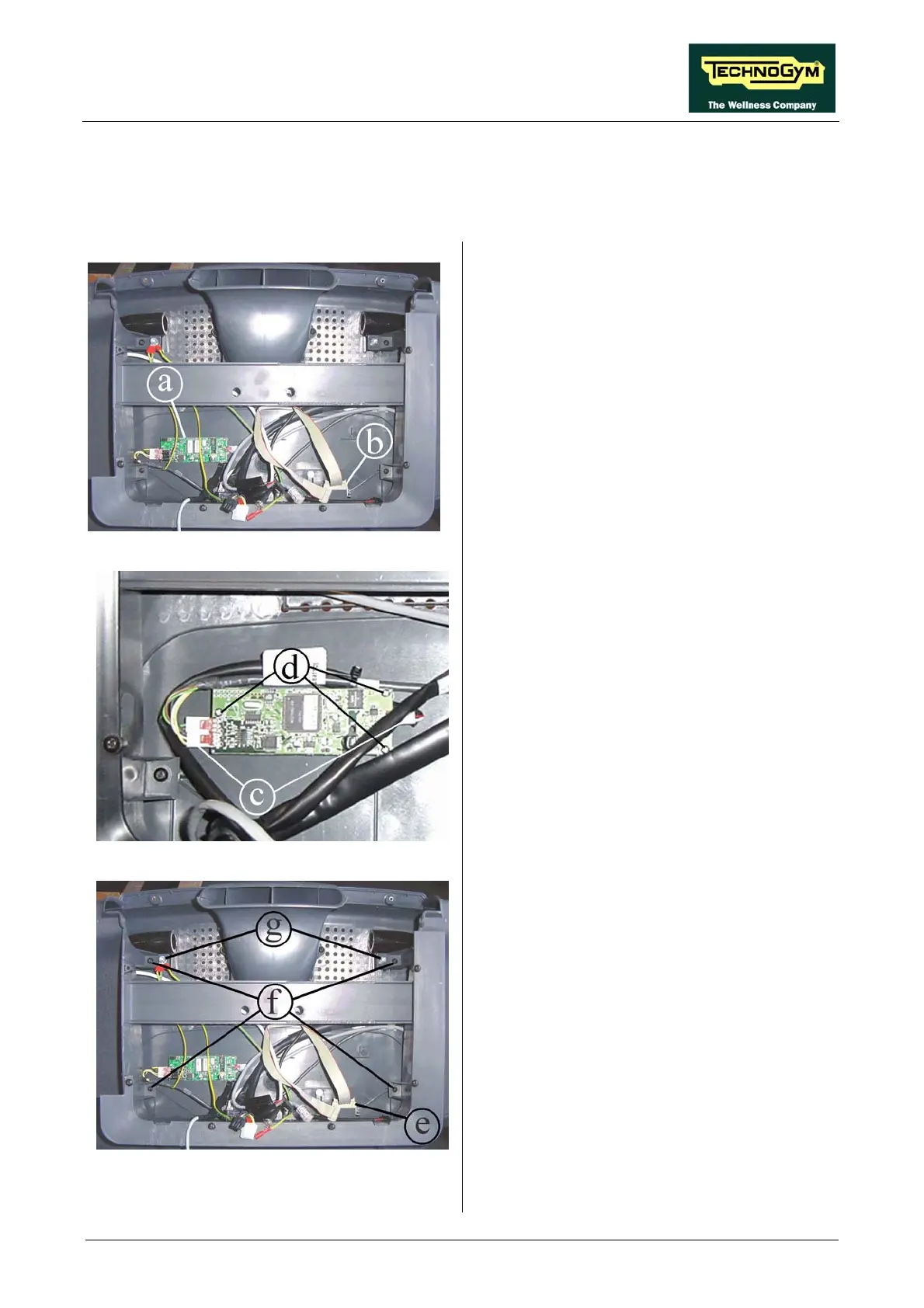
Figure 7.3-1
Carry out the procedure described in paragraph
7.1. “Disassembling the display”.
1. This exposes the Hand sensor board a and
the CSafe board b, on the inner side of the
rear display support.
Figure 7.3-2
o disassemble the boards:
2. Back off the 3 screws d using a medium
Phillips screwdriver.
3. Remove the hand sensor board.
T
Hand sensor board a:
1. Unplug the connectors c.
Figure 7.3-3
CSafe board b:
1. Disconnect the serial cable e.
2. Back off the 4 screws f using a medium
Phillips screw
3. Back off the
wrench.
driver.
2 screws g using a 5-mm Allen
Continued on following page →
Page 7.3












 To Next Page