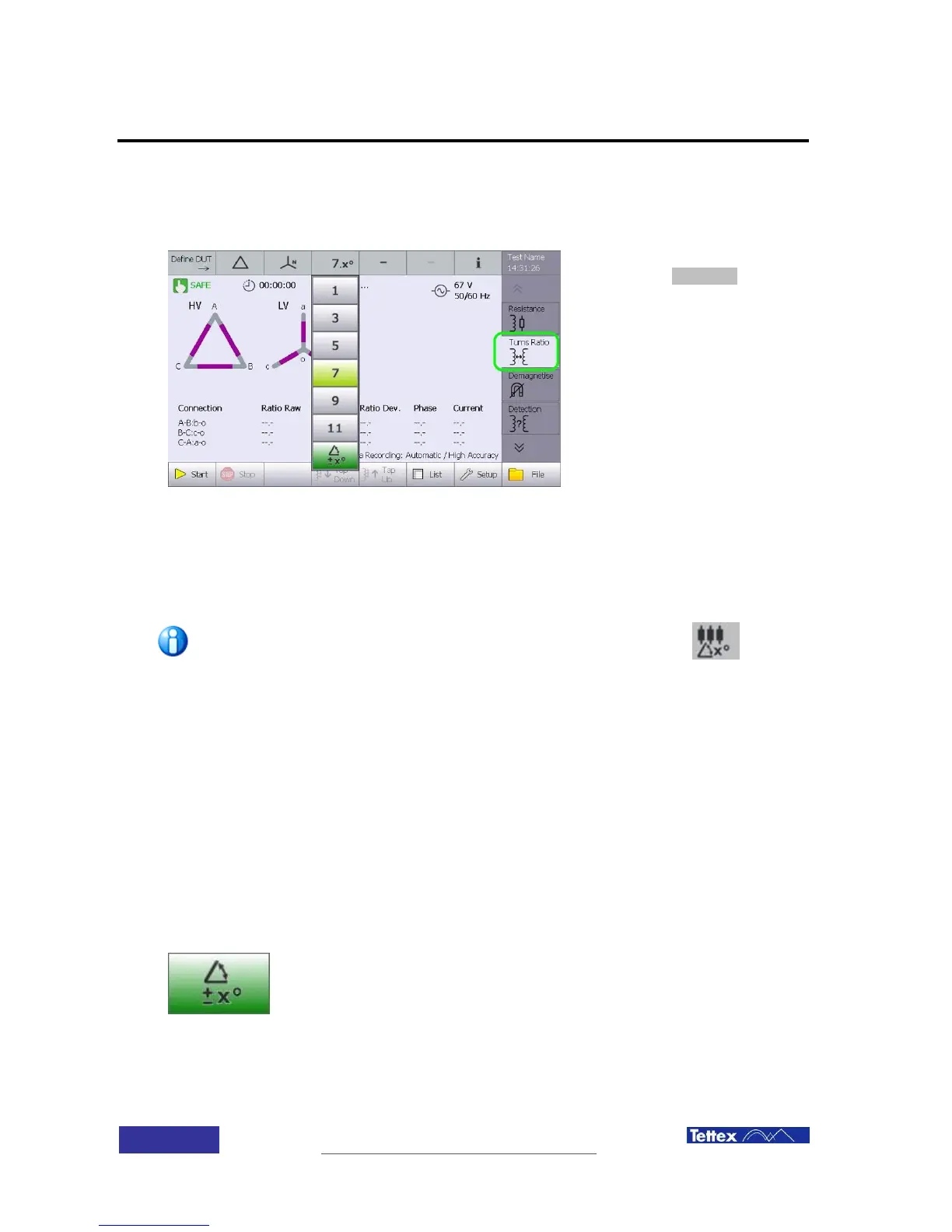
12.7 User Interface
12.7.1 Setup
To access the arbitrary phase
feature, select turns ratio function
in the applications bar (side bar).
Set the DUT winding types. Select in the phase displacement drop down list the closest clock
number and also activate there the “Arbitrary” button in the lowest position.
The arbitrary measuring mode is activated now. This is stated in the DUT phase displacement
info as clock number.x° (e.g. 7.x°)
If Define DUT has the “3phase unconventional transformer” setting
selected, the arbitrary mode in the turns ratio application is preset
automatically.
12.7.2 Function Keys and Setup
See the chapter Turns Ratio Measurement User Interface for information about the function keys.
DUT and test setup is similar to making a turns ratio measurement and so the chapters Turns
Ratio Measurement Setup DUT Data and Data Handling Definitions give details of this.
12.7.3 Active Window
When the arbitrary phase shift is selected the measurement screen
displayed is described below. An example use would be a transformer
with a zig-zag winding where each leg of the zig-zag has a different
number of turns.



 To Next Page