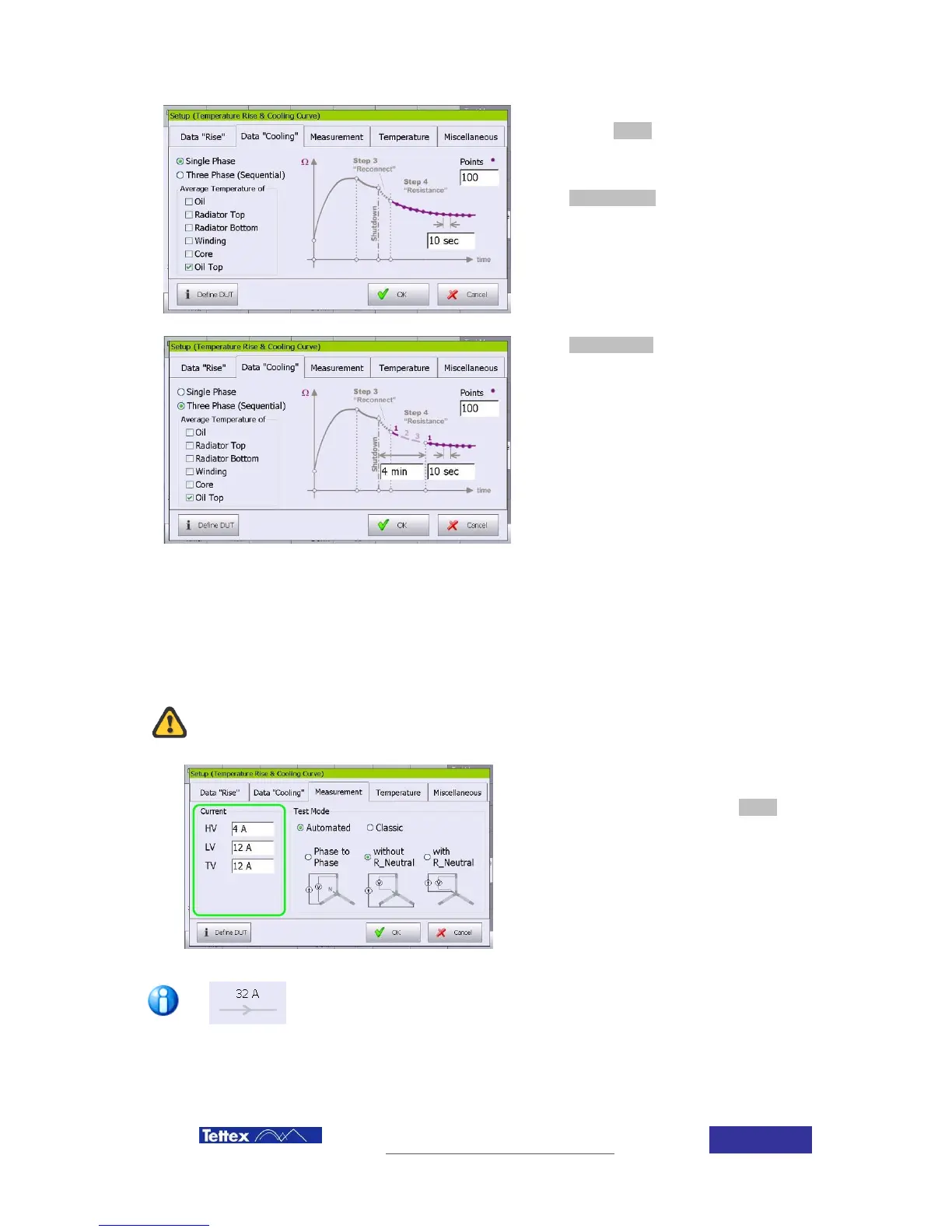
The recording option is available after
selecting the Setup button in the function key
bar while cooling curve is selected in the
applications bar.
When Single Phase is selected, the
measurement will be performed on one phase
of each selected winding.
The interval (time between readings) and the
number of readings can be here selected by
clicking in the corresponding field
When Three Phase (Sequential) is selected,
the measurement will be performed
sequentially on all three phases of each
selected winding up to the time interval (t2-t4).
After this time interval the measurements will
be performed on the selected phase until the
number of readings is reached.
The exact number of 3 phase measurements
achieved is dependent on the time taken
before reconnection and the charging time.
9.3.3 Test current selection
According international standards, the maximum test current should not be higher than 10% (IEC)
or 15% (ANSI) of the nominal winding current to avoid heating up of the winding and therefore
non stable readings.
Selection of measuring currents above the transformer nominal current can end in the
transformer break down.
The measuring current must be introduce
independent for each winding and is done in the
“measurement” folder selecting the Setup menu
in the function key bar.
Independent current per winding must be
selected. Read carefully the chapter “Power
supply modes” to understand the operating mode
of the unit and let the unit select the faster
measurement procedure.
A shortcut for current selection is available in the main screen; clicking in the
current by winding drawing.



 To Next Page