7.6 Temperature Measurement
Temperature sensors can be connected to the
corresponding connectors in the front panel. If more
than 6 temperature sensors are requested, optional
extender can be purchased. PT100 sensors are used
for temperature measurement.
Sensors for liquids or magnetic sensors are available,
consult the accessories chapter for additional
information.
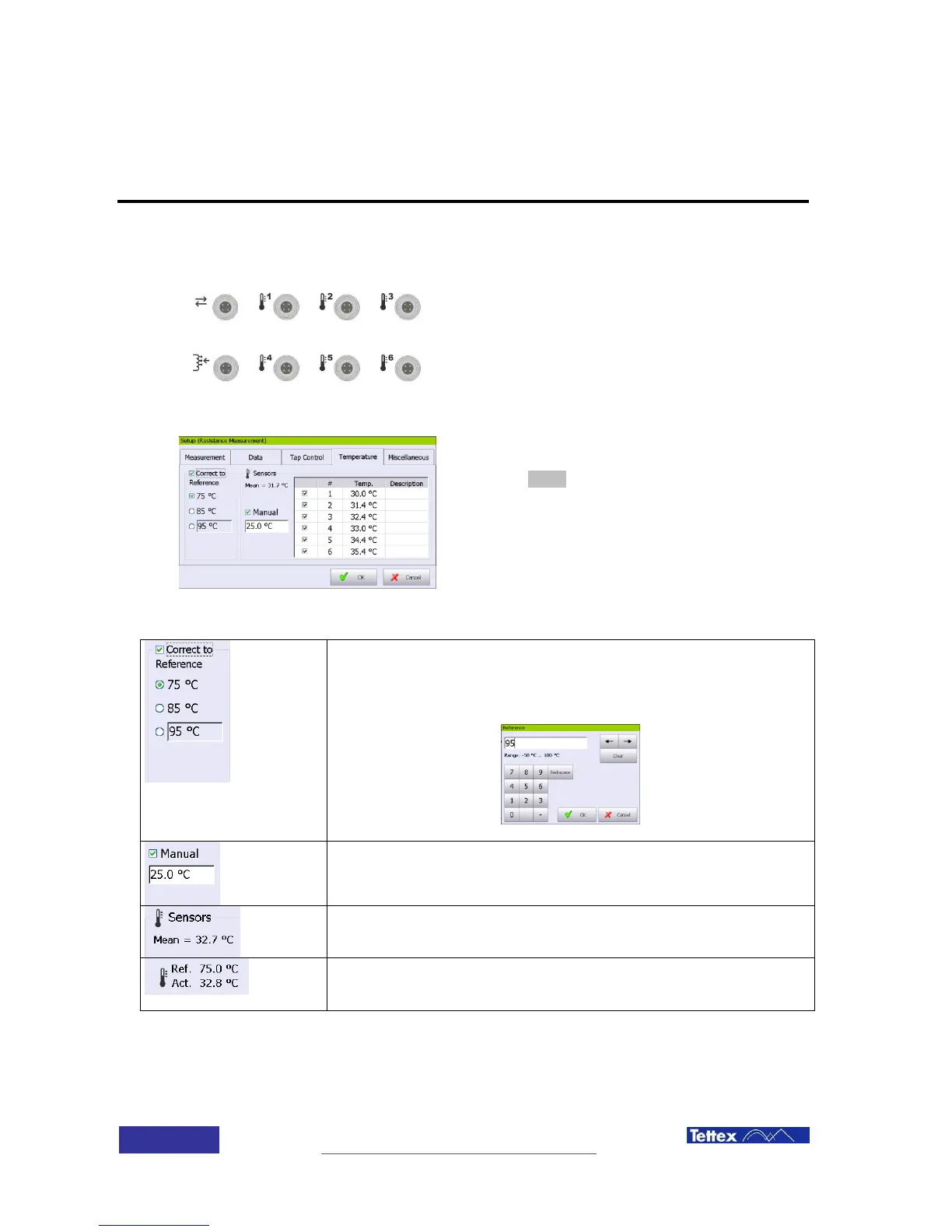
The temperature measuring screen is accessed
clicking the Setup button, under the temperature folder
in the function key bar.
Measured resistance can be automatically corrected to a referenced
temperature. This temperature can be 75 degrees, 85 degrees or any
temperature between -50 and 100 degrees. The selection is done by
clicking into the white button field
When no temperature sensor is connected, the DUT actual temperature
can be introduced manually by clicking in the white field bellow the
manual selection. Manual selection must be activated
Actual temperature of the sensors. If more than one sensor is selected,
then the temperature shown is the medium of all actives ones
If temperature correction is active, then the main screen will show the
actual temperature and the reference temperature.



 To Next Page