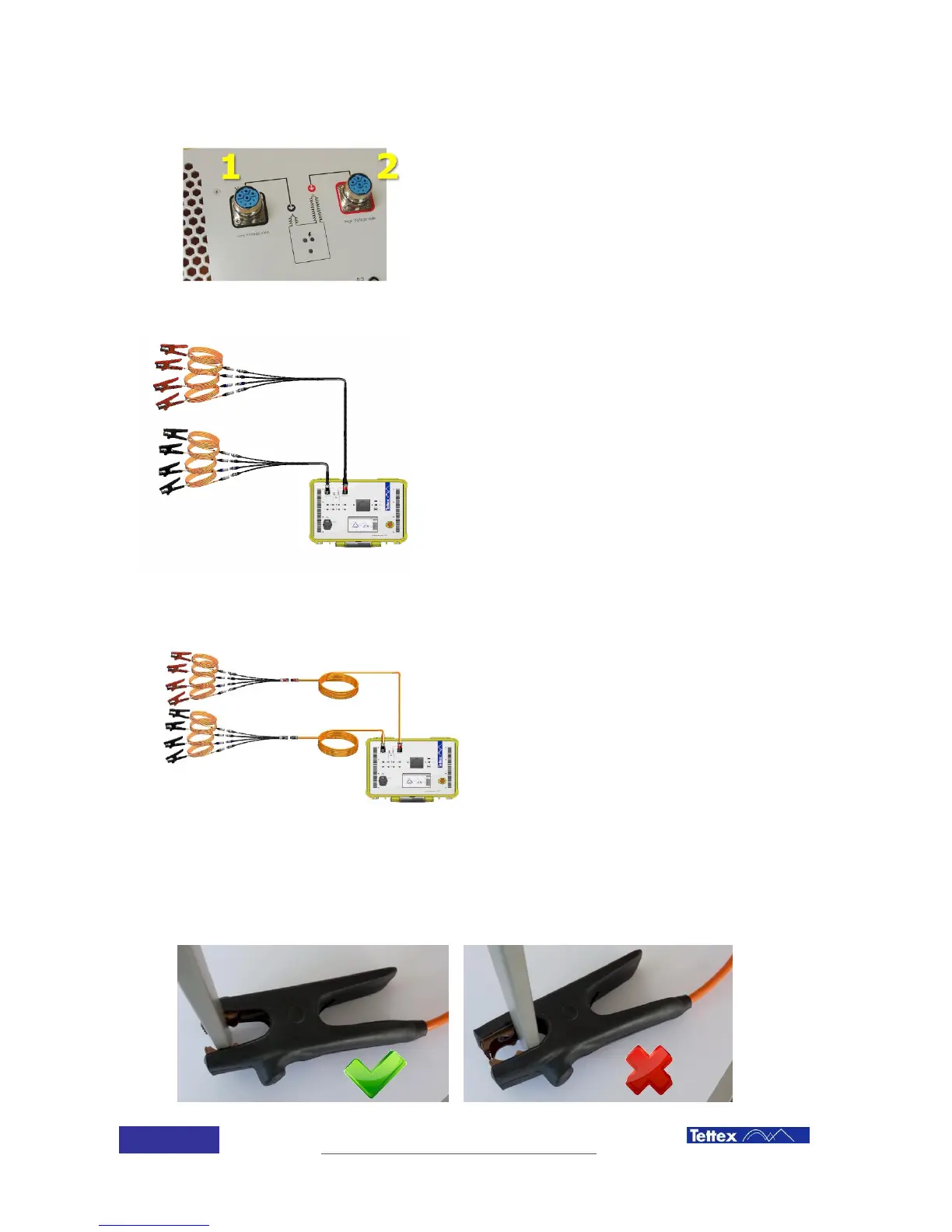
Red connector has to be connected to the right side (2)
defined by a red dot. (H)
Black connector has to be connected to the left side (1)
defined by a black dot. (X)
5.2.1 Connection without extenders
Connect the adaptors to the device connectors. The
easiest way to screw the connector is to hold them
straight with one hand and screw with the other
one. . Ensure that the connectors are locked.
Now connect the single phase connection cables
(labelled at the clamp) to the test object using the
Kelvin clamps.
Connect the single phase connection cables
(orange cable, colored connector) to the matching
color of the spider connectors.
5.2.2 Connection with extenders
Connect the extenders to the device respecting the
colour code (red with red, black with black). The
easiest way to screw the connector is to hold them
straight with one hand and screw with the other
one. Ensure that the connectors are locked.
Connect the extenders to the adaptors.
Now connect the single phase connection cables
(labelled at the clamp) to the test object using the
Kelvin clamps.
Connect the single phase connection cables
(orange cable, colored connector) to the matching
color of the spider connectors
Make sure that you don’t shortcut the specially designed 4-wire measurement Kelvin clamp. Only
use the designated teeth in the front of the clamp.



 To Next Page