EasyManua.ls Logo

Tettex 2293 - Page 50

Tettex 2293
226 pages
Print Icon
To Next Page IconTo Next Page
To Previous Page IconTo Previous Page
Loading...
46
User Interface
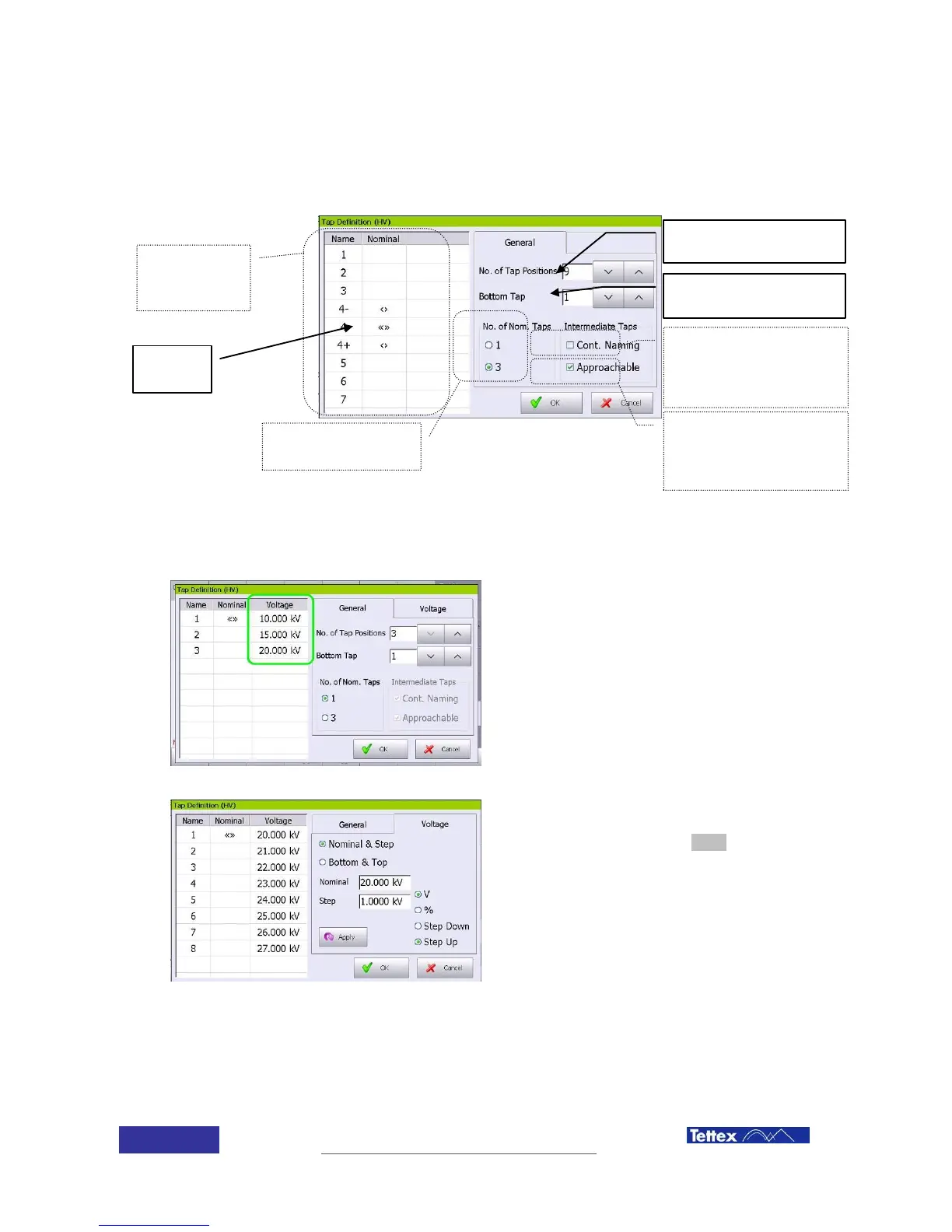
Enter each theoretical tap voltage in
the voltage column.
Alternatively change to the voltage
folder for a quick way to enter multiple
tap voltages.
The nominal & step option will
automatically populate the voltage
values when the apply button is
pressed. In this example the nominal
voltage is 20kV and each tap steps up
1kV.
Actu
al tap
chan
ger
confi
gurati
on
N
o
m
i
n
a
l
p
o
s
i
t
i
o
n
Total number of
tap changer
positions
First position
number
Select if the
intermediate
taps are
reachable and
can be
measured
Select if if when
more than 1
nominal
position, the
numbers are
consecutive
Number of
nominal
positions

Table of Contents