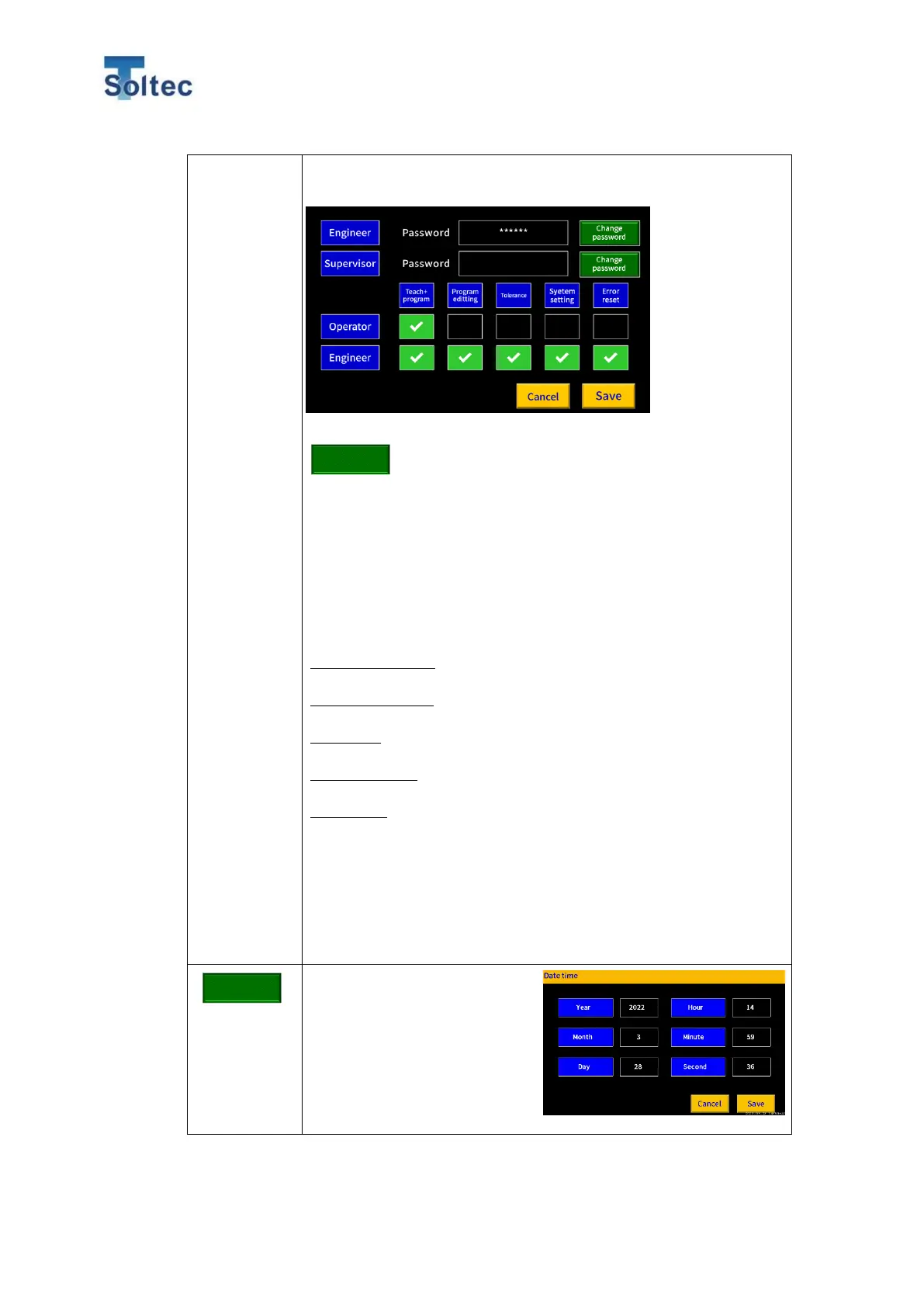
operation. There’s no password in the initial. When you use this
function, set passwords for each Operator and Engineer.
●How to set and change passwords
1. Press Change password button for the Authority you would
like to change.
2. Numeric keypad will open.
3. Enter a new password.
Only numbers can be entered and up to 6 digits can be
entered.
4. Press ENT button and close the numeric keypad.
●Content of Authority item
Teach + Program
Limit access to Program and Teach from OPE screen.
Program editing
Limit access to Program Edit from the Program list.
Tolerance
Limit access to tolerance select from OPE screen.
System setting
Limit access to System setting from OPE screen.
Error reset
Limit access to Error reset button during OPE mode.
●Limitation for Superior authority
Supervisor authority cannot be lower than Operator authority. In
other words, you cannot transfer the authority to Operator and
nullify the Supervisor authority at the same items.
Date and time can be set.
Press each numbers frame
and numeric keypad appears.
Adjust the date and time first
and start using CFM.



 To Next Page