Watlow EZ-Zone PM Express Temperature ControllerD291511.18a.fm
A-9 Appendix A: Sensors
Adjusting the Set Points
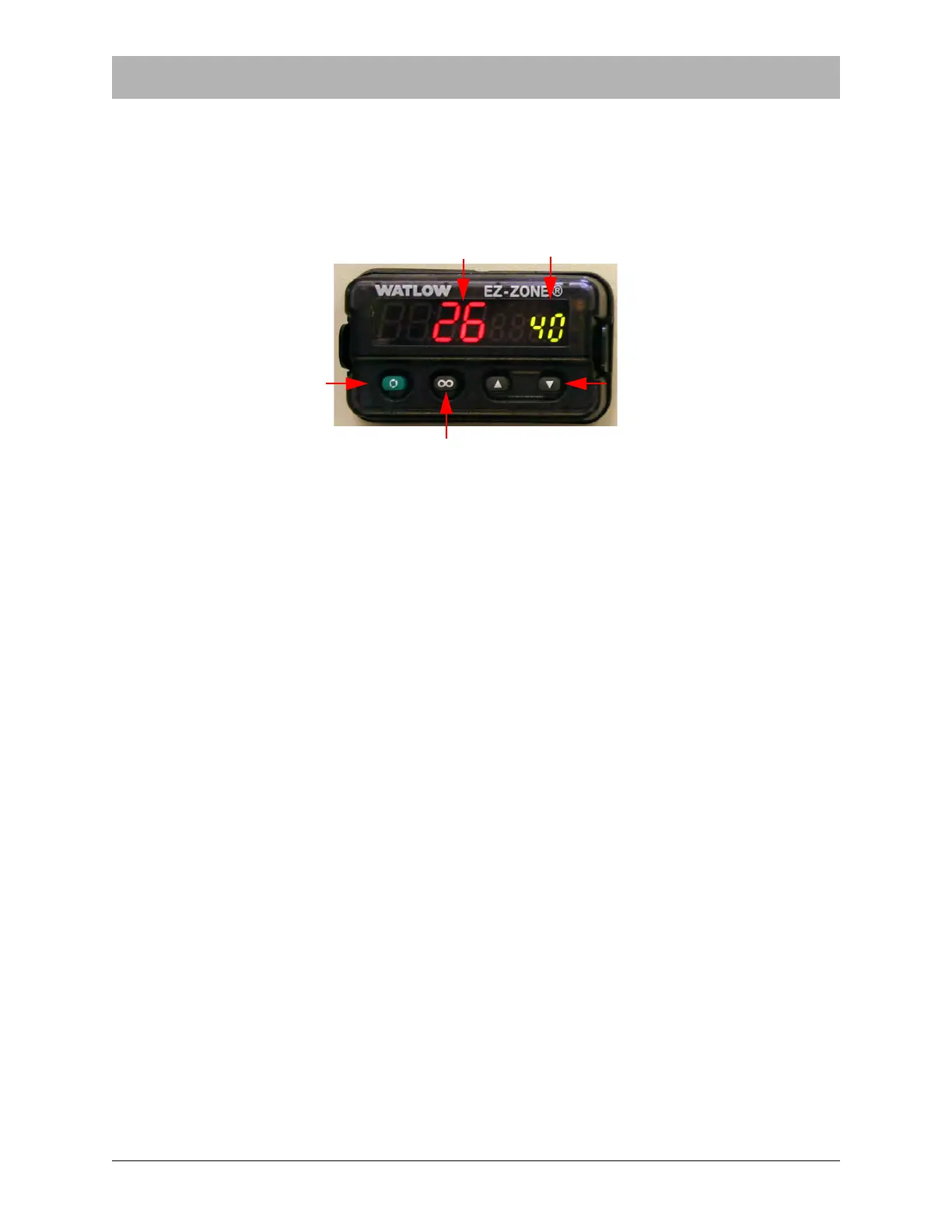
To adjust the set point, simply press the up and down arrows. The Set Point Display will show the
changes and the controller will immediately begin adjusting the temperature of the sealer shoes
according to the new range that results. If a large adjustment is required, pressing and holding
the up or down arrow keys will increase or decrease the set point quickly..
Default Factory Settings
Refer to the Watlow EZ-Zone PM Express Temperature Controller when necessary for more
detailed technical information regarding the operation of the temperature controllers. The direc-
tions below describe the factory settings set at the time the controllers are installed at V-TEK, Inc.
Initial Settings
1. Press and hold the Up and Down Arrow Keys for about 3 seconds to enter the Setup
Menu.
2. Press the green Advance button to scroll through the menu.
3. Begin with the Lockout Menu (LoC). Use the arrow keys to select option 5. Then press
the green Advance button to move to the next setting.
4. In the Sensor Type Menu (SEn) select Thermocouple (tC). Press Advance.
5. In the Linearization Menu (Lin) select J. Press Advance.
6. In the Decimal Menu (dEC) select Whole (0). Press Advance.
7. In the Display Units Menu (C_F) select ° C (C). Press Advance.
8. In the Range Low Menu (r.Lo) select desired range. This setting may be adjusted by the
user to fit their chosen specification. V-TEK presets the low range at 100 (100). Press
Advance.
9. In the Range High Menu (r.Hi) select desired range. This setting may be adjusted by the
user to fit their chosen specification. V-TEK presets the high range at 200 (200). Press
Advance.
Temperature Display Set Point Display
Up & Down Keys Advance Key
Infinity Key


 To Next Page