DIAGNOSTICS
Vertical Express Product Manual 3-41 88500 v.1.0
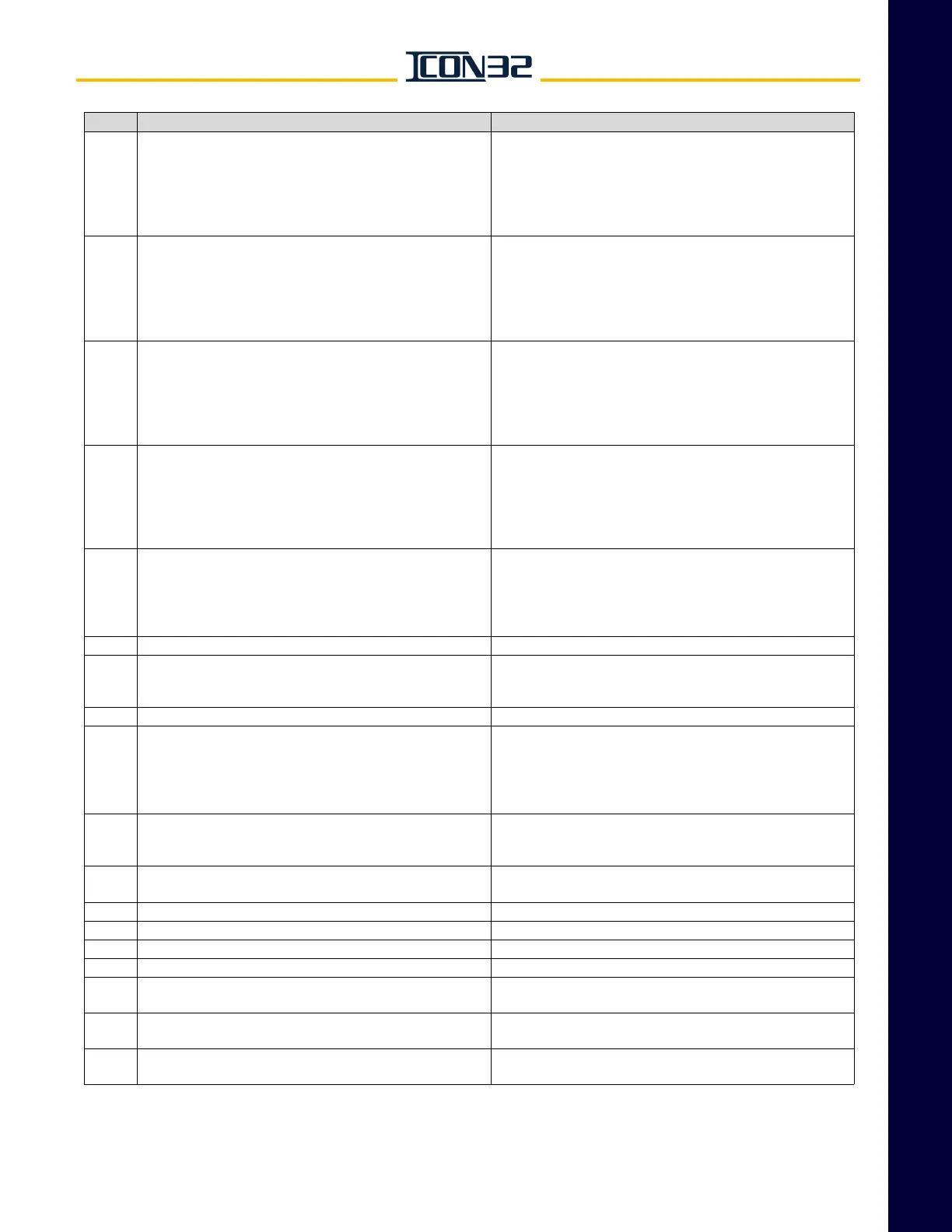
Diagnostics Section Control System Fault Codes
This manual shows only the parameters that have an operational relevance to the ICON32. The UIT may have
additional parameters available, which should not effect the controller operation.
1535
FPGA detected invalid drive state - While on hoistway access
or inspection with no inspection Up/Down button active, or
while on door bypass with no controller/machine room
inspection Up/Down button active, the valve has been
detected as energized - The safety string opens, stopping all
car motion.
• Use the CLR FLT button to reset.
• Cycle operation to inspection and back to automatic. This
fault indicates a timing issue with hardware on the IOF Card.
Check all connections and verify no added relays to sole-
noid outputs. Should this continue to happen, replace the
IOF Card.
1536
FPGA detected invalid door bypass - The car door bypass or
hoistway door bypass monitor inputs have been detected as
active when door bypass switches are off, or internal hoist-
way access bypass terms are active when the hoistway
access switches are off - The safety string opens, stopping
all car motion.
• Use the TFR Command to reset.
• Cycle operation to inspection and back to automatic. This
fault indicates a timing issue with hardware on the IOF Card.
Check all connections and verify no added relays to sole-
noid outputs. Should this continue to happen, replace the
IOF Card.
1537
FPGA detected invalid door zone bypass - Internal door zone
bypass terms have been detected as active when the car is
not in the door zone - The safety string opens, stopping all
car motion.
• Use the TFR Command to reset.
• Cycle operation to inspection and back to automatic. This
fault indicates a timing issue with hardware on the IOF Card.
Check all connections and verify no added relays to sole-
noid outputs. Should this continue to happen, replace the
IOF Card.
1538
FPGA detected programming jumpers active - When IOF Card
jumpers JP2 or JP3 are placed in the 1-2 position to allow
CPU programming of the FPGA's, this fault registers and the
safety string opens.
• Remove the jumpers to restore operation.
• Cycle operation to inspection and back to automatic. This
fault indicates a timing issue with hardware on the IOF Card.
Check all connections and verify no added relays to sole-
noid outputs. Should this continue to happen, replace the
IOF Card.
1539
Safety processor system detected ambient temperature out
of range - The ambient temperature sensor on the IOx has
reported the controller temperature to be outside the accept-
able range for continued operation (5°F to 167°F, or -15 °C to
75 °C). The safety string opens, stopping all car motion.
• Resets when the detected temperature returns to the
acceptable range.
1540 FPGA has opened the safety string via the SAFCPU output. • Check other existing associated fault codes.
1541
Motor starter monitor fault - The IO for starter control has
been detected in an invalid state. Either MCC1/MCC1M or
MCC2/MCC2M are in unequal states.
• Use the TFR Command to reset.
• Cycle operation to inspection and back to automatic.
1685 Invalid CN version. • Update CN software or replace the CN Card.
1687 CN No Poll Response - The inputs are cleared.
Possible Cause:
• CN/HN has a safety critical I/O, and it did not respond to the
controller’s request. All I/Os on that node are cleared.
Possible Solution:
• Check power and communication to that node.
1689 Maximum Safety Nodes Exceeded - The car was shutdown.
Possible Cause:
• The job configuration has too many CN ports with safety I/
Os on it.
1690
Invalid CN Configuration - The job configuration has an
invalid CN configuration.
—
1691 Invalid message ID on Channel 1. —
1692 Invalid message ID on Channel 2. —
1693 Invalid message ID on Channel 3. —
1705 End of run test failed circuits. —
1707
Rear selector vane set but I/O not present - P12>0, but is
missing the rear selector input.
—
1726 Thread non-responsive.
• Reload generic and job image.
•Replace CPU.
1850 Power disturbance detected on P24 volt power supply.
• Check power supply for proper current rating.
• Check grounds, etc.
Code Description (cont.) Possible Causes/Solutions (cont.)



 To Next Page