TROUBLESHOOTING
Vertical Express Product Manual 4-17 88500 v.1.0
Troubleshooting Section Troubleshooting Guide
CE MicroComm Troubleshooting
Problem Possible Solutions
•NC Displays.
• No LEDs active.
• Card not active when
power is applied.
• Verify that the CAN resistive loading equals 60 ohms.
• Set O43=9.
• Startup Wizard > Write to Flash.
• Cycle power to the controller.
PIs Do Not Display
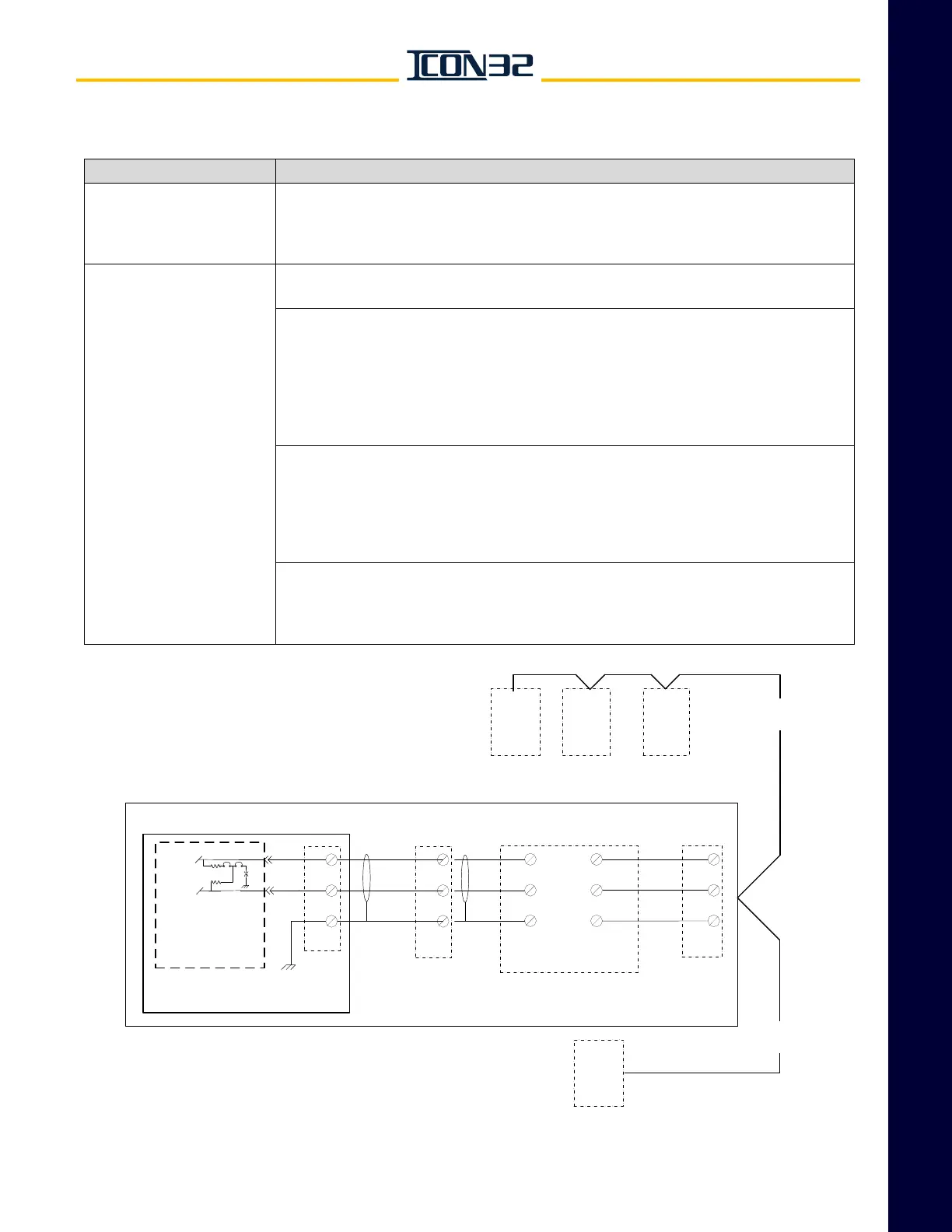
The PIs should display the information shown on the THY02 Card display. If not, verify all
wiring for the PIs, start at the THY02 MicroComm and work out.
Check the power supply on the following; Observe proper polarity.
• THY02 Card:
+VDC (P24), COM (G24)
• PI Connectors:
MicroComm1 is CEPI1 = COM (G24).
MicroComm2 is CEPI2 = +VDC (24VDC).
MicroComm3 is CEPI3 = DATA.
• Place THY02 Card SW1-1 in the ON position.
• THY02 Card and all PIs should scroll through the test output from the THY02 Card.
The PIs fail to display due to a wiring issue, the PIs are the wrong type, or the PIs are not
MicroComm.
If the THY02 Card fails to display and the PIs fail to display the test sequence, the
THY02 Card is most likely the issue.
If PIs have power when the controller's disconnect is turned OFF:
• The CE MicroComm Card and Hoistway Access switches are fed 24VDC from F-P24HF
for grouped controllers having CE PIs.
• Open the fuse holder F-P24HF to remove 24VDC from the PIs and HA switches.
Hall PI Cards
Car PI Card
CE PI Wiring Example
CPUC
IOF
Controller
Traveling
Cable
Hoistway
Wiring
1 (COM)
2 (VIN)
3 (DATA)
CEPI
1 (COM)
2 (VIN)
3 (DATA)
CEPI
1 (COM)
2 (VIN)
3 (DATA)
CEPI
CCH
CCL
SHCC
1 (COM)
2 (VIN)
3 (DATA)
CEPI
CCH
CCL
SHCC
BLUE
WHT
SHLD
BLUE
WHT
SHLD
RED
BLUE
BLK
CEPI1
CEPI2
CEPI3
CANH
CANL
COM
1
2
3
JP6 JP2
CON2
TSP
TSP
Rail
Term
Rail
Term
MICROCOMM
OUT
THY-02
CAN High
CAN Low



 To Next Page