Software Management Service Information Section
©Vertical Express 5-34 Printed in USA November 2019
USB Flash Drive Preparation
Requirement: PC with an available USB port, and a USB flash drive
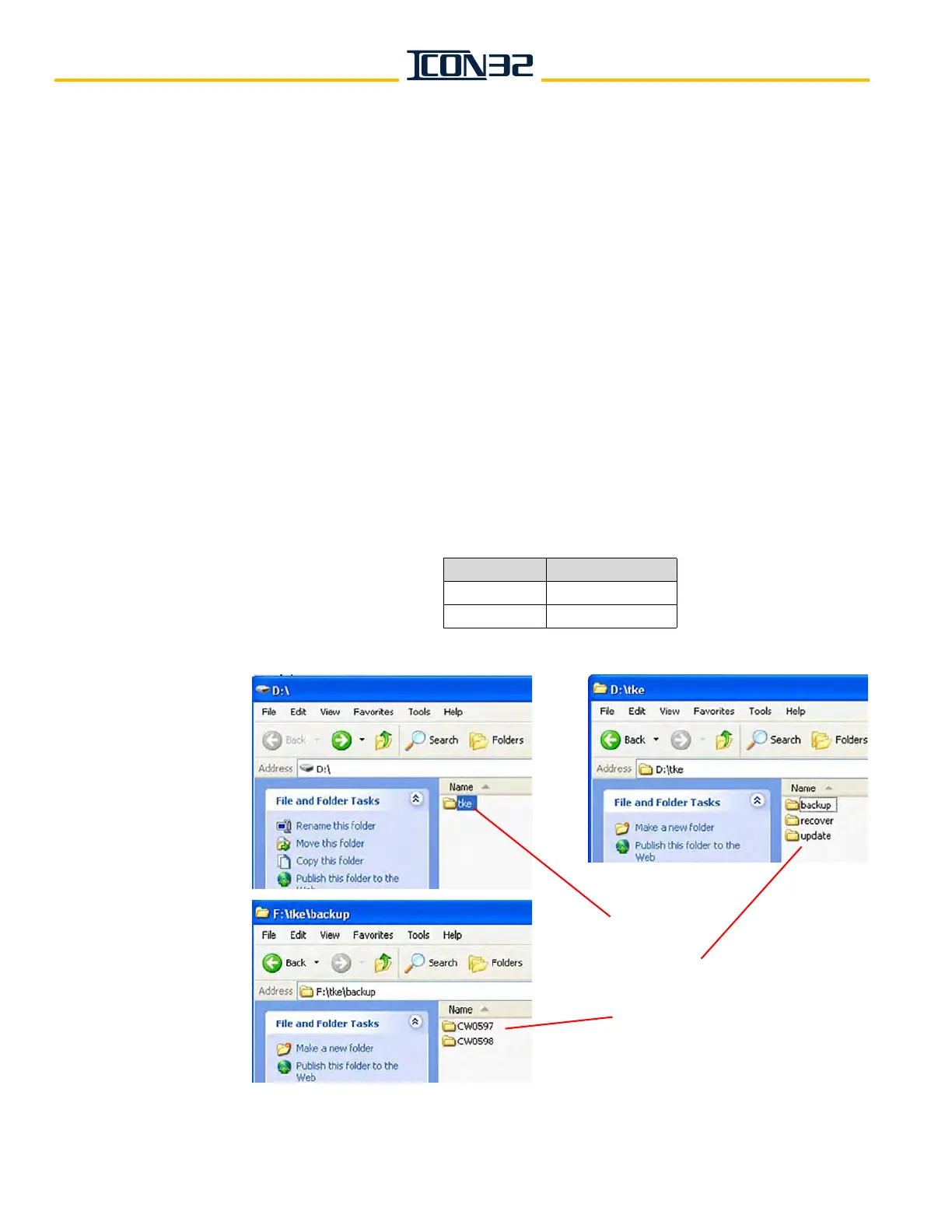
1. At the root of the USB flash drive, create a "tke" folder. When creating folders on the
USB flash drive, all folder names must be in lowercase for the CPU to recognize the
folder names. See Figure 8.
2. Inside the "tke" folder, create two separate folders: "update" and "backup."
3. Access the generic file (if required) and place a copy of the generic file into the
"\tke\update" folder.
4. Create a subfolder in the "\tke\backup" folder for each elevator controller being
updated/reloaded.
Helpful Tip: The "\tke\backup" location is a convenient place for quick access to files at
a later time.
5. Access the needed software, and place a copy of each elevator's configuration (.cfg)
file in the corresponding subfolder of the "backup" folder. The job configuration file
name has the elevator job number ("xxxnnn") included in it. See Table 1.
Table 1
- CPUC File Type
Figure 8 - Create Folders for USB Flash Drive
File Type CPUC
Configuration jobxxxnnn.cfg
Generic icon-cpua.v6r4D_
tke Folder
backup, recover, update Folders
Elevator Job Number Folders



 To Next Page