Controller User Interface Tool (UIT) Service Information Section
©Vertical Express 5-20 Printed in USA November 2019
Controller User Interface Tool (UIT)
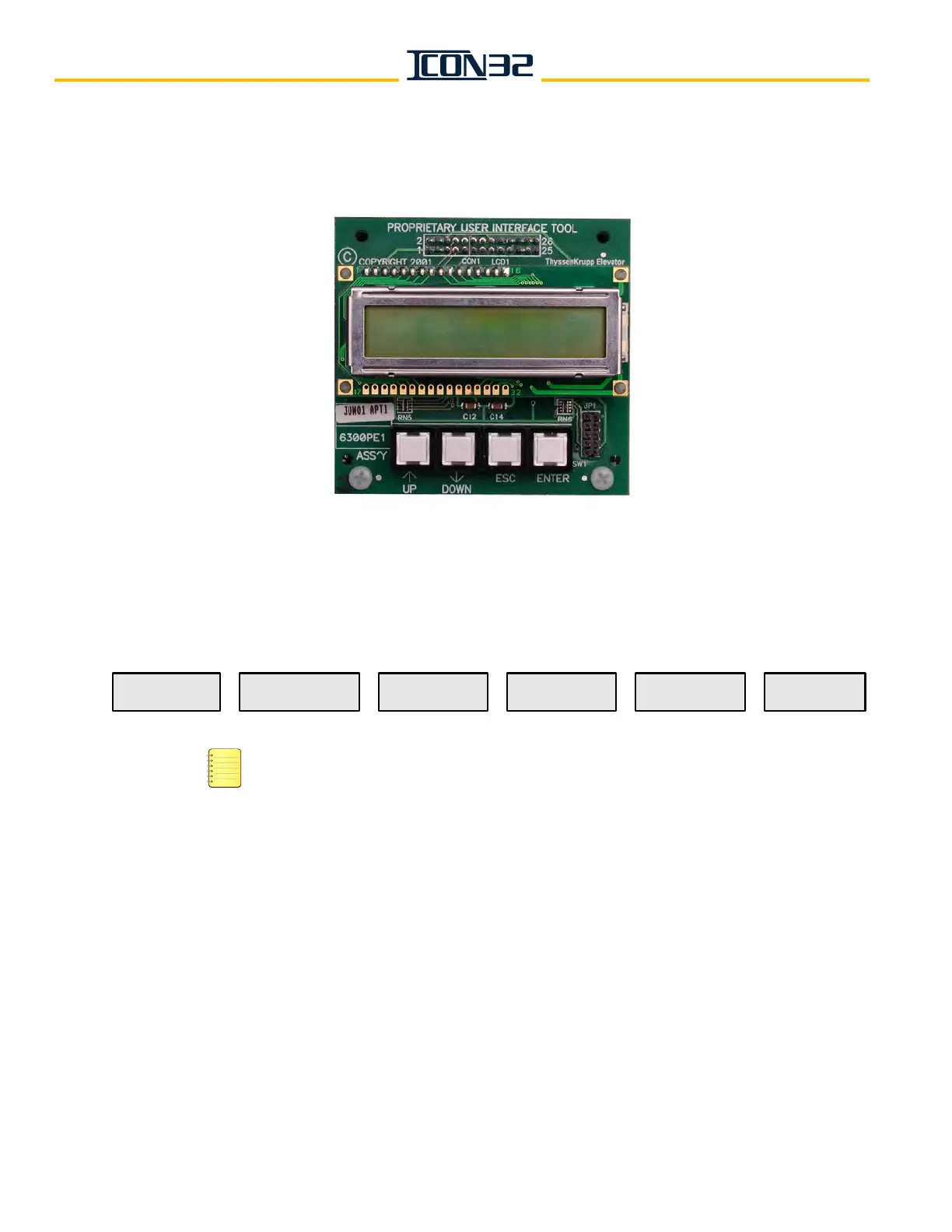
The User Interface Tool (UIT) is an embedded diagnostics and service tool that allows a
qualified mechanic to commission and troubleshoot an ICON32 Controller.
Figure 1 - UIT Main Menu Screen
Primary Menus
• Press UP or DOWN to navigate through the menu blocks.
• Press ENTER to go forward.
• Press ESC to go back.
• For a list of the submenus, see the UIT Menu Tree starting on page 5-21.
Access the UIT 1. Press ENTER.
2. Press any button while Vertical Express is displayed in the UIT window, and enter
the pin number - 1234144. See Figure 1 (above). If the wrong pin number is
entered, continue to press UP until Vertical Express appears in the window, then
enter the pin number again.
3. Navigate to the desired Block Select Menu, and press ENTER.
12 34
Vertical Express
The numbers on the buttons above are for
illustration and are not printed on the actual UIT.
Block Select
Startup Wizard
Block Select
Inspector Tests
Block Select
Log-Off UIT?
Block Select
System Clock
Block Select
Adjustments
Block Select
Real-Time Motion



 To Next Page