Troubleshooting I/O Issues Troubleshooting Section
©Vertical Express 4-14 Printed in USA April 2020
Troubleshooting I/O Issues
(continued)
1. Check the controller fault log for applicable faults.
2. If Ports 1 - 10 all display zeros, both the Safety Processor and the NTSD Processor
have mismatched I/O with the CPU.
a. Check the F1 pico fuse on the IOF Card.
b. Reload the controller generic files and the job configuration files. See Upload Soft-
ware to CPU Cards on page 6-36.
c. Configure the Safety Processor. See page 2-8.
d. From Startup Wizard, scroll to Clear HN Config? > Config HN/CN > Verify All CN's.
3. If the SP and NP I/O mismatch faults still exist, then communication is faulty between
the IOF and the CPUC. Replace the IOF or CPUC Cards.
Selector I/O Troubleshooting
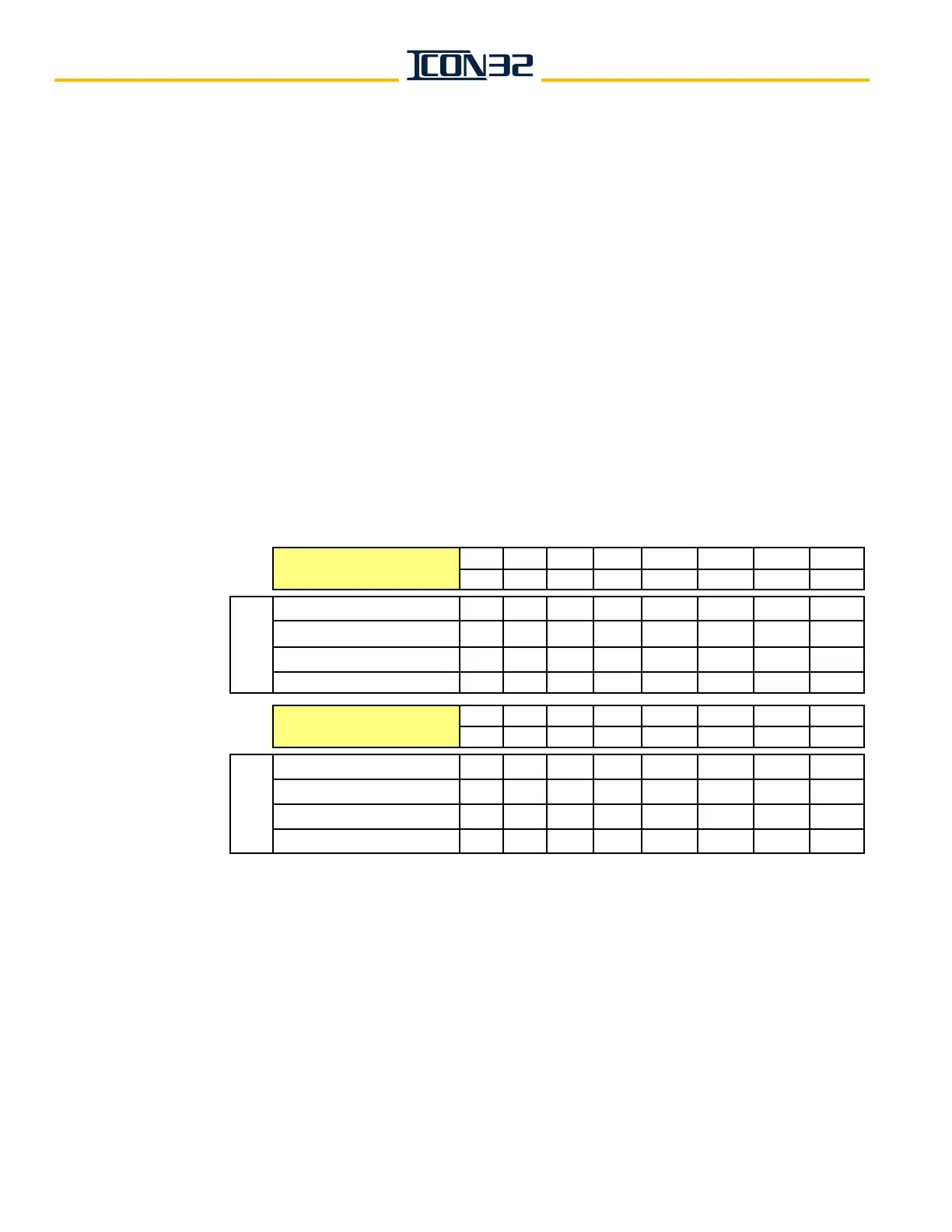
Table 3 - Correct Selector I/O States
• LVUR*, LVDR*,DZ1R*, DZ2R* are only used for close floors—for that close floor,
activate these I/Os instead of LVU, LVD, DZ1, DZ2.
• The I/O states for Bits 5-8 are a copy of the first four bits shown in Port 15 at a close
landing; requires P12=1.
Bit 1 Bit 2 Bit 3 Bit 4 Bit 5 Bit 6 Bit 7 Bit 8
LVU LVD DZ1 DZ2 LVUR* LVDR* DZ1R* DZ2R*
@1 1 1 1 1 0 0 0 0
On Directional Limit Bottom 1 0 1 1 0 0 0 0
@top landing 1 1 1 1 0 0 0 0
On Directional Limit Top 0 1 1 1 0 0 0 0
Bit 1 Bit 2 Bit 3 Bit 4 Bit 5 Bit 6 Bit 7 Bit 8
TSR1 TSR2 NTST NTSB DL x x x
@1 0 0 0 1 0 x x x
On Directional Limit Bottom 0 0 0 1 1 x x x
@top landing 1 1 1 0 0 x x x
On Directional Limit Top 1 1 1 0 1 x x x
Port 16
Car PositionCar Position
Port 15



 To Next Page