4. Test and Setting
4.1 Test Mode
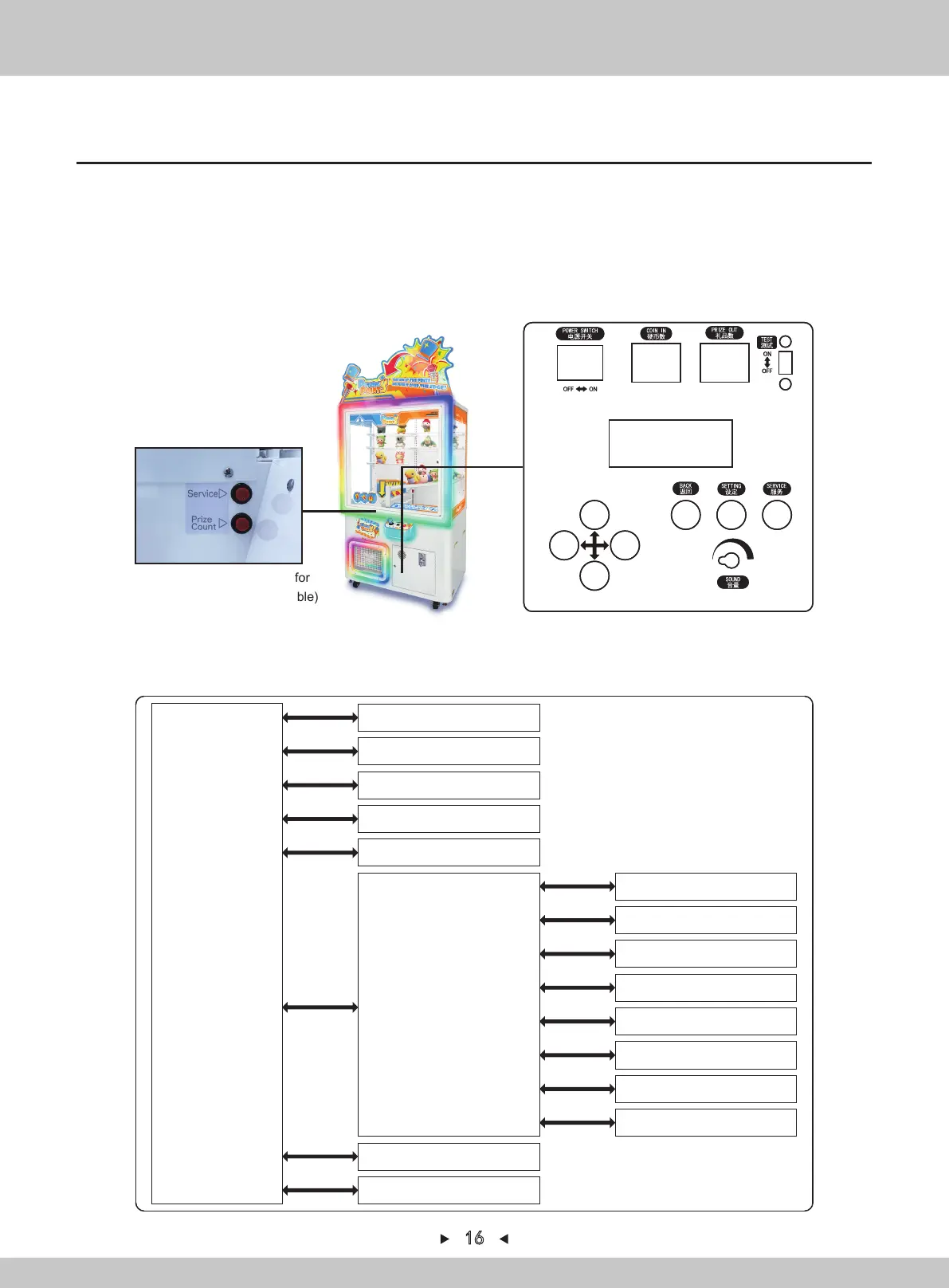
【Basic operation and service-panel】
1. The service-panel can be seen when the right access door is opened.
2. Turn on [TEST]. The various data will be displayed and the test-mode can be entered.
3. Use [↑] and [↓] on the service-panel to select the item. Press [SETTING] to confirm and press
[BACK] to return.
4. If [TEST] is changed to "OFF", the game mode will be restored automatically.
16
(refer to the section on P18 for
instructions of prize code -table)
【Test-mode classified-catalogue】
TOP MENU
GAME HISTORY
PRIZE OPERATION
METER
ERROR HISTORY
SETTING
I/O TEST
DATA CLEAR
ROM VERSION
PUSHER UNIT TEST
SHUTTER TEST
COIN IN TEST
SWITCH&SENSOR TEST
LED TEST
7SEG TEST
SOUND TEST
AGING TEST


 To Next Page