18
5
.
Return to the main menu by pressing [BACK].
1. The service-panel can be seen when the right access door is opened.
2. Turn on [TEST]. The various data will be displayed and the test-mode can be entered.
3. By pressing
[↑] and [↓]
, the arrow will point to "METER". Press [SETTING] to confirm.
4. By pressing
[↑] and [↓]
, switch to the following page.
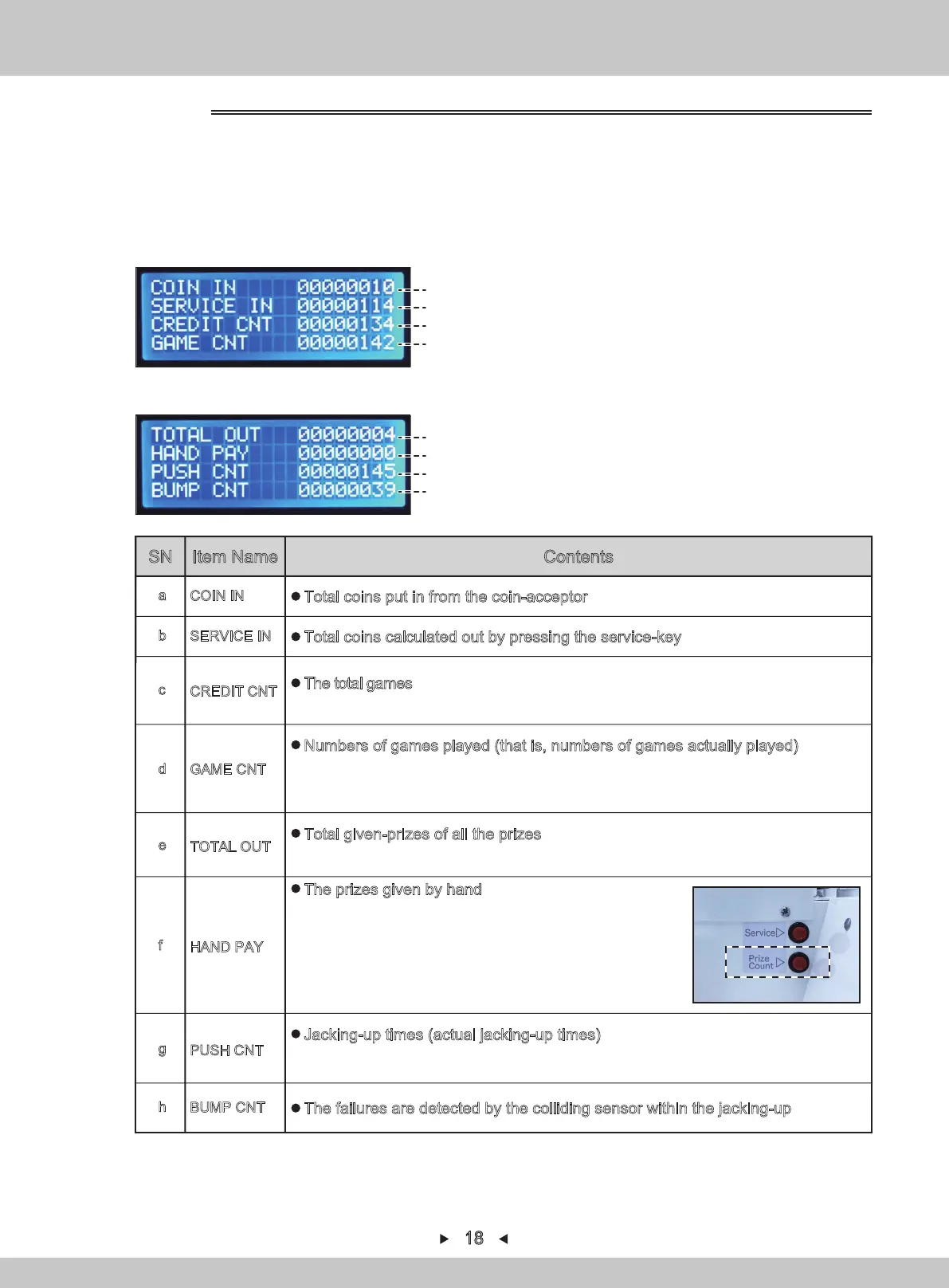
For revenue, refer to P1
(a)
4.1.1.2 METER
(b)
(c)
(d)
For revenue, refer to P2
(e)
(f)
(g)
(h)
Total coins put in from the coin-acceptor
COIN IN
a
Total coins calculated out by pressing the service-key
SERVICE IN
b
The failures are detected by the colliding sensor within the jacking-up
BUMP CNT
h
CREDIT CNT
c
The total games ※Include the games generated by pressing the service-key.
※The games in free mode are not included.
Numbers of games played (that is, numbers of games actually played)
※The games in free mode are not included.
In addition, because it does not include the cleared times , it is not entirely consistent
with the total coins.
GAME CNT
d
Total given-prizes of all the prizes
※Including the prizes given by hand.
TOTAL OUT
e
HAND PAY
f
The prizes given by hand
When the prize cannot come out normally, press the prize
count button in the frame to hop the stopwatch.
Press the button for 1 second after the stopwatch will be
hopped (given prizes).
The button of the prize count can only be used in the current
game.(The repeated press is also ineffective and the
pressed times can't be saved either)
PUSH CNT
g
Jacking-up times (actual jacking-up times)
※If the jacking-up is set to be repeated in 1 game, the repeated jacking-up times will
also be counted.
SN Item Name Contents
How to set the initial value, refer to P21-23 “4.1.1.5”


 To Next Page