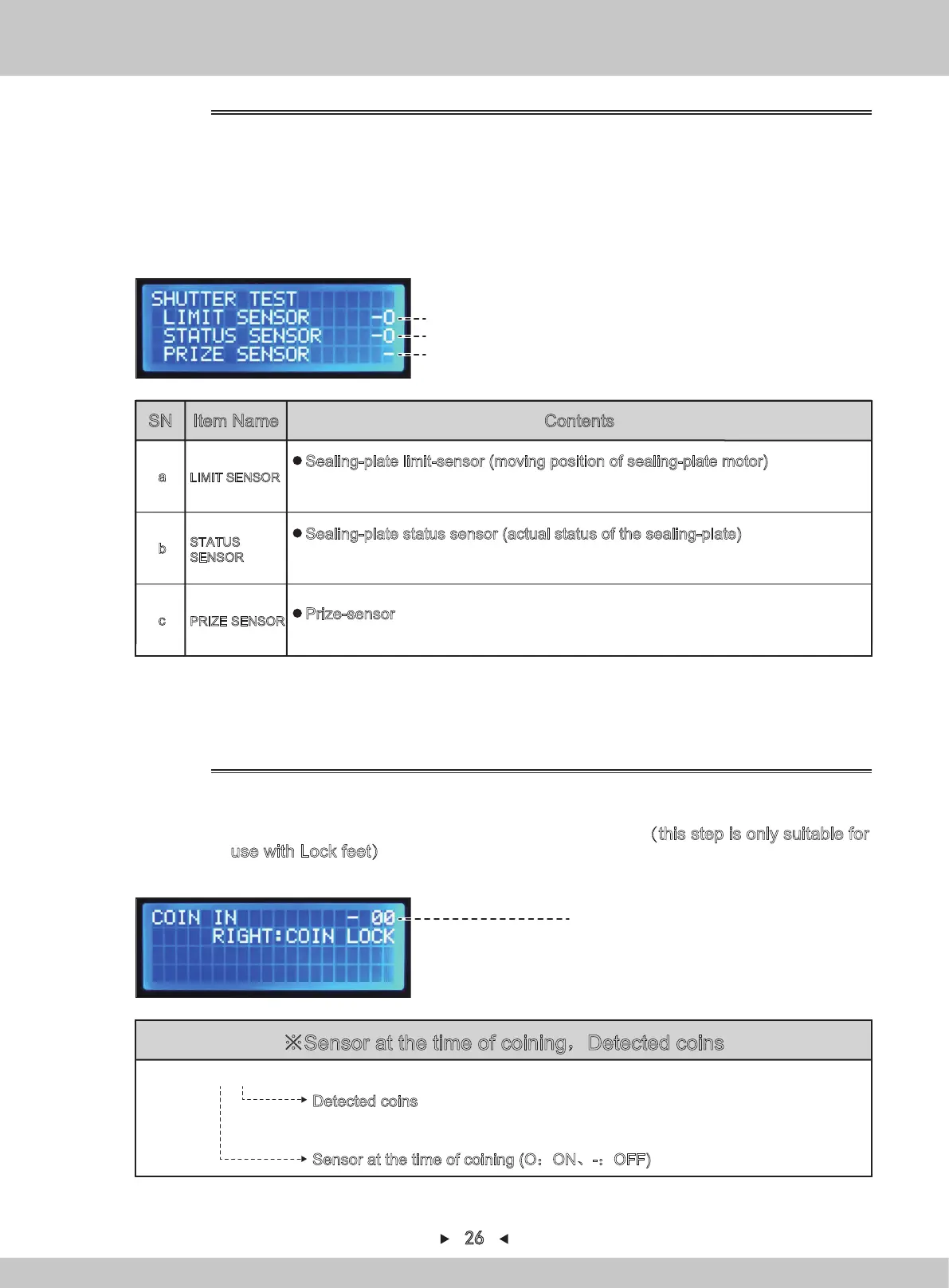
※Sensor at the time of coining,Detected coins
COIN IN - 00
Detected coins
When a coin is detected, the number will be accumulated slowly (after 99, the number
starts from 00 again)
Sensor at the time of coining (O:ON、-:OFF)
3.
Return to I/O test by pressing [BACK].
Sensor at the time of coining
(O:ON、-:OFF),Detected coins
Test of coin-acceptor
4.1.1.6.3 COIN IN TEST
(a)
(b)
(c)
Sealing-plate and prize-sensor test interface
1. Repeat steps 1-2 in 4.1.1.6.1. By pressing [↑] and [↓] , the arrow will point to
“SHUTTER TEST”. Press [SETTING] to confirm.
2. Press
[→]
or move the sealing-plate upward or to the right by using the joystick on the
control panel to open the sealing-plate.
3. Press
[←]
or move the sealing-plate downward or to the left by using the joystick on the
control panel to close the sealing-plate.
1. Repeat steps 1-2 in 4.1.1.6.1. By pressing [↑] and [↓] , the arrow will point to
“COIN IN TEST”. Press [SETTING] to confirm.
2.
When LEFTWARD is pressed, the coin-acceptor acts(this step is only suitable for
use with Lock feet)
4.
Return to I/O test by pressing [BACK].
4.1.1.6.2 SHUTTER TEST
LIMIT SENSOR
a
Sealing-plate limit-sensor (moving position of sealing-plate motor)
Starting from the left, turn off the limit sensor/turn on the limit sensor.
(O:blocked indicator、-:bright indicator)
STATUS
SENSOR
b
Sealing-plate status sensor (actual status of the sealing-plate)
Starting from the left, turn off the sensor/turn on the sensor.
(O:blocked indicator、-:bright indicator)
PRIZE SENSOR
c
Prize-sensor
(O:Prize detected、-:No prize detected)
SN Item Name Contents
26


 To Next Page