6.
Return to I/O test by pressing [BACK].
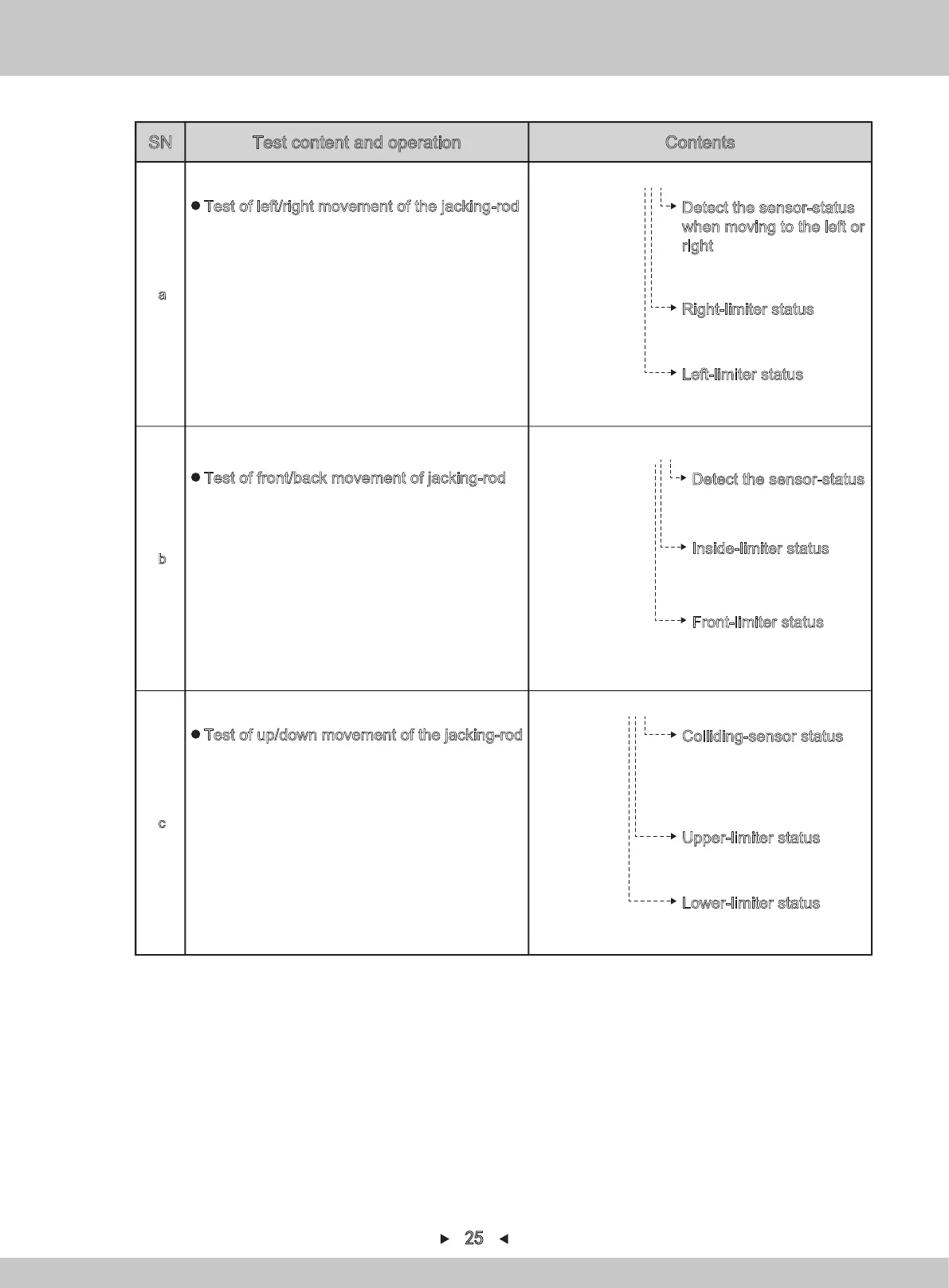
a
>LEFT/RIGHT -- -
Detect the sensor-status
when moving to the left or
right
(O:blocked indicator、
-:bright indicator)
Right-limiter status
(O:blocked indicator、
-:bright indicator)
Left-limiter status
(O:blocked indicator、
-:bright indicator)
Test of left/right movement of the jacking-rod
Press
[→]
to move to the right
Press
[←]
to move to the left
Move to all the directions by using the joystick.
By pressing the button, the arrow will move to (c)
※It will not act when moving up/down if it is not in
the lower limit. If it's not in the lower limit, it shall
move down first.
b
>FRONT/BACK -- -
Detect the sensor-status
(O:blocked indicator、
-:bright indicator)
Inside-limiter status
(O:blocked indicator、
-:bright indicator)
Front-limiter status
(O:blocked indicator、
-:bright indicator)
Test of front/back movement of jacking-rod
Press
[→]
to move backward
Press
[←]
to move forward
Move to all the directions by using the joystick.
By pressing the button, the arrow will move to (c)
※It will not act when moving up/down if it is not in
the lower limit. If it's not in the lower limit, it shall
move down first.
c
>DOWN/UP -- -
Colliding-sensor status
(O:blocked indicator、
-:bright indicator)
Upper-limiter status
(O:blocked indicator、
-:bright indicator)
Lower-limiter status
(O:blocked indicator、
-:bright indicator)
Test of up/down movement of the jacking-rod
Press
[→]
or move up or to the right by using the
joystick on the control panel.
Press
[←]
or move down or to the left by using the
joystick on the control panel.
By pressing the button, the arrow will move to (a)
25
Test content and operation
SN Contents


 To Next Page