3.
Return to I/O test by pressing [BACK].
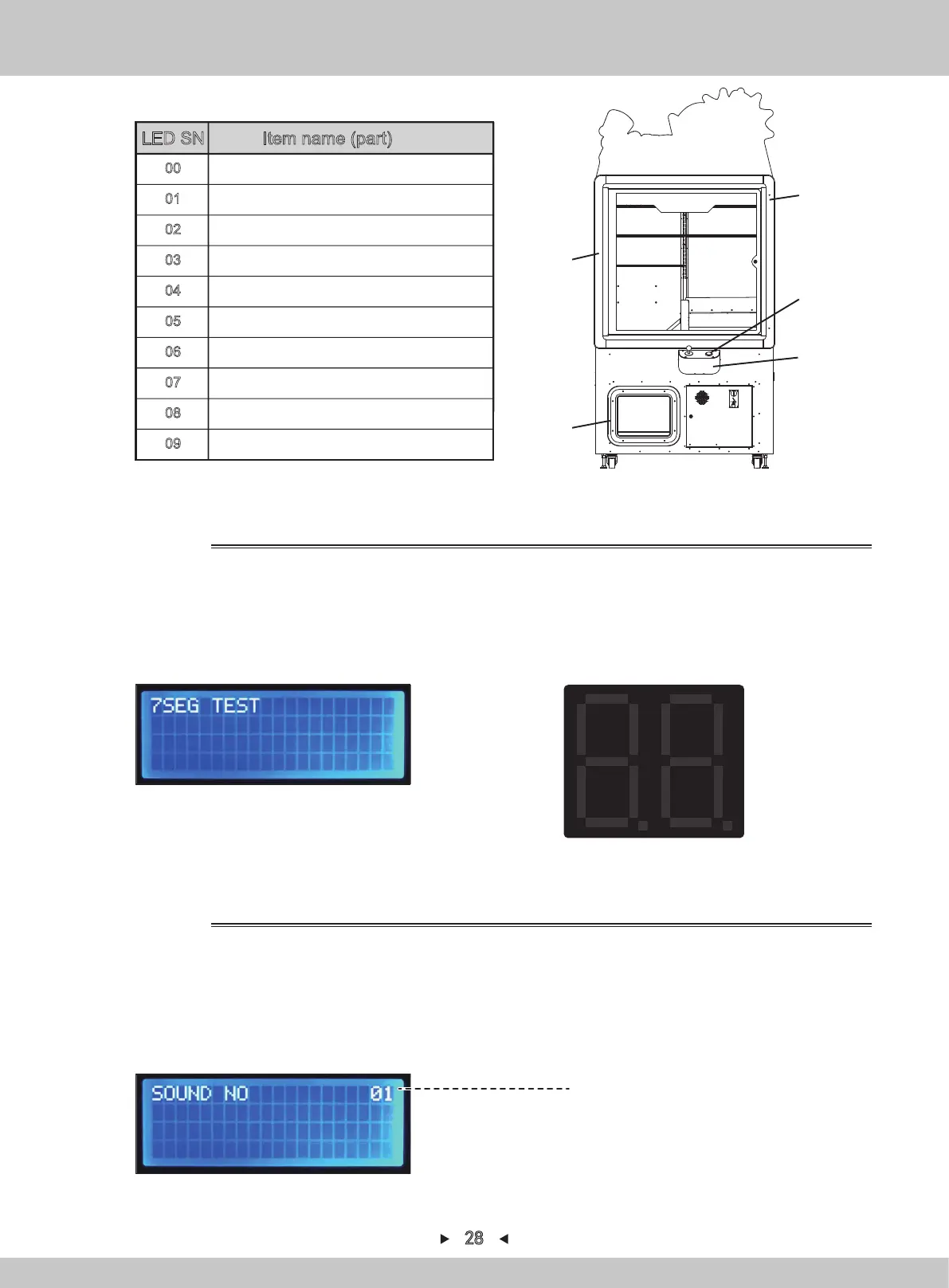
LED SN Item name (part)
ALL OFF
00
Button(Jacking-up)
01
Front-frame LED (right) 、Prize outlet
(red)
02
Front-frame LED (right) 、Prize outlet
(green)
03
Front-frame LED (right) 、Prize outlet
(blue)
04
Front-frame LED (right) 、Prize outlet
(white)
05
Front-frame LED (left) 、Control-panel LED
(red)
06
Front-frame LED (left) 、Control-panel LED
(green)
07
Front-frame LED (left) 、Control-panel LED
(white)
09
Front-frame LED (left) 、Control-panel LED
(blue)
08
01
06~09
02~05
06~09
02~05
Digital-board test Order of lamp-lighting on digital board
1. Repeat steps 1-2 in 4.1.1.6.1. By pressing [↑] and [↓] , the arrow will point to
“7SEG TEST”. Press [SETTING] to confirm.
2. During the display of this interface, the lamps on the digital board will automatically
be on in the order marked below.
1. Repeat steps 1-2 in 4.1.1.6.1. By pressing [↑] and [↓] , the arrow will point to
“SOUND TEST”. Press [SETTING] to confirm.
2.
Select the sound to be played and play the sound by pressing [↑] and [↓].
3.
By pressing [SETTING] and the sound will be replayed at this time.
3.
Return to I/O test by pressing [BACK].
4.1.1.6.6 7SEG TEST
1
7
4
26
35
8
9
15
12
1014
1113
16
4.
Return to I/O test by pressing [BACK].
Replayed sound
※For the sound SN, refer to the sound
list on P37 “4.4”
Sound test
4.1.1.6.7 SOUND TEST
28


 To Next Page