06/2014
4-81
WC 5022/5024
Repairs and Asdjustments
Version 1.0
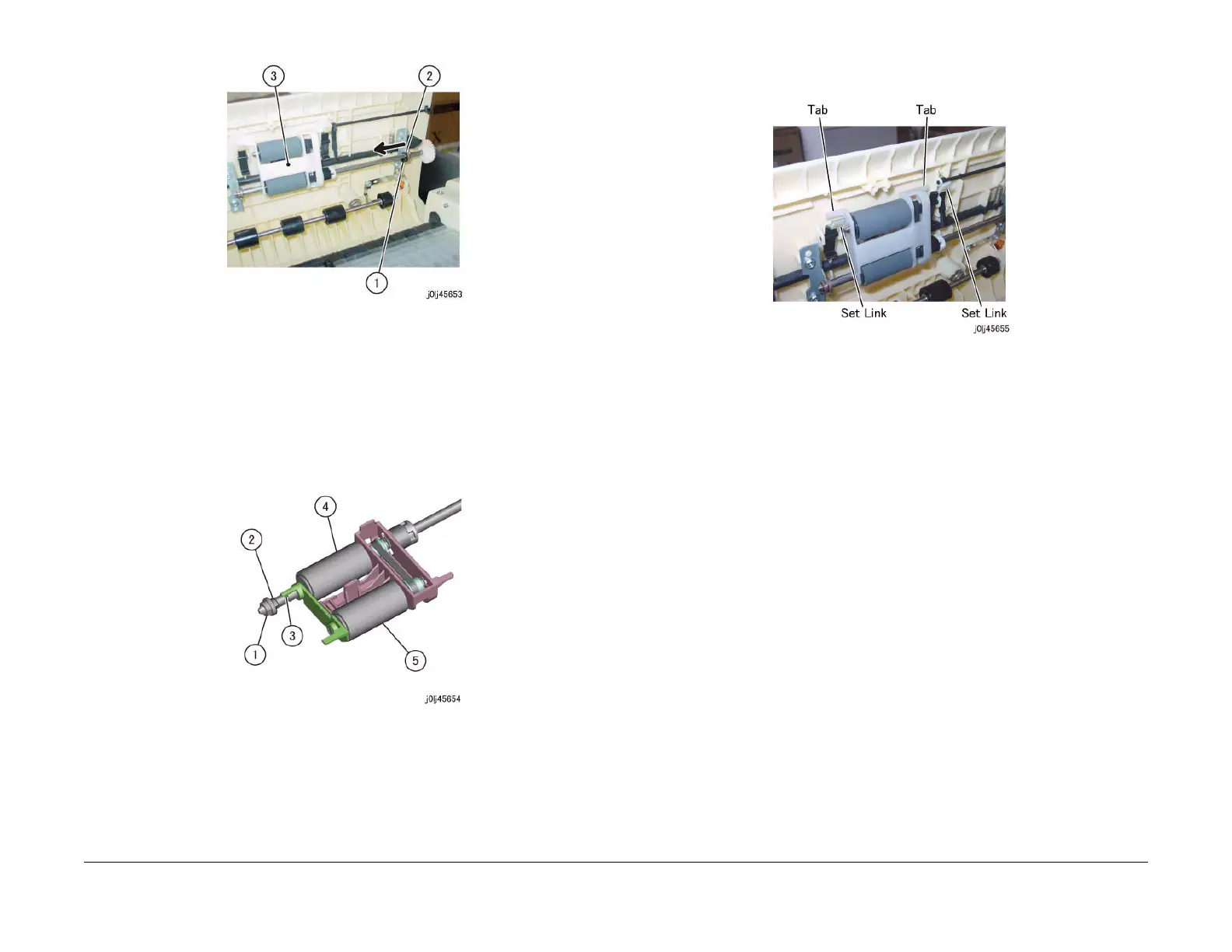
Figure 2 j0lj45653
4. Remove the Feed Roll and the Nudger Roll. (Figure 3)
a. Remove the Bearing.
b. Remove the KL-Clip.
c. Release the hook to remove the housing.
d. Remove the Feed Roll.
e. Remove the Nudger Roll.
Figure 3 j0lj45654
Replacement
1. To install, carry out the removal steps in reverse order.
2. When installing the Feed Roll and the Nudger Roll, install them such that they are rotating
in the clockwise direction.
3. When installing the Feed Roll Nudger Roll Assembly, install it such that the Tab (x2) of the
Feed Roll Nudger Roll Assembly are at the inner side of the Set Link. (Figure 4)
Figure 4 j0lj45655
4. After a replacement, enter the Diag Mode and use [Initialize HFSI Counter] to clear the
HFSI counter.
"Chain Link : 955-806"
Refer to [6.5.2.7 HFSI Counter Clear / Initialize].


 To Next Page
 Loading...








